1. OPERATION
5
1.5 How to Select a
Range
The basic range may be selected in the [Auto]
or [Manual] mode.
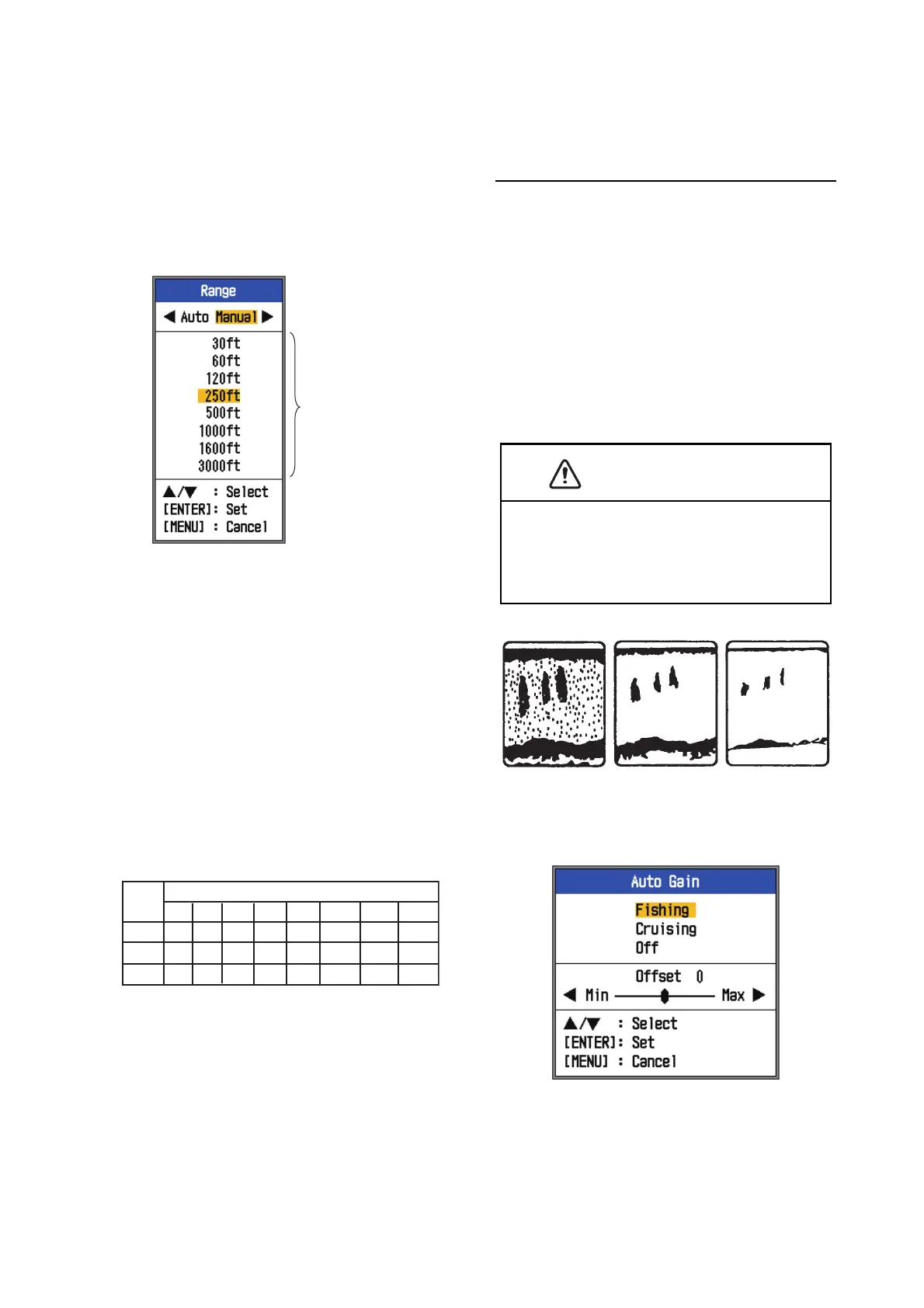
1. Press the RANGE key to open the
[Range] setting window.
2. Use W or X to select [Auto] or [Manual].
[Auto]: The range changes automatically
to display the bottom echo on the screen
always. (The shift function is inoperative
in the auto mode.) [AUTO_R] is shown at
the top left corner on the screen.
[Manual]: The range may be selected
from the eight ranges listed below.
[MAN_R] is shown at the top left corner
on the screen.
If you selected [Auto], go to step 4. For
[Manual], go to the next step.
3. For [Manual], use the RANGE key (or S
or T) to select the range.
Note: Basic ranges may be preset as de-
sired. For further details, see section 2.2.
4. Press the ENTER key.
Note: The range mode indication, which ap-
pears at the top-left corner, may be turned on
or off with [Header Info] in the [Display] menu.
For details, see [Header Info] on page 16.
1.6 How to Adjust the
Gain
How to select the gain adjustment mode
The gain may be adjusted automatically
([Fishing] or [Cruising]) or manually. In auto-
matic adjustment, the gain is automatically
selected to display the bottom echo in reddish
brown. The automatic gain setting can be fine
tuned with the offset gain feature. Clutter and
TVG are also adjusted automatically when
automatic gain is active.
For manual gain adjustment, adjust the gain
according to signal strength.
1. Press the GAIN knob to open the [Auto
Gain] setting window.
2. Press the GAIN knob (or S or T) again
to select [Fishing], [Cruising] or [Off].
[Fishing]: This mode clearly displays
weaker echoes and is useful for search-
ing schools of fish. "G:AF" is shown at the
top left corner on the screen.
These are
available with
Manual mode.
Unit
Basic Range
1
2
3
4
5
6
7
8
10005002501206030
300
15080
40
20
10
m
ft
500
1000
1600 3000
160804020105
fm
250 500
CAUTION
Adjust the gain correctly.
Incorrect adjustment can lead to a dangerous
situation if the boat is steered according to the
depth indication.
Too high
Correct
Too low


 To Next Page