18
2. SYSTEM MENU
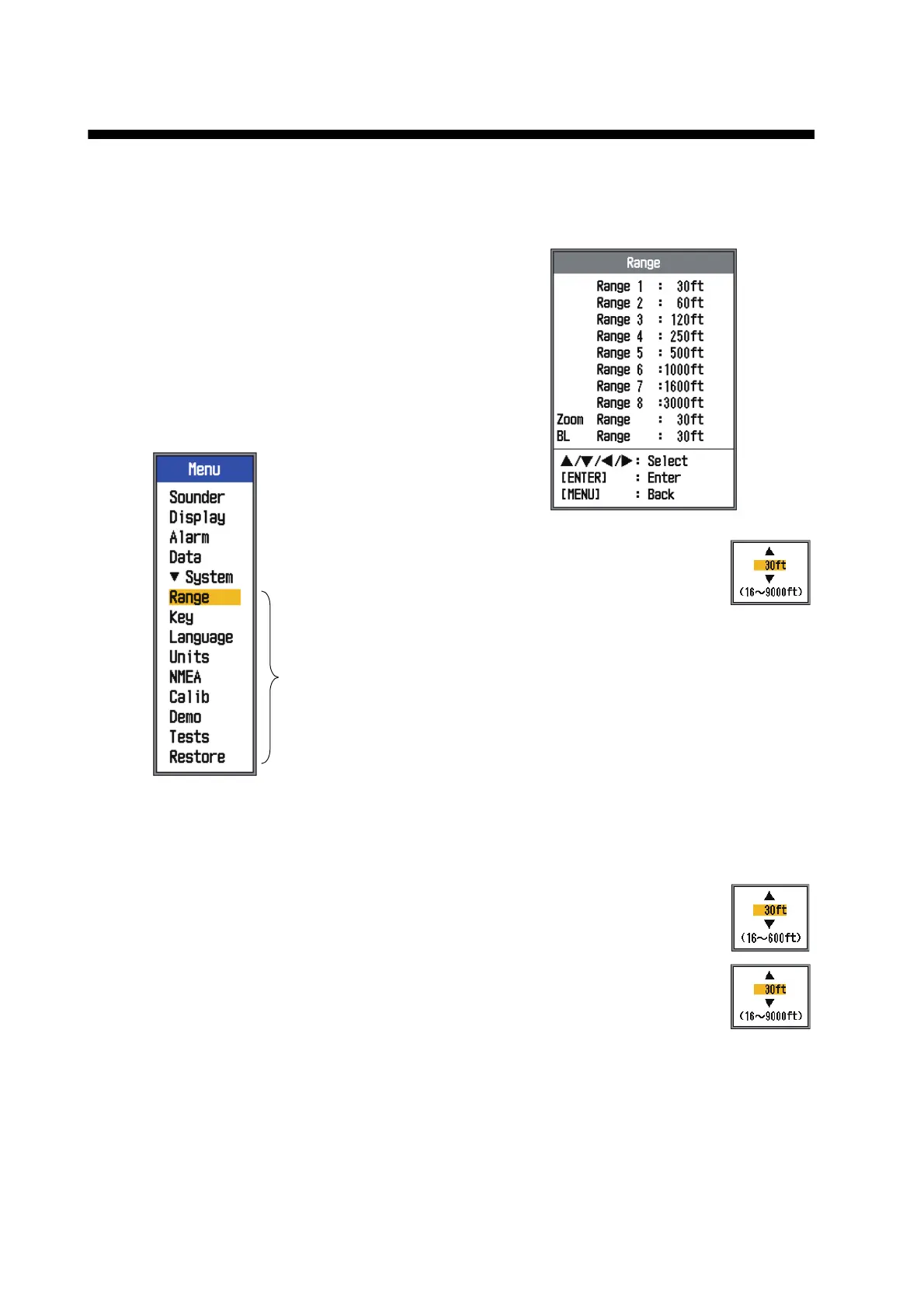
2.1 How to Display the
System Menu
The [System] menu mainly consists of items
which do not require regular adjustment.
1. Press the MENU ESC key to open the
menu.
2. Select [System]. For [Tests], and [Re-
store], see chapter 3. See chapter 4 for
“NMEA”.
2.2 Range Menu
[Range 1] - [Range 8]: Set the
range of each of the eight rang-
es. Note that all default ranges
are restored whenever the depth
unit is changed. Therefore,
change the depth unit before changing the
preset ranges.
Available range for [Range 1] to [Range 8]:
16 to 9,000 ft
[Zoom Range]: Select the range
to zoom in the bottom zoom and
marker zoom modes.
[BL Range]: Select the expan-
sion width for the bottom lock
display.
Available range for [Zoom
Range] and [BL Range]: 16 to 600 ft
Menus
shown
when
[System]
is selected.
16 to 30 ft, 1 ft step
30 to 500 ft, 10 ft step
500 to 1,000 ft 50 ft step
1,000 to 9,000 ft 100 ft step
16 to 30 ft, 1 ft step
30 to 500 ft, 10 ft step
500 to 600 ft, 50 ft step



 To Next Page