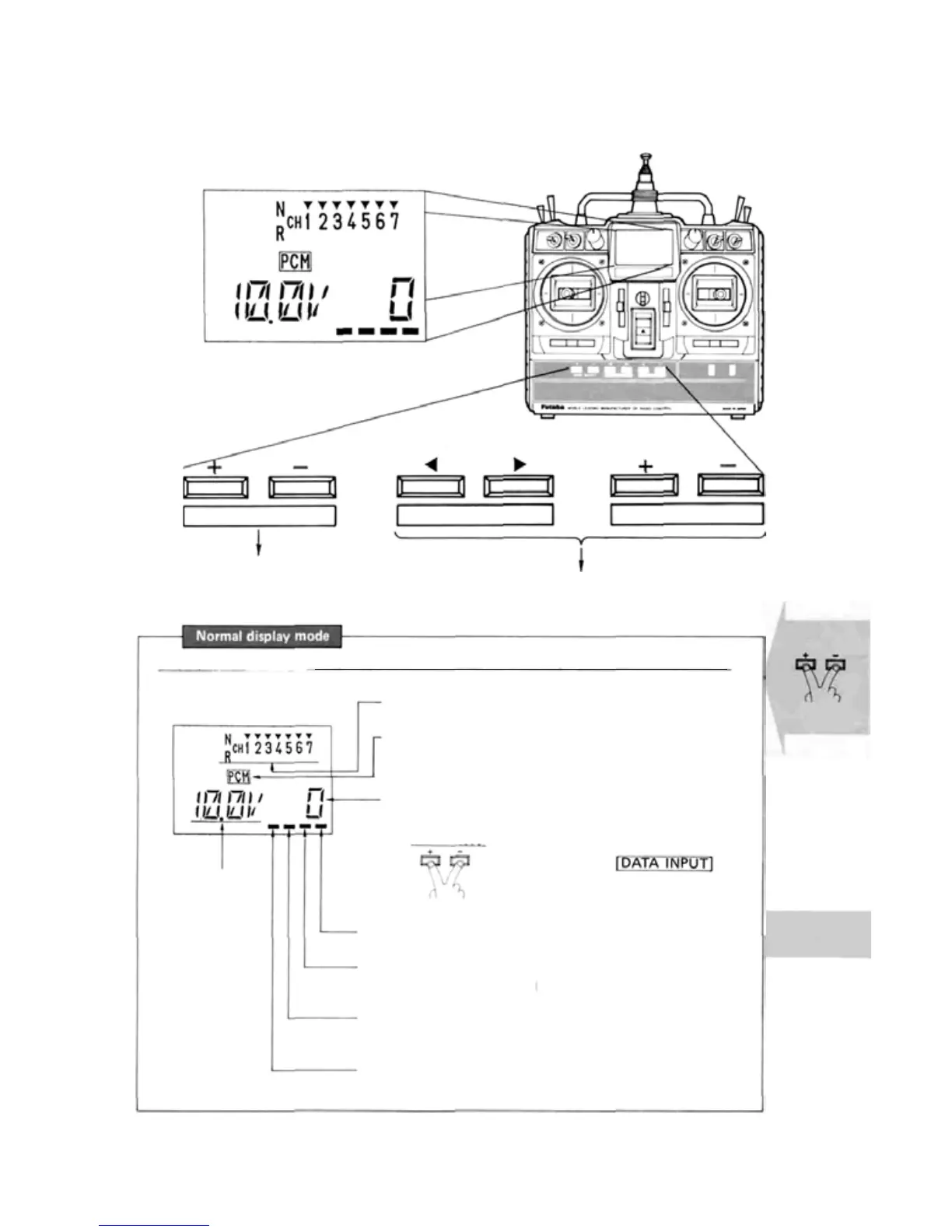
• DISPLAY FUNCTION
• Used in display mode switching.
• Used in setting function selection
• Used at data setting.
Liquid crystal panel
• Operated in three display modes
CURSOR
DATA INPUT
MODE SELECT
EDIT KEY
Display
Display mode at_normal use (Mode which is displayed when the power switch is turned on.)
(Display)
Battery voltage
display
• Reverse function display
(N: Normal, R: Reverse)
• PCM/PPM mode display
(PCM: PCM mode, PPM: PPM mode)
• Integrated time display (0—199 minutes)
(Displays the integrated time after reset.)
Clock reset
—6—
• Flashes at a 1 second period
• F/S data transfer display (FP-7UAP only)
(Lights momentarily each minute)
• RF indicator
(Lights when radiowaves are transmitted.)
• Mixing indicator
(Flashes when
snap roll mixing or 6 -> 2 mixing is ON.)
Error
Reset by pressing the
keys
simultaneously.


 To Next Page