166
< ModelMenu(HelicopterFunctions) >
Gyro [Helicopter]
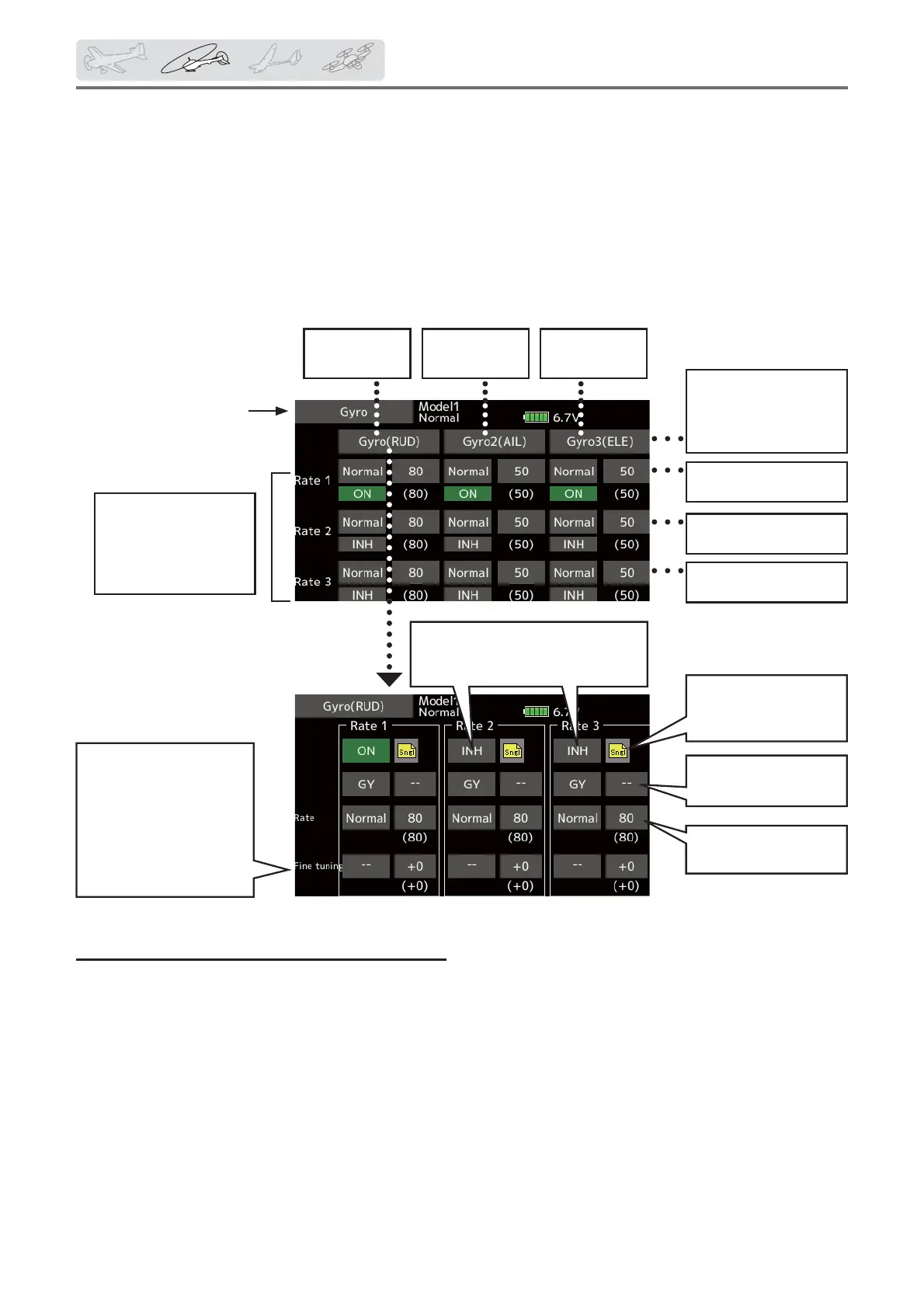
Usethiswhenyouwant
toadjustsensitivityvia
VR,etc.,andnoton-
screendataentry.Tap"--
",select"VR",etc.,and
thentapthevalueto
adjust.(Won'toperate
whenvalueis"0".)
Theoperationmode
(AVCS/NOR)and
sensitivityofthe3
axesGyro/Gyro2/
Gyro3canbeset.
Tappingthesewill
pullupthedetailed
selectionscreenfor
each.
Rate1Gyrotypeand
gain
Rate2Gyrotypeand
gain
Rate3Gyrotypeand
gain
TheON/OFFswitch
ofgyroischosen.
WhenusingRate2/Rate3,makeit
INH → ONorOFF.
Gyro(RUD)
setting
Gyro2(AIL)
setting
Gyro3(ELE)
setting
3rate(gyrogain)
adjustment
Conditiongroup/
singlemodeselection
(Gr./Sngl)
This function is used to adjust gyro sensitivity.
The sensitivity and operation mode (Normal mode/
AVCS mode) can be set for each condition.
The gyro sensitivity can be switched with each
condition or the switch. (3 sensitivities)
*Compatible with 3 axis gyro (CGY750).
Setting method
ŏ When using this function, Tap [INH]. (ON is
displayed.)
ŏ When you want to set the same contents at
other conditions, select the group mode.
When you want to set the selected condition
only, select the single mode (initial setting).
ŏ Three rates can be switched for each
condition. (Rate1/Rate2/Rate3)
ŏ A Àne tuning VR can be set.
ŏ Select [Gyro] at the
model menu and call
the setup screen.
Note: [Gyro] [Gyro2] [Gyro3] Default function
[Gyro]: CH6(FASSTest12CH) CH5(Other system type)
[Gyro2] : CH9
[Gyro3] : CH10
Always set to [--] both (control) and (trim) for
the [Gyro] function at the Function menu in
the Linkage menu.
ŏReturn to Model menu



 To Next Page