COMMAND SET
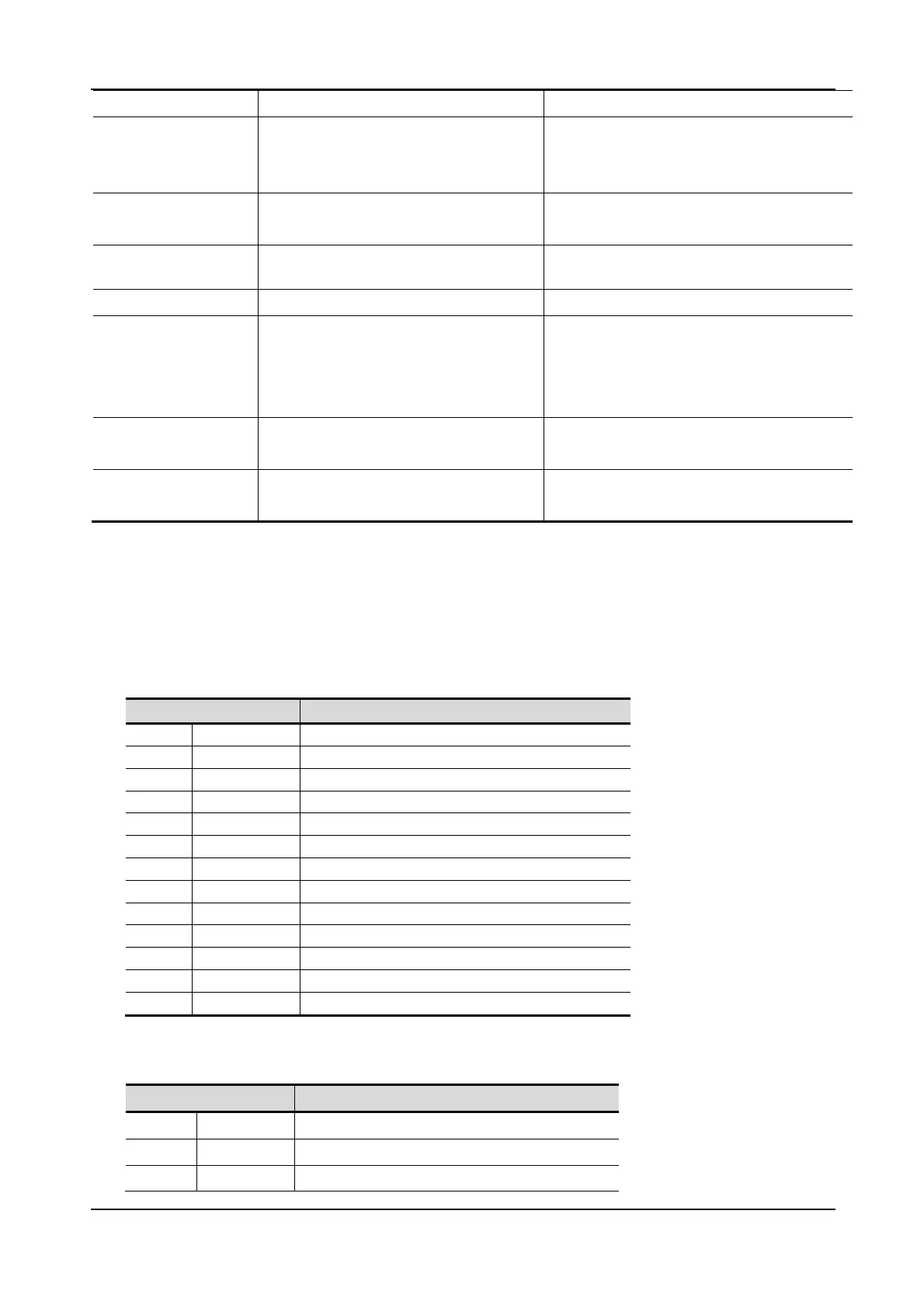
25 Customer Pole Display CD-220 VFD
ESC ? n 1B 3F Delete download characters
ESC % n 1B 25 n
n=00h, 01h
Select/Cancel download
character set
n=01 select, n=00 cancel
ESC _ n 1B 5F n
n=00h, 01h
Set cursor on/off
n=01 cursor on, n=00 cursor off
ESC f n 1B 66 n
Select international font set
(see Note 3)
ESC c n 1B 63 n Select code (see Note 4)
ESC = n 1B 3D n
n=01, 02h, 03h
Select peripheral device
n=01h, select printer
n=02h, select display
n=03h, select printer + display
ESC s 1 1B 73 01 Store the user defined character
into EEPROM.
ESC d 1 1B 64 01 Download the user defined
character from EEPROM.
NOTE:
1. While using the command “ESC Q A” or “ESC Q B”, other commands cannot be used
except for “CLR” or “CAN” to change the operating mode.
2. When using the command “ESC Q D”, the upper line message will scroll continuously
until a new command is received. It will then clear the upper line and move the cursor
to the upper left end position.
3. The parameters of the international font set control command “ESC f n”.
Parameter “n” International Font Set
‘A’ 41h U.S.A.
‘G’ 47h Germany
’I’ 49h Italy
‘J’ 4Ah Japan
‘U’ 55h U.K.
‘F’ 46h France
‘S’ 53h Spain
‘N’ 4Eh Norway
‘W’ 57h Sweden
‘D’ 44h Denmark I
‘E’ 45h Denmark II
‘L’ 4Ch Slavonic
‘R’ 52h Russia
4. The parameters of the code table control command “ESC c n”.
Parameter “n” International Font Set
‘A’ 41h Compliance with ASCII code
‘L’ 4Ch Compliance with SLOVONIC code
‘R’ 52h Compliance with RUSSIA code


 To Next Page