19
Basic settings
Your appliance can be individually adjusted in the basic
settings.
1 Turn the function selector to S.
2 Select "Basic settings" using the rotary selector.
3 Touch the ™ symbol.
4 Turn the rotary selector to select the required basic
setting.
5 Touch the % symbol.
6 Set the basic setting using the rotary selector.
7 Save with ™ or cancel with ' and exit the current
basic setting.
8 Turn the function selector to 0 to exit the basic
settings menu.
The changes are saved.
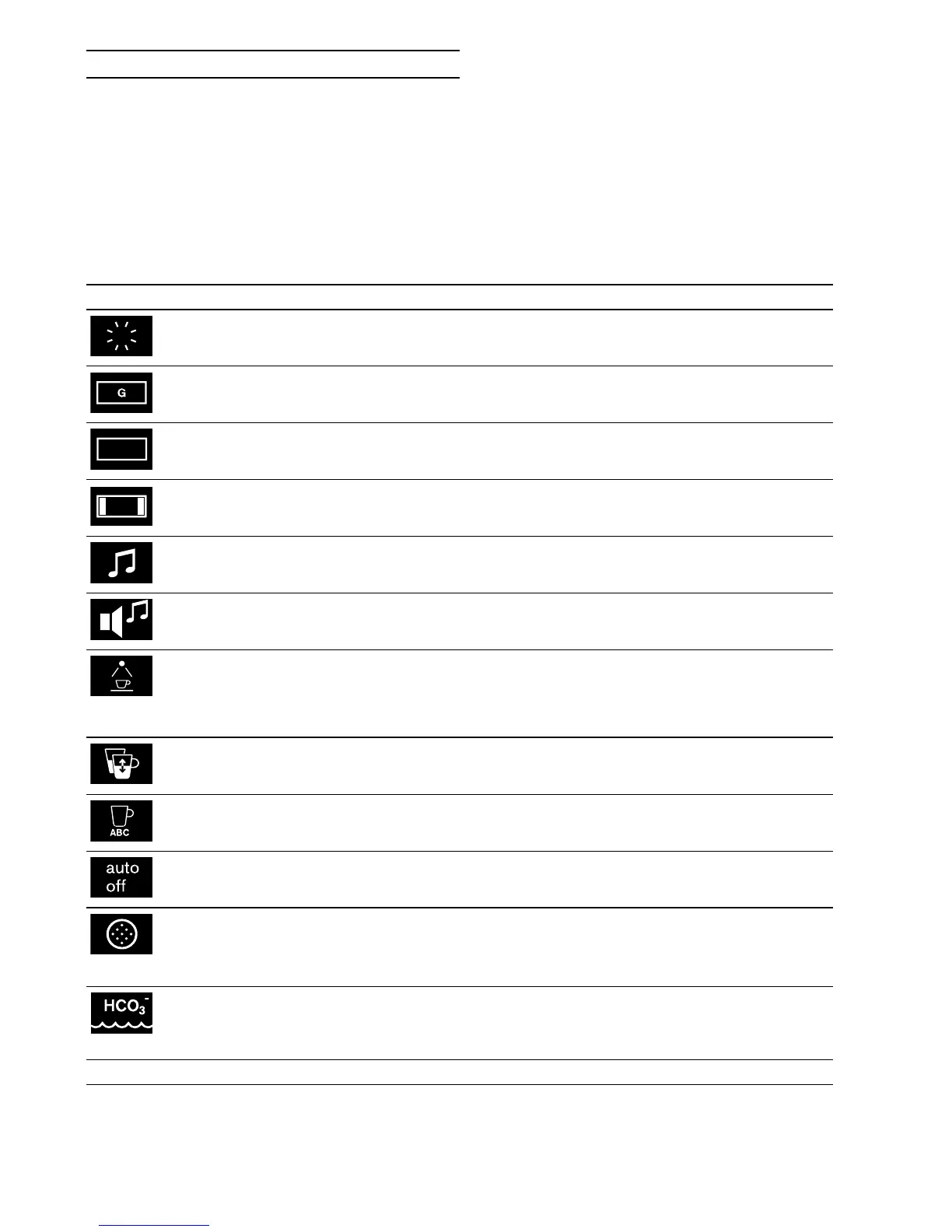
Basic setting Permitted settings Explanation
Brightness Level 1, 2, 3, 4, 5*, 6, 7, 8 Sets the display brightness
Hibernate mode with logo*/without logo Hibernate mode display with or without
GAGGENAU logo
Display Reduced*/Standard If the 'Reduced' setting has been selected,
only the most important information will be
shown on the display after a short time.
Touch field colour Grey* / White Selects the colour of the symbols on the
touch fields
Touch field tone Tone 1* / Tone 2 / Off Selects an audible signal for when a touch
field is touched
Touch field tone vol-
ume
Level 1, 2, 3, 4, 5*, 6, 7, 8 Sets the volume of the touch field tone
Light setting Lighting options 1*-7
Û Light off
Ú Light on
~ Light only on when a beverage is being
dispensed
Capacity +/- 5 up to 50 ml Adjust the capacity to individual cup sizes.
First select the beverage and then set the
capacity.
Beverage types clear
text display
on* / off Beverage name display on or off. Off: Only
the symbol will be displayed.
Automatic shut-off 5 minutes to 12 hours Set the time after which the appliance
automatically rinses and switches off.
Water filter Available/not available* Available: Operating the appliance with a
water filter.
Not available: Operating the appliance
without a water filter.
Water hardness 1-4* Briefly immerse the enclosed test strips in
fresh mains water, allow them to drip and
then read the result after a minute. Set the
measured water hardness.
* Factory setting


 To Next Page