22
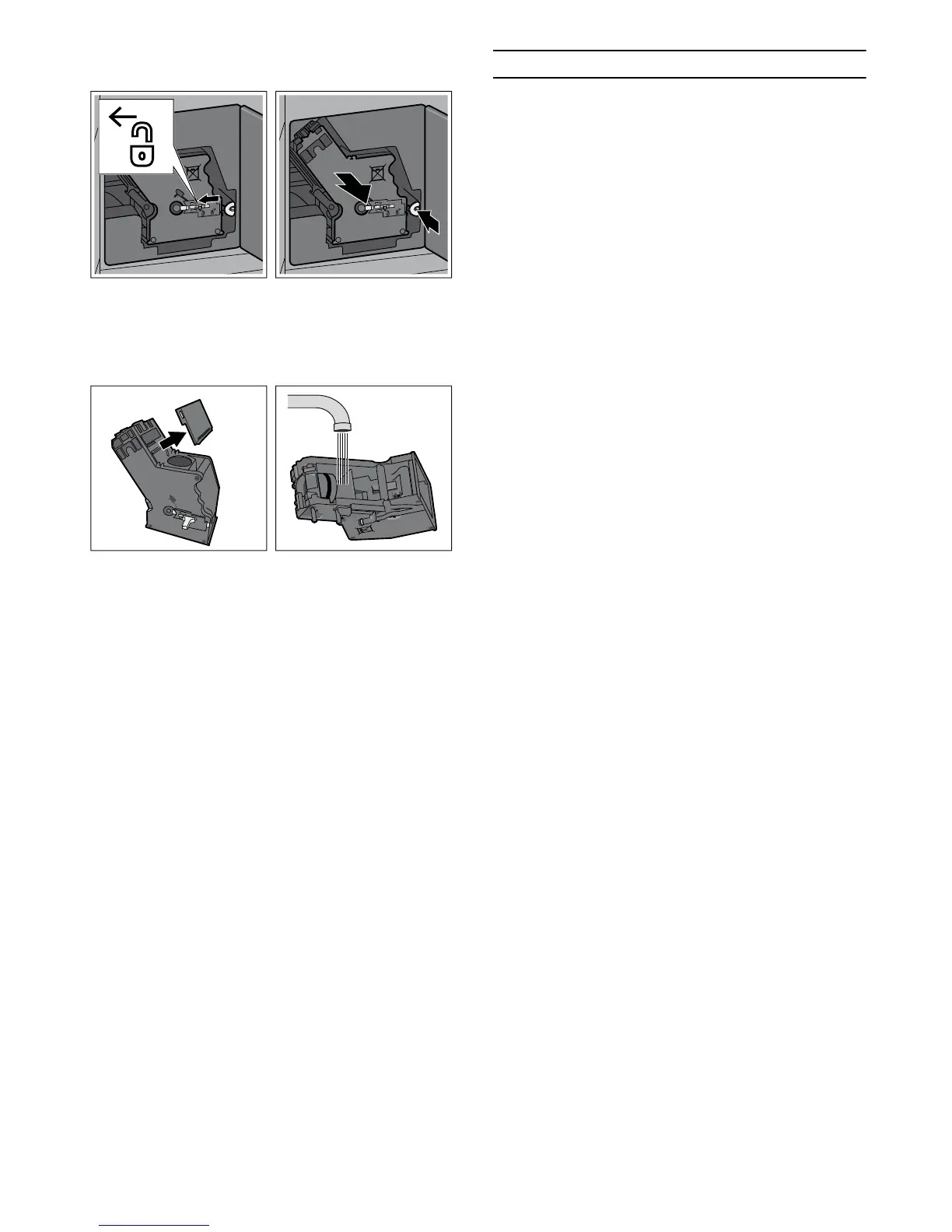
6 Press the red button, hold the brewing unit on the
recessed grips and carefully remove it.
7 Clean the brewing unit thoroughly under running
water.
8 Remove the cover and clean the filter under running
water.
9 Clean the interior of the appliance thoroughly,
taking care to remove any coffee residues.
10 Allow the brewing unit and the interior of the
appliance to dry.
11 Refit the cover.
12 Insert the brewing unit as far as it will go. Slide the
red lock all the way to the right and close the door.
Service programmes
Every so often – the exact frequency depends on usage
and water hardness – one of the following messages
will appear in the display in place of the coffee
selection:
▯ Please clean milk system
▯ Please change water filter
▯ Please clean
▯ Please descale
▯ Please descale and clean
Then the ) warning symbol lights up.
The water filter should be changed immediately at this
point and the appliance cleaned or descaled using the
appropriate programme. The appliance could otherwise
be damaged.
The service programmes can also be started at any time
without notification from the display. Set the function
selector to S, and select and run the desired
programme.
Notes
‒ For each of the service programmes, use descaling
and cleaning agents as described in the
instructions and observe the safety information.
‒ Do not drink the liquids.
‒ Never use vinegar, vinegar-based products, citric
acid or citric acid-based products for descaling.
‒ For cleaning and descaling only use the tablets
intended for such purpose. They were specially
developed for this fully automatic espresso
machine, and replacements are available from after-
sales service (see section
Accessories).
‒ Never put descaling tablets or other descaling
agents in the ground coffee drawer.
‒ Never interrupt the service programme.
‒ If one of the service programmes is interrupted, e.g.
by a power failure, proceed as follows:
1 Rinse the water tank.
2 Fill the tank with fresh water up to the “max”
indicator.
3 Place a container under the coffee dispenser.
4 Touch the ™ symbol.
The cleaning programme runs for about 2 minutes.


 To Next Page