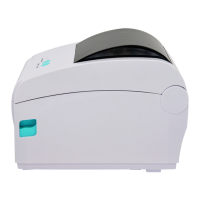
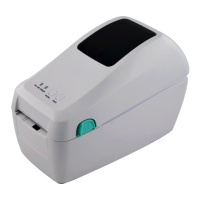
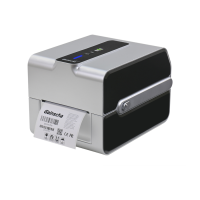
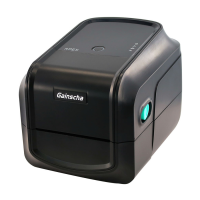
The Gainscha GS-2406T PLUS / GS-3405T PLUS / Series is a thermal transfer and direct thermal label printer designed for various labeling applications across manufacturing, warehousing, healthcare, retail, and small office/home office environments. This printer series is built with a single motor capable of handling a large capacity of 300-meter ribbons and large rolls of media, all within a sleek design. For users requiring even greater media capacity, an external media roll mount can be added, allowing the PLUS series to accommodate 8-inch outer diameter (OD) rolls of labels typically designed for more expensive industrial label printers.
Function Description
The Gainscha GS-2406T PLUS / GS-3405T PLUS / Series printer is primarily used for printing bar code labels. It supports both thermal transfer and direct thermal printing methods, offering flexibility based on media and application requirements. The printer is equipped with a movable black mark sensor, which allows it to accept a wide range of label media types, including continuous, die-cut, black mark, fan-fold, and notched labels. It supports all frequently used bar code formats and can print fonts and bar codes in any of the four directions (0, 90, 180, 270 degrees).
The printer series is designed with flexible firmware, enabling users to download various printer commands to perform specific tasks. It is compatible with multiple printer languages, including TSPL, EPL, ZPL, ZPL II, and DPL, ensuring broad compatibility with existing labeling software and systems.
Usage Features
The printer offers a user-friendly interface with a power switch, two buttons (Feed & Pause), and four LEDs (Online, Error, Ribbon status, Communication) for easy operation and status monitoring.
- Loading Media and Ribbon: The process of loading both ribbon and roll labels is straightforward. Users press two buttons on the printer's sides to open the cover, then load the print media and adjust the paper guide to match the media width. The ribbon loading involves inserting a black ribbon roller into a new ribbon, fixing it on the left and right sides, then inserting a blue ribbon roller into an empty roll for collection after printing. The ribbon is pulled out and stuck to the empty roll, ensuring it is flat and smooth against the print head.
- Button Functions:
- Feed Button: When the printer is ready (Blue LED ON), pressing the Feed button once advances the label to the front of the next label. If the "Demand" function is activated, the printer will stop after printing and wait for the user to press this button before printing the next label.
- Pause Button: When the printer is printing continuously, pressing the Pause button pauses printing, indicated by a blue flashing power indicator. Pressing it again resumes the print job. In case of an error (Red ERROR LED ON), pressing the Pause button once cancels the error, resumes printing, and reprints the label layout from where the error occurred.
- Power-on Utilities: The printer includes six power-on functions for setting or testing hardware. These functions are activated by pressing specific buttons simultaneously while turning on the power and releasing them upon a light signal.
- Self-test: Prints a self-test page.
- Enter USB storage device function: Prints a setting value page.
- Enter dump mode: Enters dump mode, printing "NOW IN DUMP MODE."
- Skip AUTO.BAS: Skips the AUTO.BAS program after two beeps.
- Printer initialization: Restores meter parameters to factory default settings after five beeps.
- Ribbon inspection: Automatically detects ribbon status in thermal transfer printing mode.
- PrinterUtility Software: The included PrinterUtility software is an integrated tool that allows users to query printer settings and status, change printer-related settings, and send commands or files to the printer. This utility provides access to port settings, printer information, printer configuration, printer functions, and a command tool. Users can load all printer general setting information through the selected communication interface and write these settings to the printer.
Maintenance Features
Regular maintenance is crucial for optimal printer performance and extended lifespan. The manual outlines simple cleaning procedures and tools:
- Cleaning Tools: Cotton swab, lint-free cloth, vacuum/blower brush, and 100% ethanol.
- Print Head Cleaning: Always turn off the printer and allow the print head to cool for at least one minute. Use a cotton swab and 100% ethanol to clean the print head surface. It is important not to touch the print head by hand.
- Platen Roller Cleaning: Turn off the power, rotate the platen roller, and wipe it thoroughly with 100% ethanol and a cotton swab or lint-free cloth.
- Tear Bar/Peel Bar Cleaning: Use a lint-free cloth with 100% ethanol to wipe these components.
- Sensor Cleaning: Use compressed air or a vacuum to clean the sensors.
- Exterior Cleaning: Wipe the exterior with a water-dampened cloth.
- Interior Cleaning: Use a brush or vacuum for interior cleaning.
- Important Notes:
- Use only 100% ethanol; medical alcohol may damage the print head.
- Regularly clean the print head and supply sensors when changing ribbons to maintain performance and extend printer life.
- The maximum printing ratio per dot line is 15% for this printer. For full web black lines, the maximum black line height is limited to 40 dots (5mm for 203 DPI resolution and 3.3mm for 300 DPI resolution printers).
The Gainscha GS-2406T PLUS / GS-3405T PLUS / Series printer is designed to be a reliable and innovative solution for diverse labeling needs, offering a balance of performance, features, and ease of use.



 To Next Page
 General