Installation – Types of Interface 1010 instruments
25
Potentiostat Devices (instruments) that are connected to the computer appear on this bar. The round indicator
associated with each device shows its status:
The device is connected to the system but is not usable. This is generally the result of a mismatch
between the Framework software and the device’s firmware. You can use the Gamry Instrument
Manager to fix the mismatch.
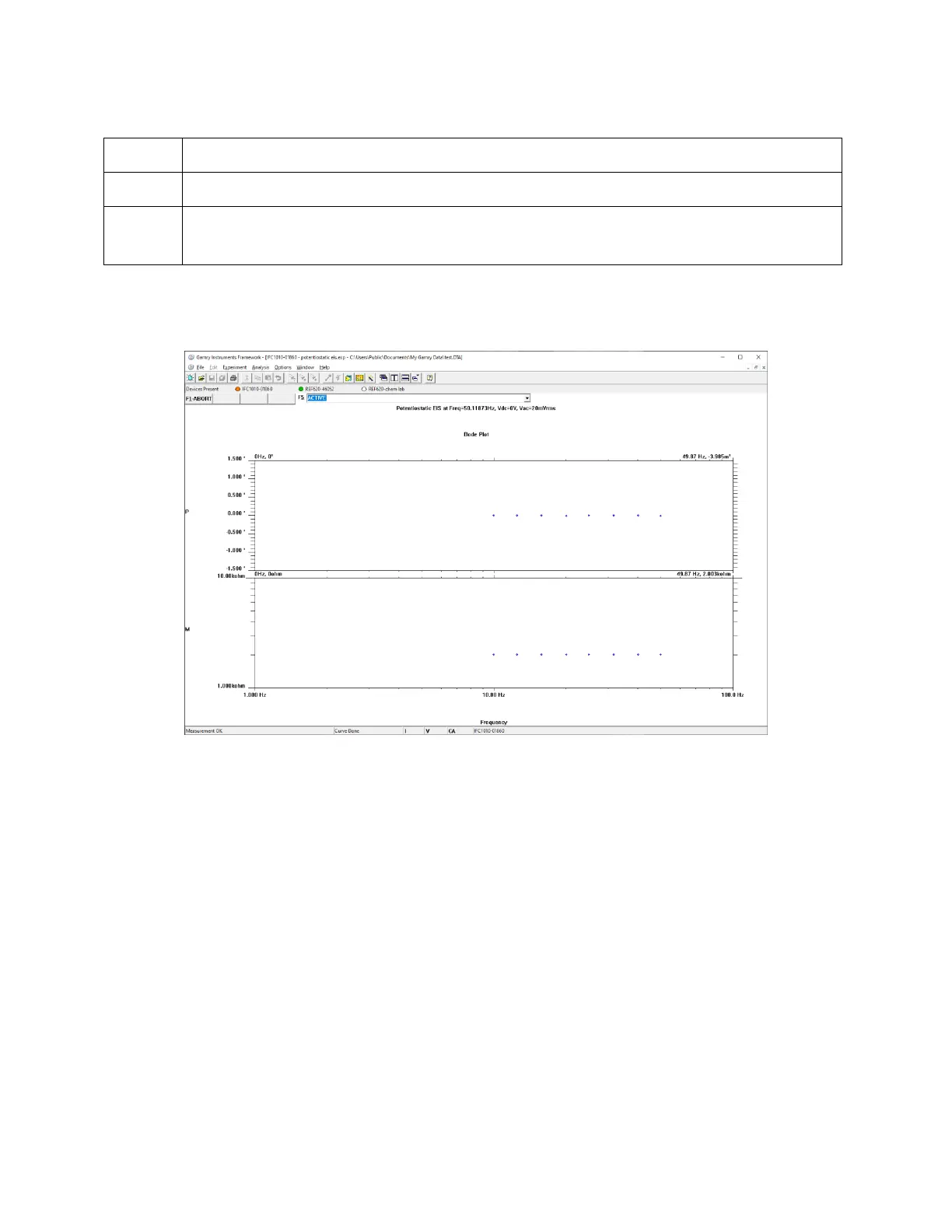
The screen capture below shows a Framework screen with three USB instruments connected.
Figure 3-3
Framework with Three Potentiostats and One Running Test
The Reference 620 (REF620-46052) in this system is shown with a green indicator because it is installed and
ready to run. The Interface 1010 labeled IFC1010-01860 has a yellow indicator because it is recording the EIS
spectrum shown on the screen. The Reference 620 labeled REF620-chem lab has a white indicator, showing it
is plugged in but cannot be used. This is an indication of obsolete firmware.
Types of Interface 1010 instruments
The Interface 1010 comes in three models, the Interface 1010T, Interface 1010B, and Interface 1010E. You
can purchase an upgrade from one version to the next. To use the upgraded Interface 1010, enter a new
authorization code using Instrument Manager. See Appendix G for a full list of each model’s capabilities.
You can use Gamry’s Instrument Manager Application to make changes to the configuration of your Interface
1010 system. Find the application through the Options menu in the Gamry Framework.
The Instrument Manager is used to:
• Rename potentiostats
• Delete potentiostats that are not currently connected to the computer
• Select the order in which potentiostats appear in menus
• Upgrade the potentiostat model from one Interface 1010 to another


 To Next Page