Panel Indicators and Connectors – Rear Panel
45
Customization Label Area
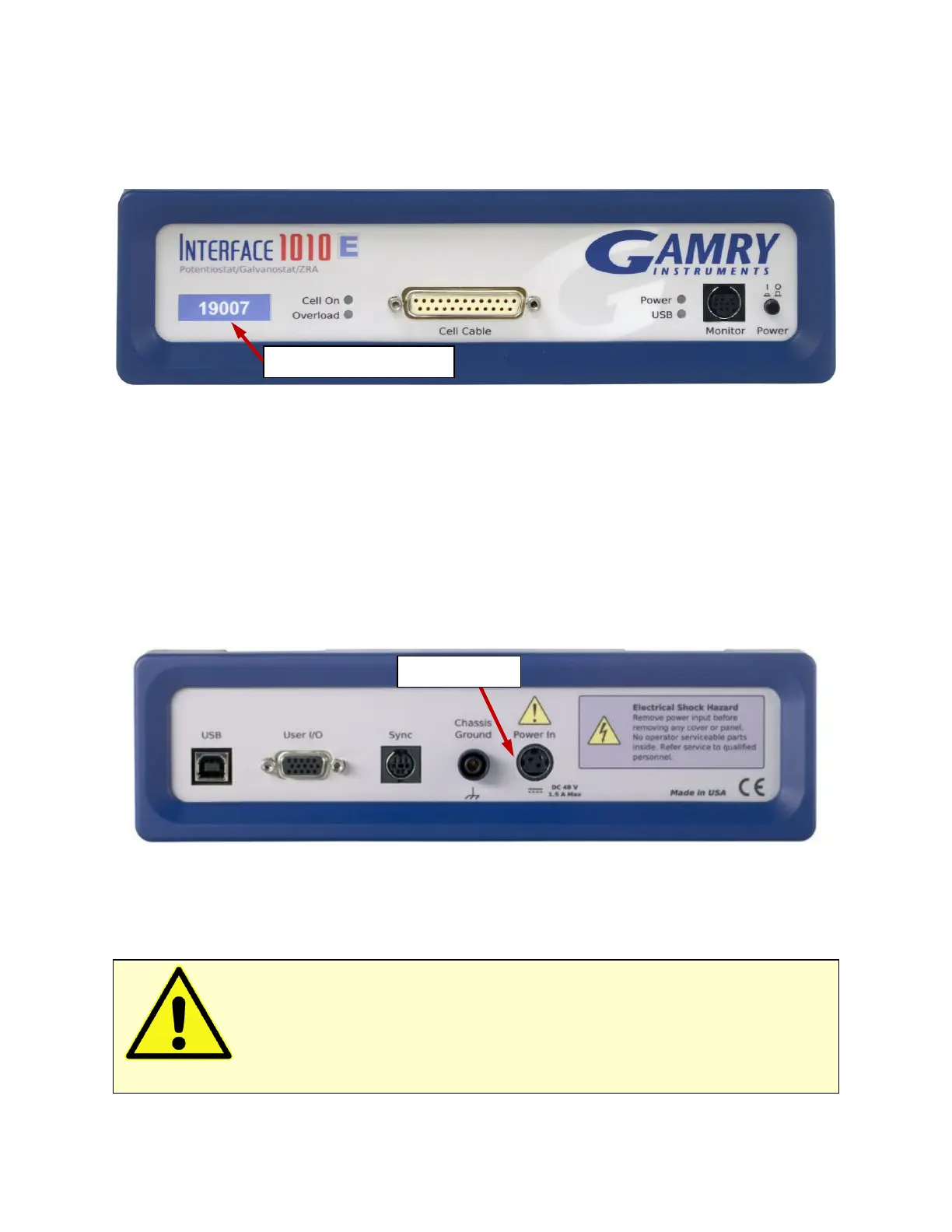
The left side of the Interface 1010 front panel has a transparent area in its plastic overlay. A paper label behind
this area allows a custom appearance. This is especially important when the instrument is in a multiple-
potentiostat system.
By default, the label in this area shows the instrument’s serial number written in white text on a blue
background. You can choose a different label. A sheet of alternate labels is provided with each instrument and
a user-editable Excel file can be found on the Gamry website.
Full instructions describing the process of changing a label are near the end of the Installation chapter (see
Chapter 3).
Rear Panel
Power In Jack
The Power In jack is a 4-pin power DIN connector. The Interface 1010 derives all its power from +48 V DC
input through the Power In jack. The input current is less than 1.5 A.
Always use the external power supply supplied with your Interface 1010 or power from an Interface Power
Hub to supply DC power to the instrument.
The external power supply is rated for operation from 100 to 240 V AC, at frequencies from 47 to 63 Hz. It
should therefore be useable worldwide.
Caution: Power input voltages less than 40 V or greater than 52 V can damage the
Interface 1010’s power supply.


 To Next Page