Garmin G1000 Pilot’s Guide for the Diamond DA40/40F
190-00592-06 Rev. A10
SYSTEM OVERVIEW
SYSTEM
OVERVIEW
FLIGHT
INSTRUMENTS
EIS
AUDIO PANEL
& CNS
FLIGHT
MANAGEMENT
HAZARD
AVOIDANCE
AFCS
ADDITIONAL
FEATURES
APPENDICESINDEX
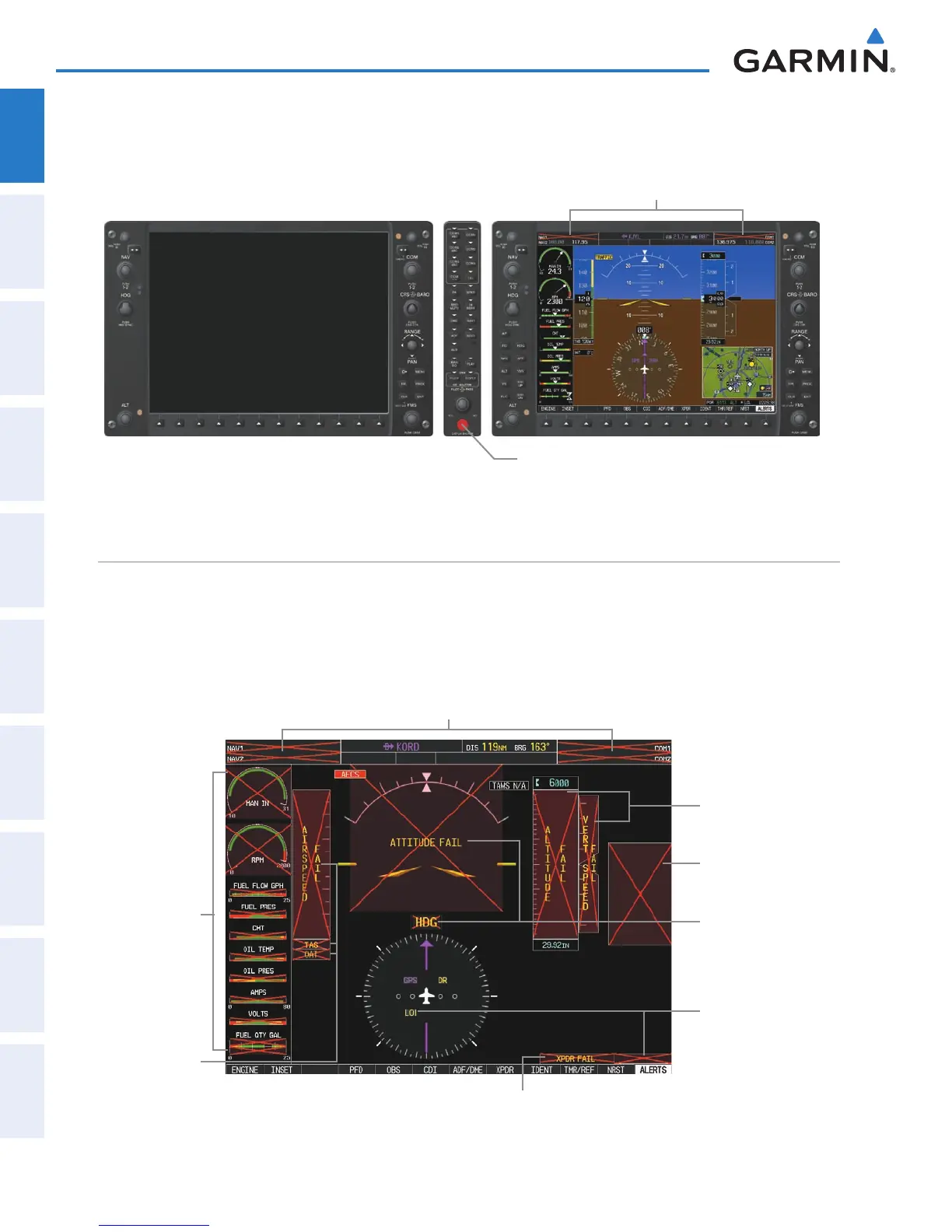
If the system fails to detect a display problem, Reversionary Mode may be manually activated by pressing the
Audio Panel’s red
DISPLAY BACKUP
Button. Pressing this button again deactivates Reversionary Mode.
DISPLAY BACKUP
Button Manually Activates/
Deactivates Reversionary Mode on Both Displays
Figure 1-7 G1000 Reversionary Mode (Failed PFD)
NAV1 and COM1 (provided by the
failed PFD) Flagged Invalid
G1000 SYSTEM ANNUNCIATIONS
When an LRU or an LRU function fails, a large red ‘X’ is typically displayed over the instrument experiencing
failed data (Figure 1-8 displays all possible flags and responsible LRUs). The G1000 System alerts the pilot
when backup paths are utilized by the LRUs. Upon G1000 power-up, certain instruments remain invalid as
equipment begins to initialize. All instruments should be operational within one minute of power-up. If any
instrument remains flagged, the G1000 should be serviced by a Garmin-authorized repair facility.
Database
Mismatch in the
PFD and MFD
GRS 77 AHRS
OR GMU 44
Magnetometer
GDC 74A
Air Data
Computer
GIA 63/63W Integrated Avionics Units
GTX 33 Transponder OR GIA 63/63W
Integrated Avionics Units
GIA 63/63W
Integrated
Avionics Units
GEA 71
Engine
Airframe Unit
OR
GIA 63/63W
Integrated
Avionics Unit
GDC 74A
Air Data
Computer
Figure 1-8 G1000 System Failure Annunciations


 To Next Page