190-00592-06 Rev. A
Garmin G1000 Pilot’s Guide for the Diamond DA40/40F
53
FLIGHT INSTRUMENTS
SYSTEM
OVERVIEW
FLIGHT
INSTRUMENTS
EIS
AUDIO PANEL
& CNS
FLIGHT
MANAGEMENT
HAZARD
AVOIDANCE
AFCS
ADDITIONAL
FEATURES
APPENDICES INDEX
HORIZONTAL SITUATION INDICATOR (HSI)
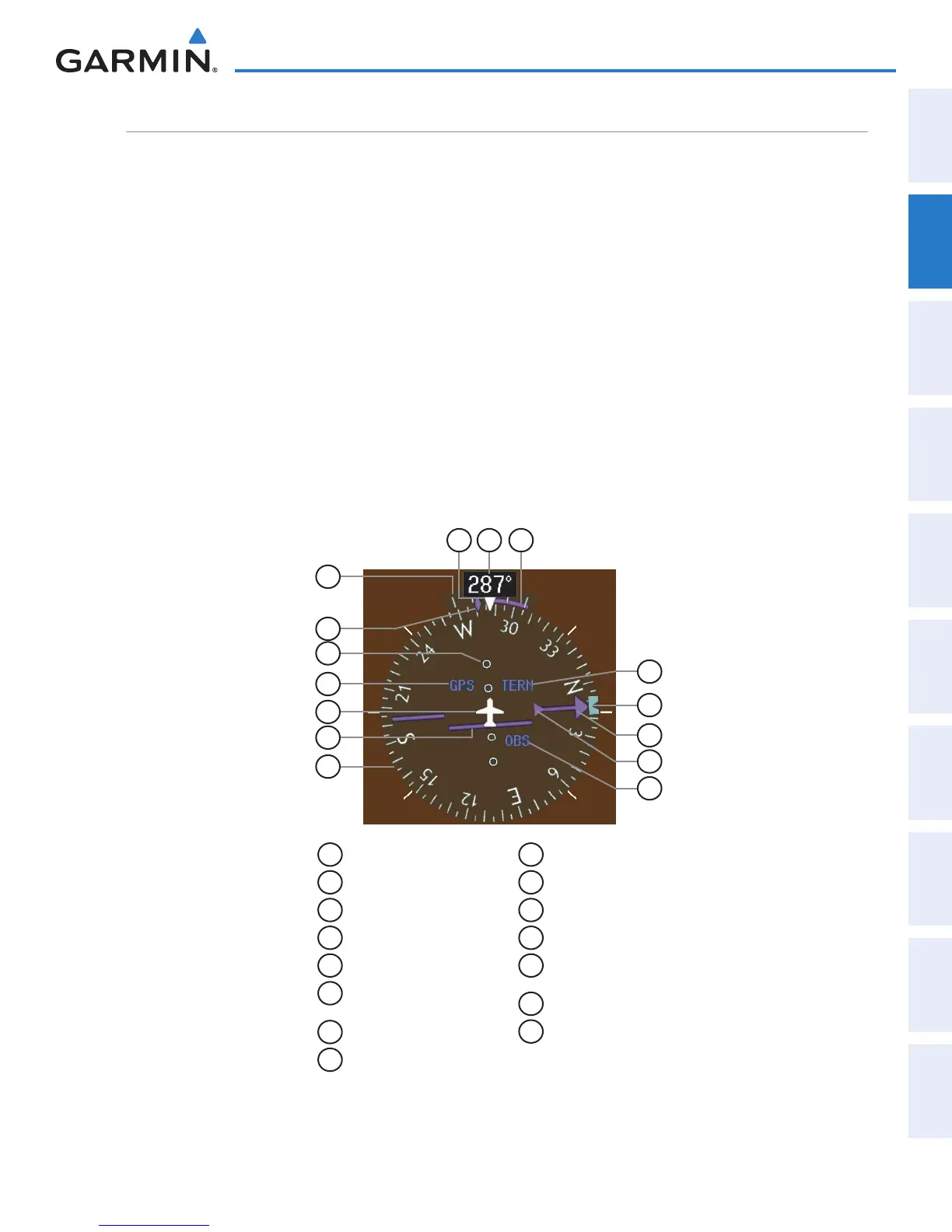
The Horizontal Situation Indicator (HSI) displays a rotating compass card in a heading-up orientation. Letters
indicate the cardinal points with numeric labels every 30˚. Major tick marks are at 10˚ intervals and minor tick
marks are at 5˚ intervals. A digital reading of the current heading appears on top of the HSI, and the current
track is represented on the HSI by a magenta diamond. The HSI also presents turn rate, course deviation,
bearing, and navigation source information. The HSI is available in two formats, a 360˚ compass rose and a
140˚ arc.
Changing the HSI display format:
1) Press the
PFD
Softkey.
2) Press the HSI FRMT Softkey.
3) Press the
360 HSI
or
ARC HSI
Softkey.
The 360˚ HSI contains a Course Deviation Indicator (CDI), with a Course Pointer, To/From Indicator, and a
sliding deviation bar and scale. The course pointer is a single line arrow (GPS, VOR1, and LOC1) or a double
line arrow (VOR2 and LOC2) which points in the direction of the set course. The To/From arrow rotates with
the course pointer and is displayed when the active NAVAID is received.
1
Turn Rate Indicator
2
Current Track Bug
3
Lateral Deviation Scale
4
Navigation Source
5
Aircraft Symbol
6
Course Deviation Indicator
(CDI)
7
Rotating Compass Rose
8
OBS Mode Active
9
To/From Indicator
10
Course Pointer
11
Heading Bug
12
Flight Phase
13
Turn Rate/Heading
Trend Vector
14
Current Heading
15
Lubber Line
Figure 2-14 Horizontal Situation Indicator (HSI)
11
7
6
5
3
2
1
12
10
4
1415 13
8
9


 To Next Page