Garmin G1000 Pilot’s Guide for the Diamond DA40/40F
190-00592-06 Rev. A
348
HAZARD AVOIDANCE
SYSTEM
OVERVIEW
FLIGHT
INSTRUMENTS
EIS
AUDIO PANEL
& CNS
FLIGHT
MANAGEMENT
HAZARD
AVOIDANCE
AFCS
ADDITIONAL
FEATURES
APPENDICESINDEX
6.7 TRAFFIC ADVISORY SYSTEM
NOTE: TIS is disabled when Traffic Advisory System (TAS) is installed.
Refer to the Avidyne TAS600 Series Pilot’s Guide for a detailed discussion of the Avidyne TAS600.
TAS SYMBOLOGY
Traffic Advisory System (TAS) is designed to help in detection and avoidance of other aircraft. TAS uses an on-
board interrogator-processor and the Mode S transponder for the air-to-air traffic data link. Traffic is displayed
according to TCAS symbology using four different symbols.
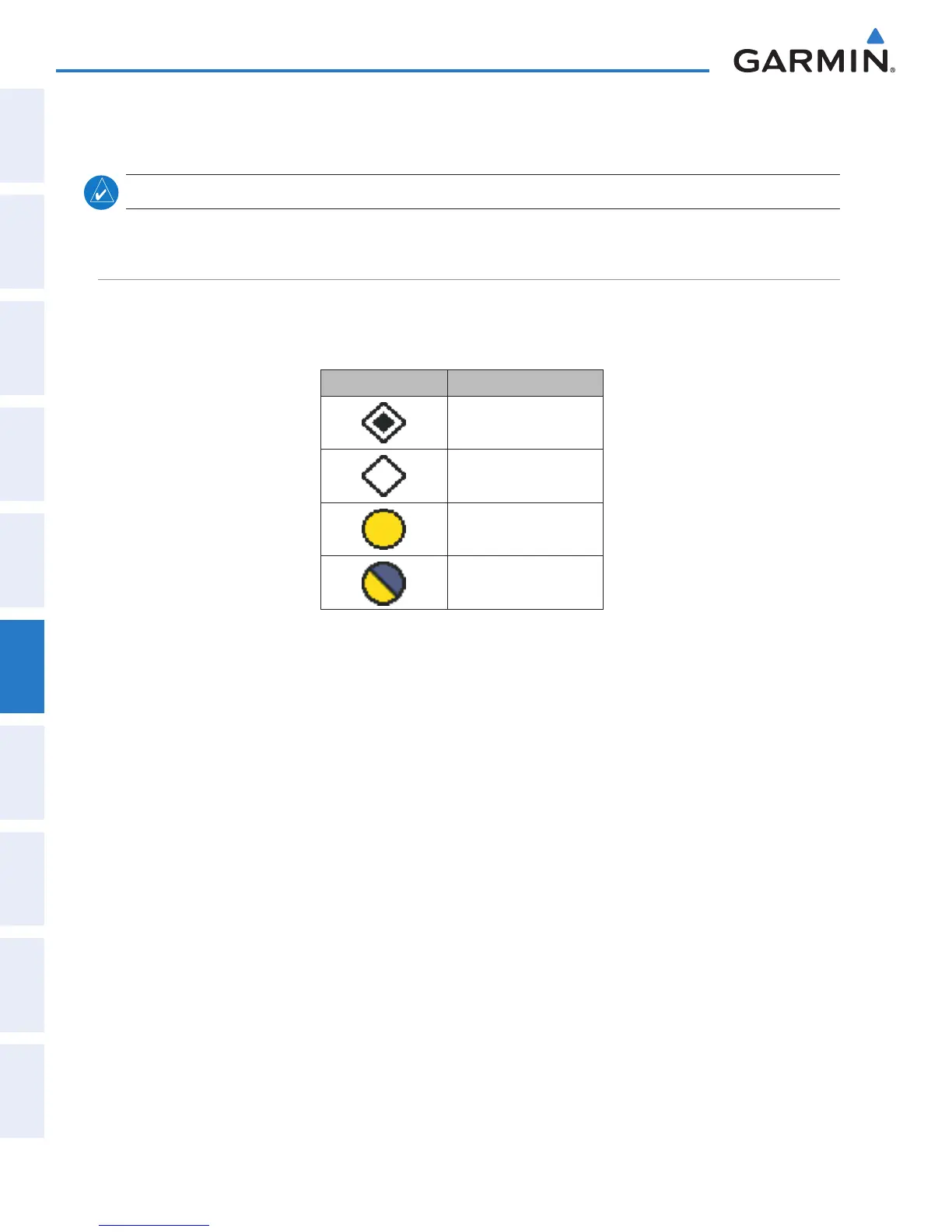
TAS Symbol Description
Non-Threat Traffic
Proximity Advisory (PA)
Traffic Advisory (TA)
Traffic Advisory Off Scale
Table 6-17 TAS Symbol Description
A Non-threat Advisory, shown as an open white diamond, indicates that an intruding aircraft is at greater than
±1200 feet relative altitude or the distance is beyond 5 nm.
A Proximity Advisory indicates that the intruding aircraft is within ±1200 feet and is within 5 nm range, but
is still not considered a threat.
A Traffic Advisory (TA) alerts the crew to a potentially hazardous intruding aircraft. Closing rate, distance,
and vertical separation meet TA criteria. A Traffic Advisory that is beyond the selected display range is indicated
by a half TA symbol at the edge of the screen at the relative bearing of the intruder.


 To Next Page