92 Forerunner
®
735XT
EN
Replaceable coin cell batteries may contain
perchlorate material. Special handling may
apply. See www.dtsc.ca.gov/hazardouswaste/
perchlorate.
CAUTION
Contact your local waste disposal department
to properly recycle the batteries.
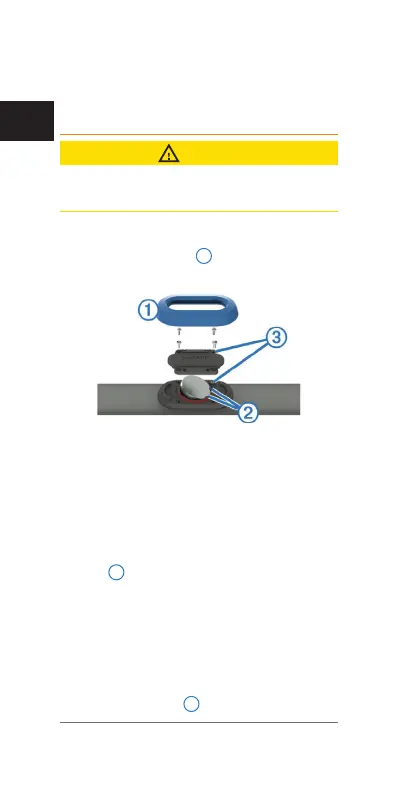
Replacing the Heart Rate Monitor Battery
1 Remove the sleeve
1
from the heart rate
monitor module.
2 Use a small Phillips (00) screwdriver to
remove the four screws on the front of the
module.
3 Remove the cover and battery.
4 Wait 30 seconds.
5 Insert the new battery under the two plastic
tabs
2
with the positive side facing up.
NOTE: Do not damage or lose the O-ring
gasket.
The O-ring gasket should remain around the
outside of the raised plastic ring.
6 Replace the front cover and the four screws.
Observe the orientation of the front cover.
The raised screw
3
should t in the match-















 To Next Page