66
Reference
Main Menu:
Comm Tab
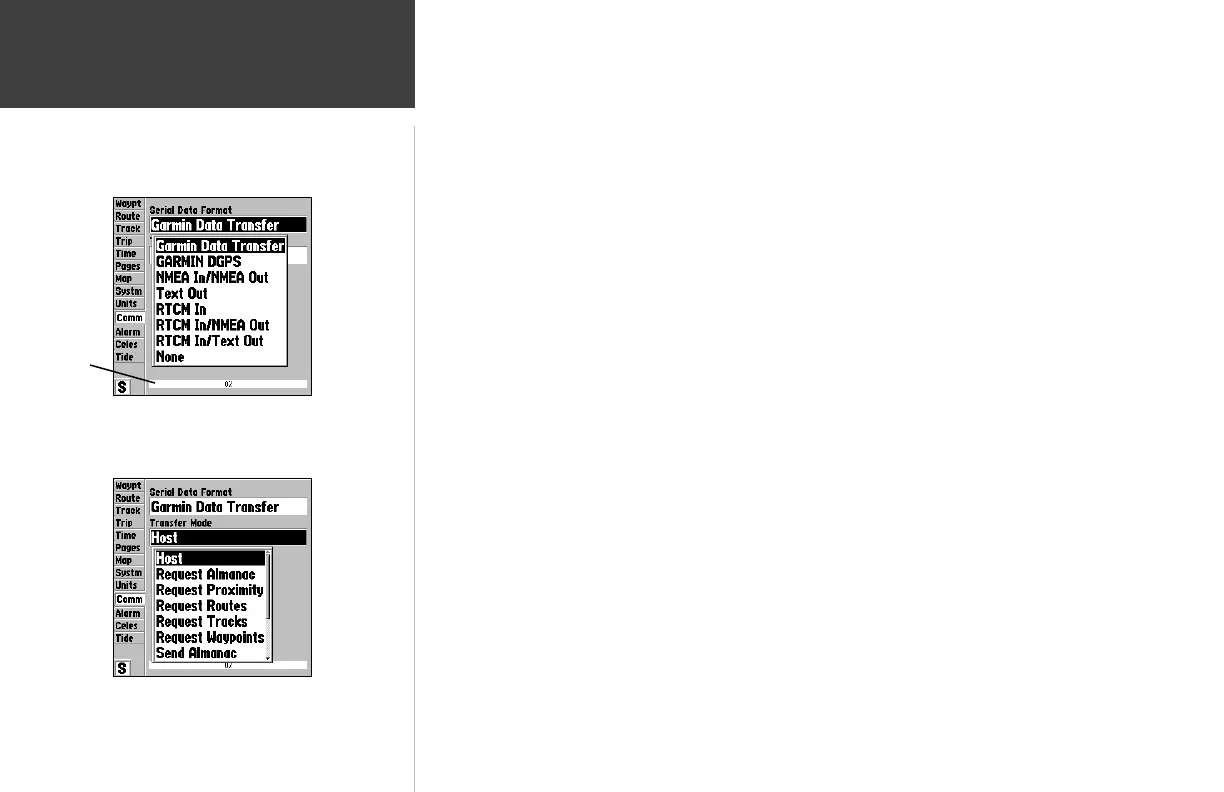
Comm (Communications) tab— lets you control the input/output format used when connecting
your GPSMAP 162 to external NMEA devices, a DGPS beacon receiver, a personal computer, another
Garmin GPSMAP 162/168, etc. Eight format settings are available:
• Garmin Data Transfer— the proprietary format used to upload/download MapSource data,
exchange waypoint, route, track, almanac, and proximity data with a PC or another GARMIN
GPSMAP 162/168. When you select ‘Garmin Data Transfer’, there are 11 Transfer Modes
to choose from: Host, Request Almanac, Request Proximity, Request Routes, Request Tracks,
Request Waypoints, Send Almanac, Send Proximity, Send Routes, Send Tracks and Send
Waypoints.
• Garmin DGPS— used to connect the GPSMAP 162 with a Garmin DGPS beacon receiver.
• NMEA In/NMEA Out— supports the input/output of standard NMEA 0183 version 2.3 data,
and sonar NMEA input support for the DPT, MTW and VHW sentences. See Appendix H on
page 85 for the Advanced NMEA Setup feature.
• Text Out— outputs simple text (ASCII) output which contains time, position, and velocity data.
• RTCM In— allows DGPS input using a standard RTCM format, without any output capabilities.
• RTCM In/NMEA Out— allows Differential GPS (DGPS) input using a standard RTCM format
and also provides NMEA 0183 version 2.3 output.
• RTCM In/Text Out— allows Differential GPS (DGPS) input using a standard RTCM format and
also provides simple text (ASCII) output which contains time, position, and velocity data.
• None— provides no interfacing capabilities.
To select an input/output format:
1. Highlight the ‘Serial Data Format’ fi eld and press ENTER/MARK.
2. Use the ARROW KEYPAD to select the desired setting and press ENTER/MARK.
To select a transfer mode:
1. Use the ARROW KEYPAD to select ‘Garmin Data Transfer’ in the ‘Serial Data Format’ fi eld.
1. Highlight the ‘Transfer Mode’ fi eld and press ENTER/MARK.
2. Use the ARROW KEYPAD to select the desired setting and press ENTER/MARK.
To restore the Serial Data Format settings to the default ‘Garmin Data Transfer’:
1. From the Comm tab, press MENU, highlight ‘Restore Defaults’ and press ENTER/MARK.
Comm Tab Serial Data Formats
Data Transfer
Progress
Comm Tab Transfer Modes












 To Next Page