71
Reference
Main Menu:
Tide Tab
To search for the nearest tide stations:
1. Highlight the ‘For’ fi eld and press ENTER/MARK.
A list of the Tide Stations nearest to your location will be displayed. If you are not within several
miles of any tide stations, the list will indicate “None Found”. To search for tide stations at a different
location, press MENU and select ‘Nearest to Other’.
To select a tide station from the list:
1. Using the ARROW KEYPAD, highlight the desired station and press ENTER/MARK.
To change the date for the tide chart:
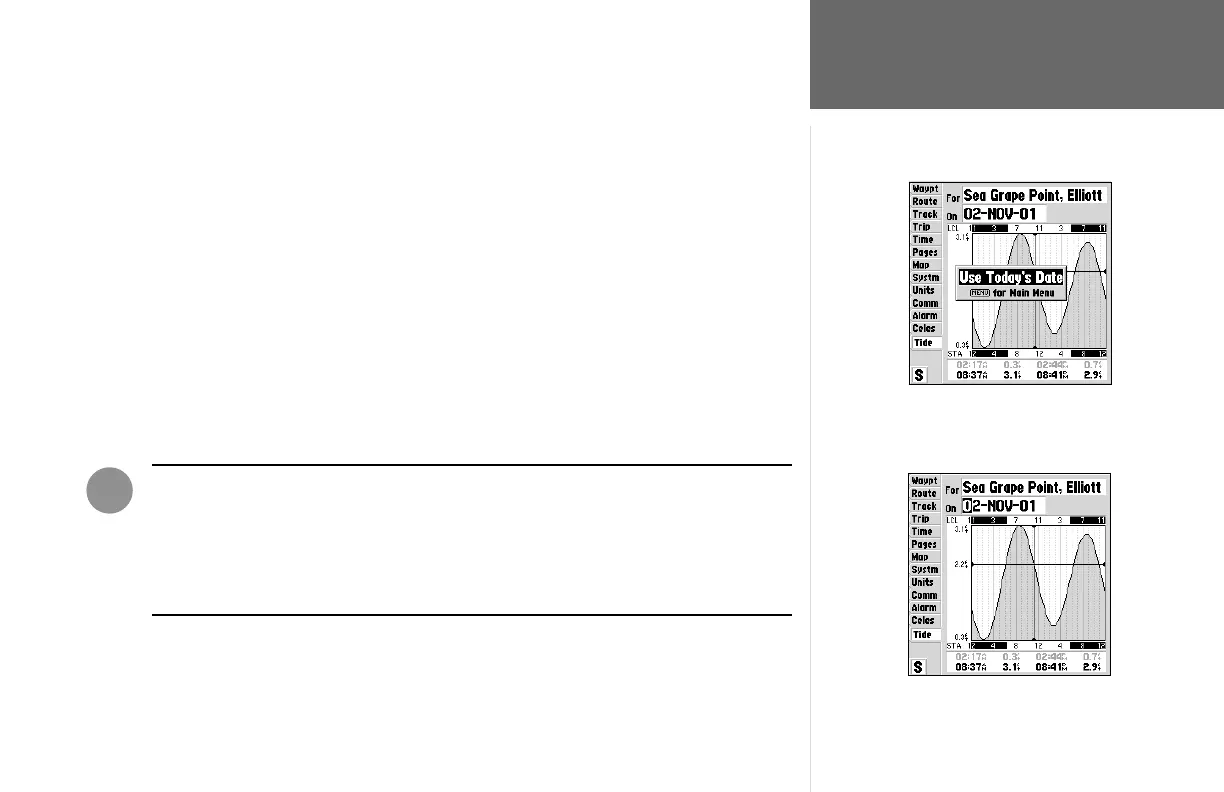
1. Using the ARROW KEYPAD, highlight the “On” fi eld and press ENTER/MARK.
2. Enter the desired date and press ENTER/MARK.
To use the current date:
1. Press MENU, then highlight ‘Use Today’s Date’ and press ENTER/MARK.
WARNING: When you load MapSource data into the GPSMAP 162, the tide station
information provided with the unit will be deleted. Replacement tide station data for
the GPSMAP 162 can be found on our web site (www.garmin.com).
If you are loading US BlueChart data, tide information can be included with the charts
that you have selected.
To use todays date, from the ‘Tide’ tab, press
MENU and with ‘Use Today’s Date’ selcted,
press ENTER/MARK
To enter a date manually, highlight the ‘On’
fi eld and press ENTER/MARK. Using the
ARROW KEYPAD enter a new date then press
ENTER/MARK to accept the change.
I












 To Next Page