48 GPSMAP 192C Owner’s Manual
MAIN MENU > POINTS TAB
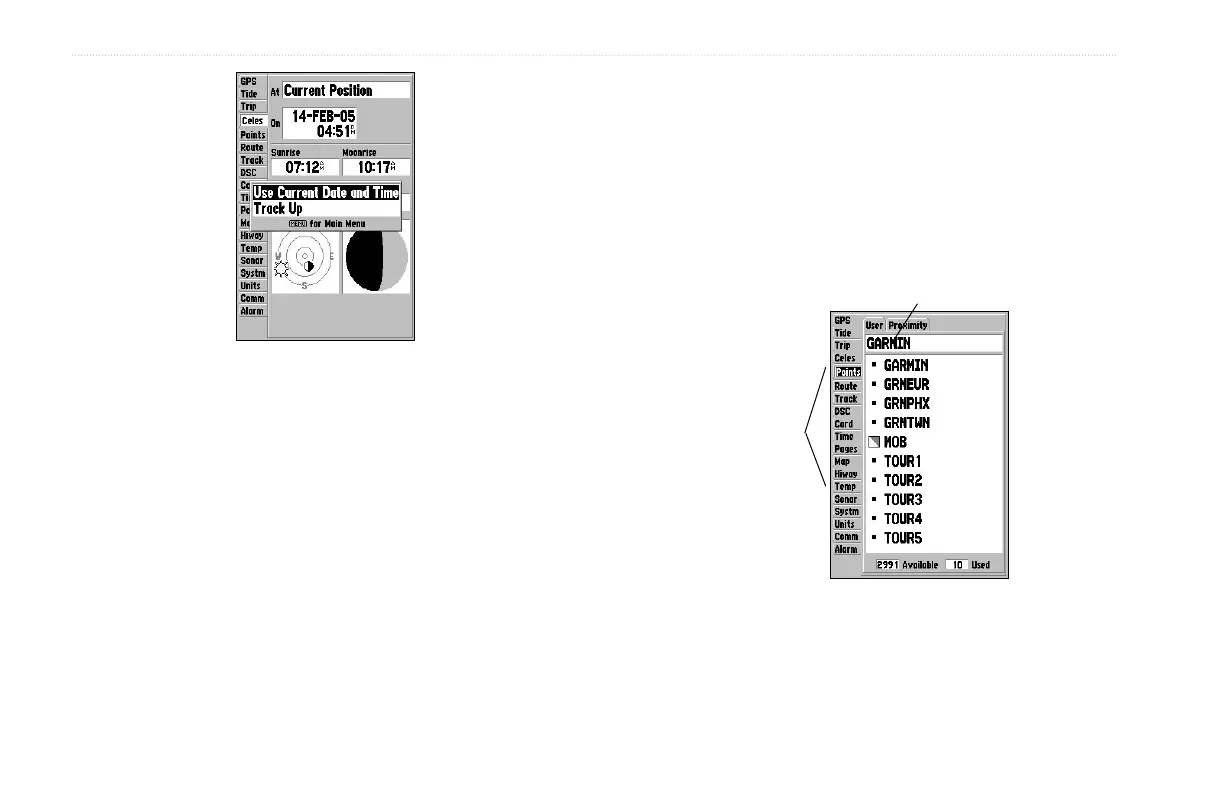
Celestial Tab Menu
To change the time or date:
1. From the Celes tab, use the ROCKER to highlight the date
or time, and press ENTER.
2. Enter a new date or time, and press ENTER.
To use current date and time:
From the Celes tab, press MENU, use the ROCKER to
highlight Use Current Date and Time, and press ENTER.
Points Tab
The Main Menu Points tab features two waypoint sub tabs, User
and Proximity, that allow you manage a large number of waypoints
quickly and efficiently. The sub tabs also provide a continuously
updated proximity waypoint alarm function that can be used to
define an alarm circle around items such as submerged hazards or
shallow waters.
Main Menu
Tabs
Sub Tabs













 To Next Page