64 GPSMAP 192C Owner’s Manual
MAIN MENU > MAP TAB
Map Tab
The Map tab changes the display properties of the Map page.
The following pages contain descriptions of the Map tab’s eight
sub tabs.
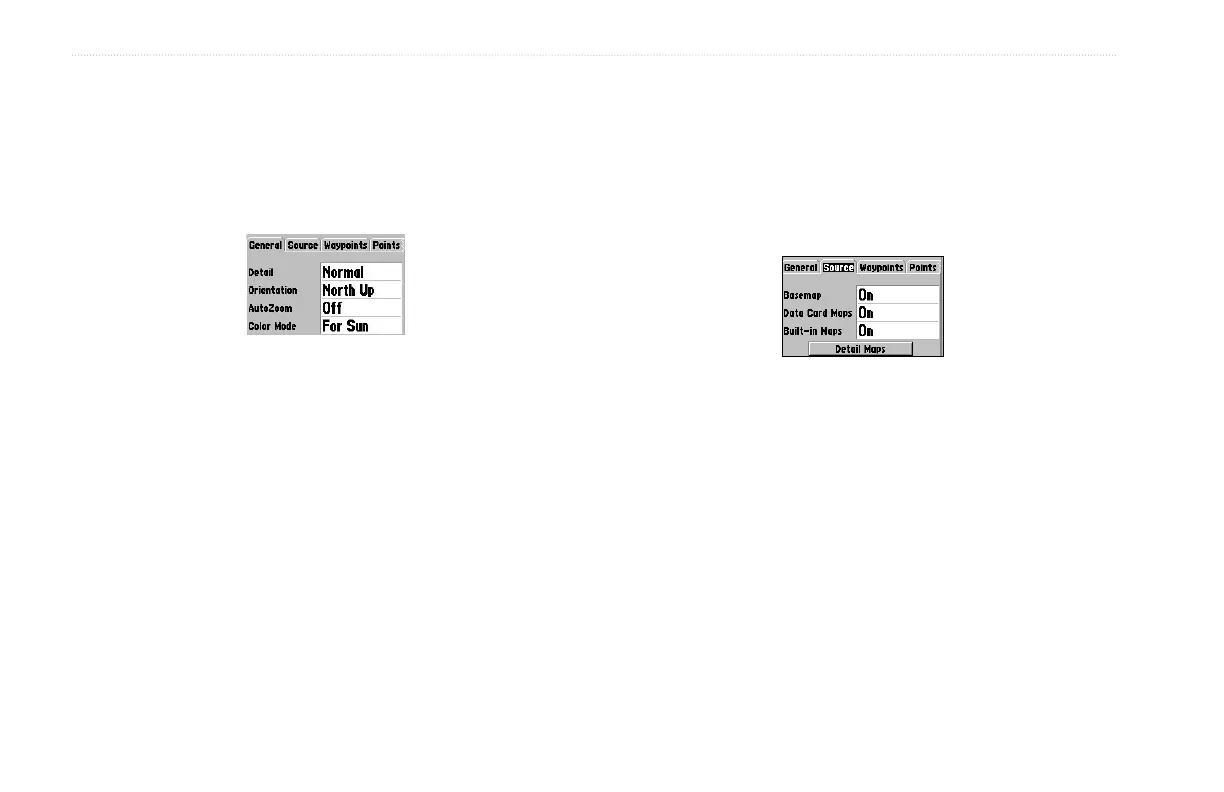
General Tab
• Detail—Most, More, Normal, Less, Least: controls how
much map detail is displayed. This setting only applies to
map features set to Auto. Features that have a specified scale
or are turned Off are unaffected by this setting.
• Orientation—North Up: fixes the top of the map display to
a north heading. Track Up: fixes the top of the map display
to the current track heading. Course Up: fixes the map so the
direction of navigation is always up.
• AutoZoom—On, Off: when On the map automatically
adjusts the map scale to a lower scale as you approach you
destination point.
• Color Mode—For Sun, For Dark: controls colors change to
correct for day and night lighting conditions.
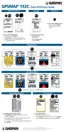
Source Tab
• Basemap—On/Off: turns on or off the built-in base map.
• Data Card Maps—On/Off: turns on or off all BlueChart or
MapSource data loaded in the unit or on the data card.
• Built-in Maps—On/Off: turns on or off all built-in
BlueChart maps.













 To Next Page