GPSMAP 192C Owner’s Manual 61
MAIN MENU > DSC TAB
You can use the Review On Map option to display a saved track on
a Track Map page.
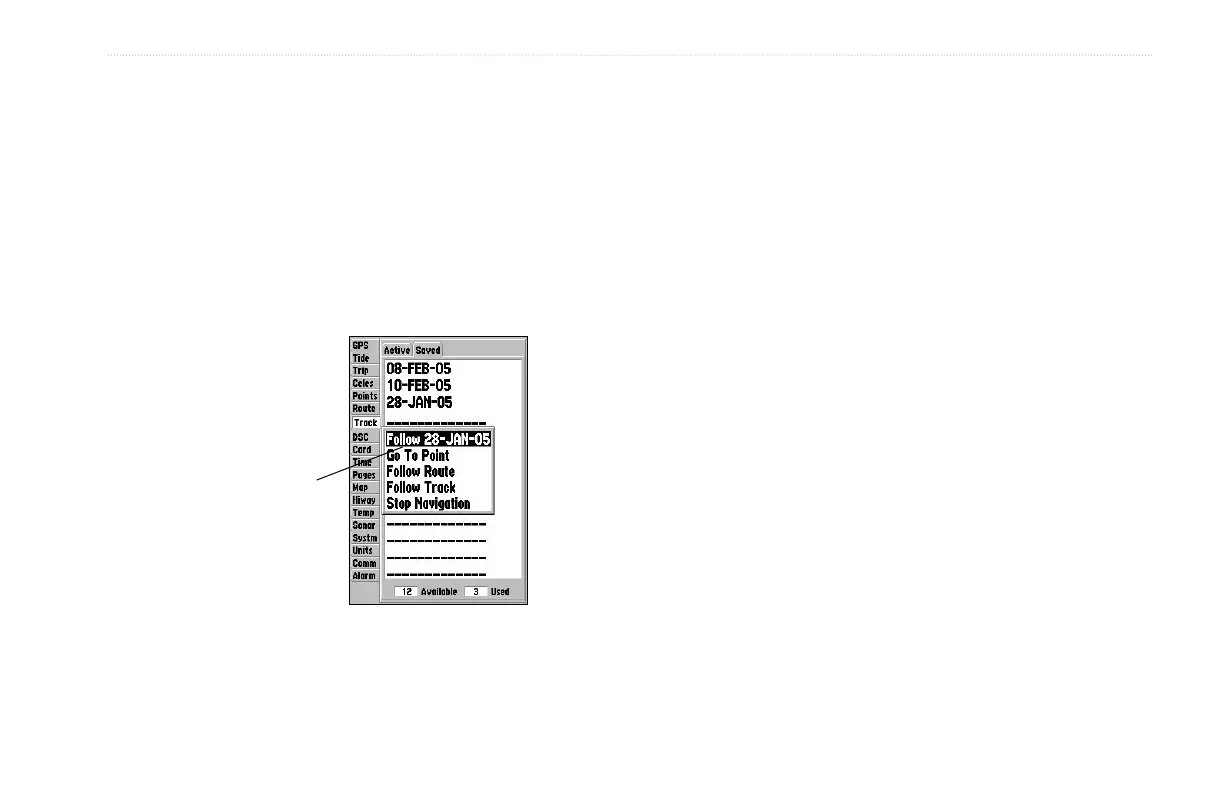
To activate a TracBack from the Saved tab list:
1. Using the ROCKER, highlight a track, and press NAV.
2. The Follow <track name> automatically appears
highlighted. Press ENTER.
3. Choose either Original, which navigates you from the end
to the start of your trip, or Reverse, which navigates you
from the start to the end of your trip, and press ENTER.
The track name
automatically
appears when
highlighted on
the Saved list and
NAV is pressed.
DSC Tab
Digital Selective Calling (DSC) uses marine VHF radio and Global
Positioning System (GPS) technologies to transmit and receive
location information. DSC is used by mariners to assist them in two
major areas: Distress Calls and Position Reporting. See page 22
and the “Appendix” for more information on DSC and using it with
your GPSMAP 192C.













 To Next Page