GPSMAP 192C Owner’s Manual 67
MAIN MENU > MAP TAB
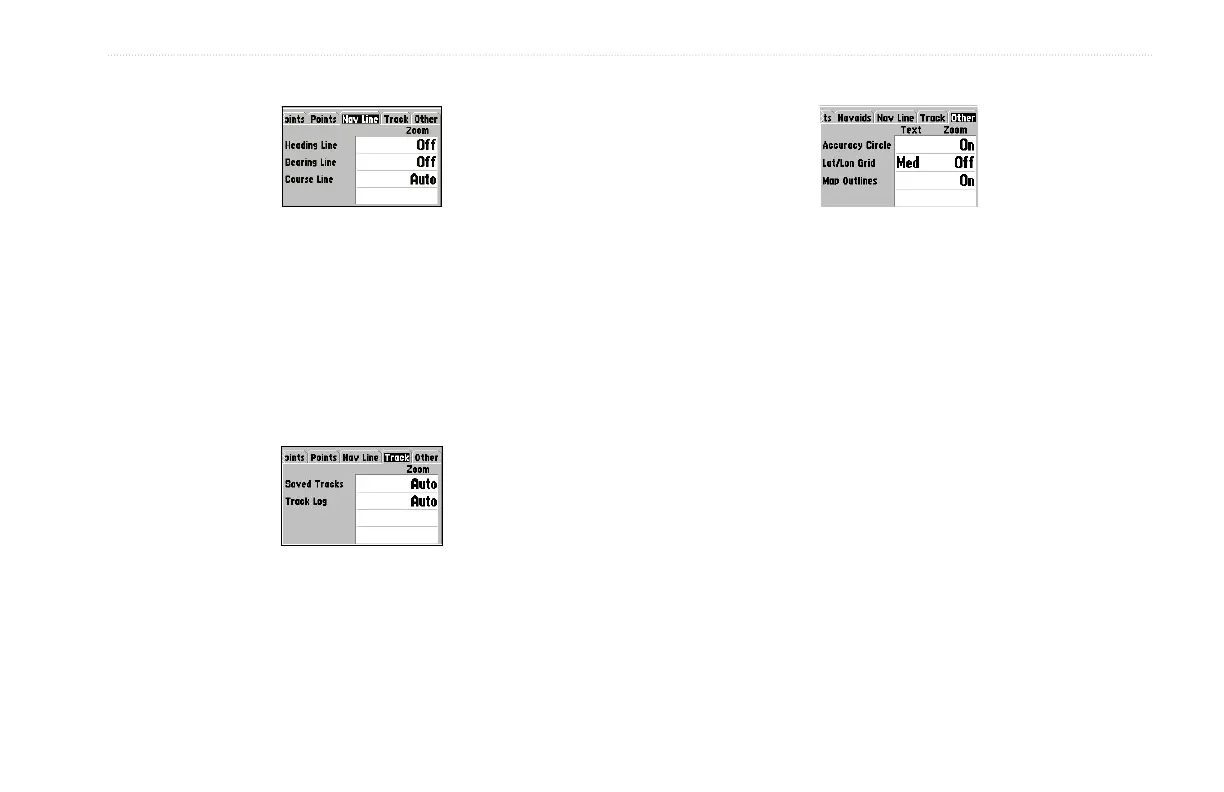
Nav Line Tab
• Heading Line—On/Off: draws an extension from the end of
the boat icon in the direction of travel.
• Bearing Line—On/Off: toggles the black/white line that
points to the current navigation point.
• Course Line—Auto, Off, 120 ft-800 mi: sets the maximum
zoom scale the course line appears on the screen.
Track Tab
The Saved Tracks and Track Log options each contain adjustments
for Zoom.
• Zoom—Auto, Off, 120 ft-800 mi: sets the maximum scale
the feature should appear on the Map page. Some types of
data only show up to specific zoom scales.
Other Tab
• Accuracy Circle—On/Off: toggles the circle On and Off.
The circle represents the approximate accuracy of the unit
based on EPE, DOP, and basemap quality. Your location is
within the circle.
• Lat/Lon Grid—Text—None, Small, Medium, and Large:
controls the screen size of the name. Zoom—Auto, Off, 120
ft-800 mi: sets the maximum scale the feature should appear.
• Map Outlines—On/Off: toggles the coverage boxes for
BlueChart/MapSource data On and Off.













 To Next Page