Installation Information
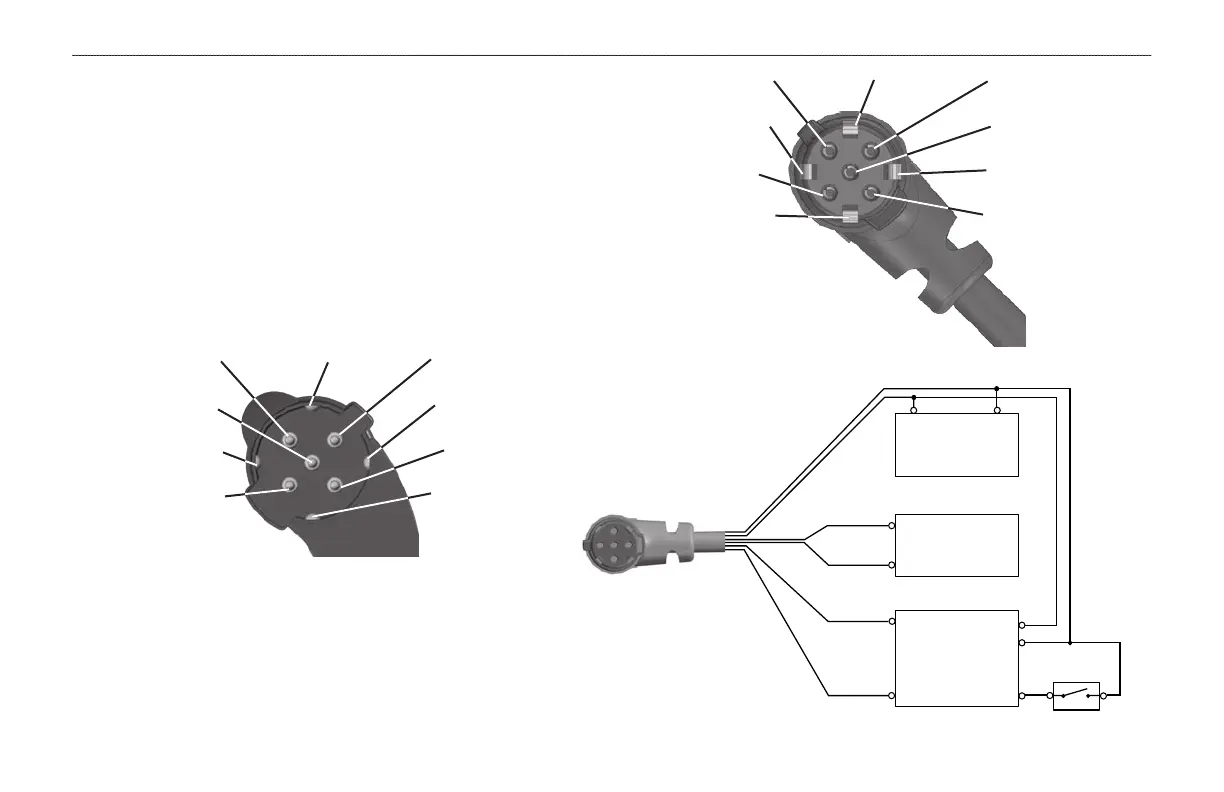
This section of the Appendix provides information on connecting the
GPSMAP 296 to auxiliary devices and removing the antenna.
Connecting the Power/Data Cable
The power/data cable connects the GPSMAP 296 to an 11–35 VDC
system and provides interface capabilities for connecting external
devices. The color code in the diagram below and to the right
indicates the appropriate harness connections. Replacement fuse is a
3AG - 1.5 Amp fuse.
Power/Data Connector on the GPSMAP 296 Unit
Data Out 1
Blue
Ground
Black
Voice (-)
Orange
Data In 2
Green
Alarm
White
Power
Red
Voice (+)
Brown
Data In 1
Yellow
Data Out 2
Violet
Power/Data Connector on the Cable
Data Out 1
Blue
Ground
Black
Voice (-)
Orange
Data In
2 Green
Alarm
White
Power
Red
Voice (+)
Brown
Data In 1
Yellow
Data Out 2
Violet
11−35 VDC
Autopilot/
NMEA
Device
GSD 20
Sounder
(−)
(+
)
(RXD)
(TXD)
(White/Blue)
(White/Blue)
(Orange)
(−)
(+
)
switch
Closed = ON
Open = OFF
Data Out 1
(Blue)
Data In 1
(Yellow)
Data Out 2
(Violet)
Data In 2
(Green)
134 GPSMAP 296 Pilot’s Guide
APPENDIX > INSTALLATION INFORMATION













 To Next Page