Editing and Managing Waypoints
When you have created and stored a waypoint, you can modify,
review, rename, move, or delete it at any time through the Waypoint
Review and Waypoint Edit Pages. These pages provide virtually the
same information. For practical purposes, we refer to these pages
as the “Waypoint Pages,” unless it is necessary to discuss them
individually.
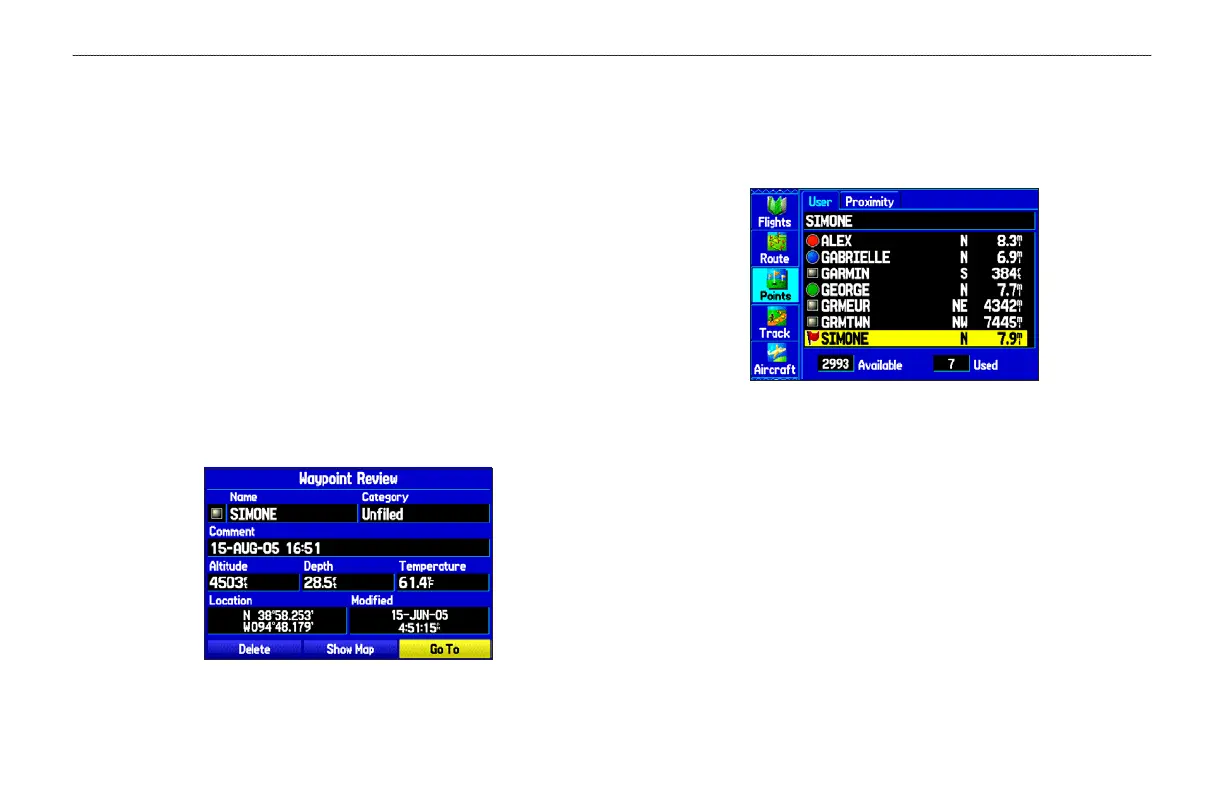
To access the Waypoint Review Page from the Map:
1. Use ROCKER to highlight the waypoint on the Map Page.
2. Press ENTER to show the Waypoint Review Page. If the
waypoint is located on a map feature or MapSource or
BlueChart feature, the Waypoint Review Page can include
additional tabs containing information about the other
features at that location.
Waypoint Review Page
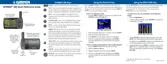
To access the Waypoint Edit Page:
1. Press MENU twice to view the Main Menu.
2. Use ROCKER to highlight Points from the vertical list of
tabs, and highlight the waypoint from the list.
Points Tab in the Main Menu
3. Press ENTER to show the Waypoint Edit Page.
If the waypoint is located on a map feature or MapSource or
BlueChart feature, the Waypoint Edit Page does NOT show
the details of the other map features.
Use either of these methods to access the Waypoint Page so you can
edit and manage the waypoint.
GPSMAP 296 Pilot’s Guide 73
AUTOMOTIVE MODE PAGES AND FEATURES > EDITING AND MANAGING WAYPOINTS













 To Next Page