GPSMAP
®
4000/5000 Series Owner’s Manual 21
Where To?
Where
To?
Where To?
Use the Where To? option on the Home screen to search for, and navigate to, waypoints, routes, and
services such as nearby fuel, repairs, and ramps.
NOTE: You must create waypoints and routes before you can navigate to them.
You can navigate to a destination using one of three methods: Go To, Route To, or Guide To.
Go To
—takes you directly to the destination.
Route To
—creates a route from your location to a destination, allowing you to add turns to the
route.
Guide To
—searches BlueChart g2 Vision chart data to suggest the best path to your destination.
You must be using a BlueChart g2 Vision SD card for this option to appear.
CAUTION: Guide To does not ensure obstacle and bottom clearance. For safety, always resolve any
discrepancies or questions before continuing navigation.
Navigating to a Destination
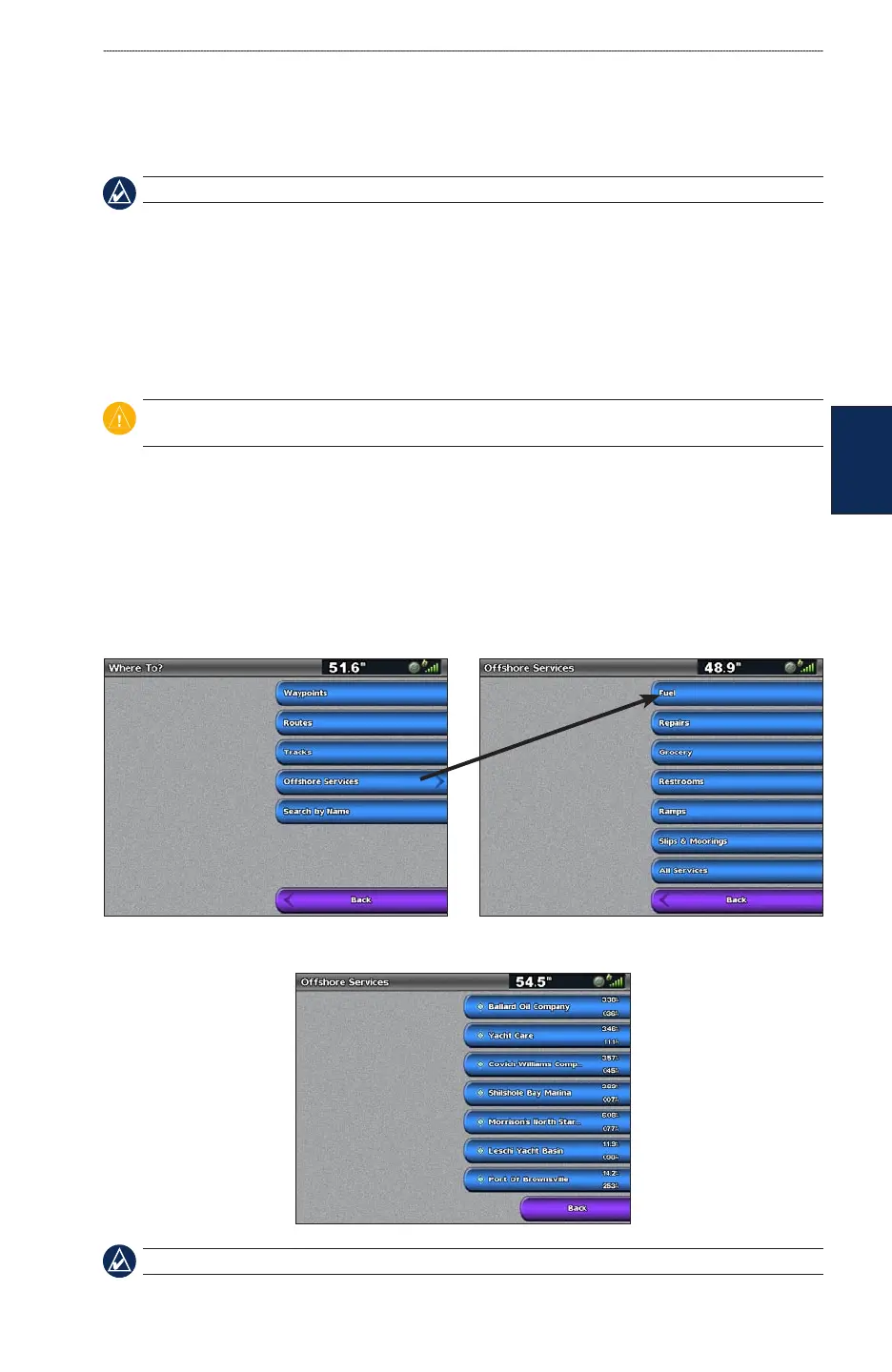
You can search for, and navigate to, waypoints, routes, and services such as nearby fuel, repairs, and
ramps.
To begin navigating:
1. From the Home screen, select Where To?.
2. Select the category to which you want to navigate.
3. Select a destination.
NOTE: Select Next Page to view additional information or to display the location on a chart.
•
•
•













 To Next Page