GPSMAP 495 Owner’s Manual 17
Aviation
Basic Operation in Aviation Mode > Viewing AOPA Airport Directory Information and SafeTaxi Diagrams
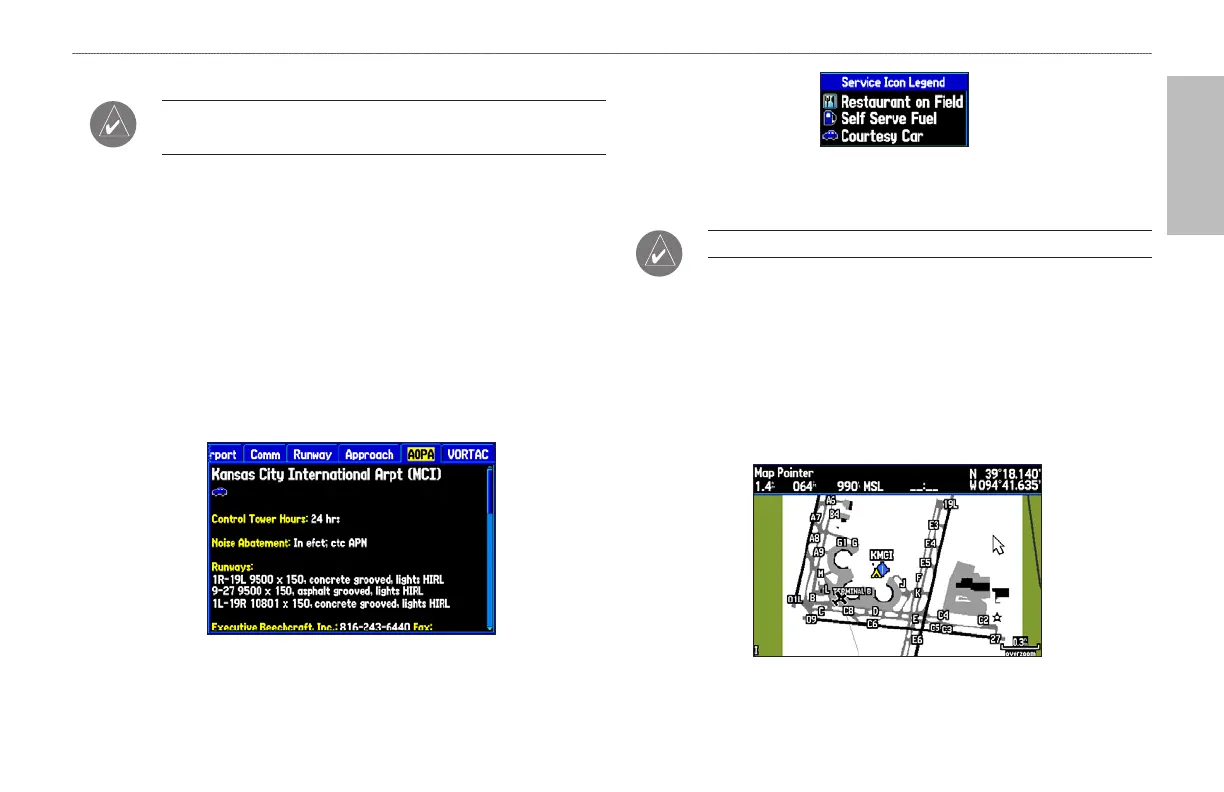
Viewing AOPA Airport Directory Information
NOTE: AOPA Airport Directory Information is currently
available in the United States only.
The AOPA Airport Directory contains airport statistics such as
pattern altitudes, noise abatement information, FBO phone numbers,
hours of operation, local attractions, ground transportation, lodging,
and services.
To view the AOPA Airport Directory information:
1. Select an airport using the map or the NRST/FIND key.
2. Use the ROCKER to select the AOPA tab.
3. Press up and down on the ROCKER to scroll through the AOPA
Directory listings.
AOPA Airport Directory Tab
AOPA Service Icon Legend
Viewing SafeTaxiTM Diagrams
NOTE: SafeTaxi is currently available in the United States only.
Garmin SafeTaxi diagrams provide detailed taxiway diagrams and
position information on more than 650 airports in the USA. Taxi
diagrams are integrated in the Map Page.
To view a SafeTaxi diagram:
1. Zoom in on an airport that has a taxi diagram available.
2. Use the ROCKER to view items on the taxi diagram.
SafeTaxi Airport Diagram













 To Next Page