3-15190-01182-00 Rev. B
Garmin GTR 225/225A/225B Pilot’s Guide
3.5 Timers
The GTR 225 has both count up and count down timers, which may operate
simultaneously, and are shown in the lower right of the COM displays. The
countdown timer always takes precedence if it is running.
3.5.1 Setting Up the Count Down Timer
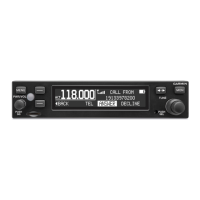
Default Start Time
Hours
Minutes
Seconds
Count Down Timer Page
1. Press FUNC.
2. Turn the outer knob to TMR CONFIGURATION.
3. Turn the inner knob to COUNT DOWN.
4. Press ENT.
5. Press the inner knob to enter a starting timer value.
6. Turn the outer knob to move to set seconds, minutes, or hours.
7. Press ENT to confirm entry.
8. Press ENT to start or stop the timer.
9. Press the CLR key to reset the timer to the starting value.
10. Press the inner knob to change the starting timer value.
3.5.2 Setting Up the Count Up Timer
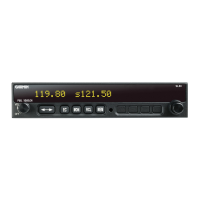
The Default (Starting) Value
Cout Up Timer Page
1. Press FUNC.
2. Turn the outer knob to TMR CONFIGURATION.
3. Turn the inner knob to COUNT UP.
4. Press ENT.
5. Press the ENT key to start the timer.
6. Press the ENT key again to stop the timer.
7. Press the CLR key to reset the timer to 0:00 and stop counting.



 To Next Page