EasyManua.ls Logo

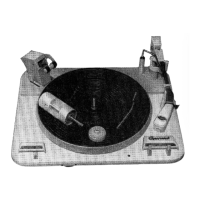
Garrard Module Zero 100SB - Page 10

Default Icon
16 pages
Print Icon
To Next Page IconTo Next Page
To Previous Page IconTo Previous Page
Loading...
Bras
de
lecture
Levier
de
blocage
du
bras
de
lecture
3
Vis
de
transport
(2)
4
Levier
manual
du
pickup
5
Cellule
et
pointe
de
lecture
(cachées)
6
Touche
'Cueing'
7
8
d
113
Pickup
Arm
114
11.2
Pickup
Arm
Locking
Lever
11.2
11.3
Transit
Screw
(2)
114
Pickup
Finger
Lift
11.
11.5
Pickup
Cartridge
and
11
stylus
(hidden
from
view)
11-
11.6
Cueing
Control
Tab
11.7
Manual
Control
Tab
11
;
11.8
Auto
Control
Tab
11.7
Touche
‘Manual
11.9
Record
Speed/Size
11.8
Touche
'Auto'
Control
11.9
Selecteur
de
vitesse
at
de
dimension
du
disque
11.10
Plateau
11-11
Axe
du
disque
11.10
Turntable
11.11
Record
Spindle
11.12
Automatic
Record
Counter
11.12
Compteur
automatique
11.43
Scale
de
disques
11.14
Pointer
11.13
Echelle
11.15
Ratchet
Wheel
11.14
Index
11-15
Roue
à
rocher
1
Tonarm
2
Tonarmvertiegelung
3
Transportsicherungs-
schrauben
(2)
4
Tonarmgrift
5
Tonabnehmer
und
Abtastnadel
.$
Absenkvorrichtung
117
Taste
Betrieb.
11.8
Taste
für
automatischen
Betrieb
119
Kombinierter
Schalter
für
Geschwindigkeit
und
Schallplattengrosse
11.10
Plattenteller
11.11
Mittelachse
11.12
Automatischer
Plattenzáhler
úr
manuellen
111
Brazo
fonocaptor
11.2
Palanca
de
sujeción
del
brazo
113
Tornillos
para
el
transporte
(2)
11.4
Dedo
para
levantar
el
brazo
41.5
Cápsula
y
aguja
del
fonocaptor
(ocultos
a
la
vista)
11.6
Palanca
de
control
de
descenso
suave
11.7
Palanca
de
control
manual
11.8
Palanca
de
control
automático
11.9
Control
de
tamaño/
velocidad
del
disco
11.10
Plato
11.13
Skala
11.14
Zeiger
11.15
Sperrad
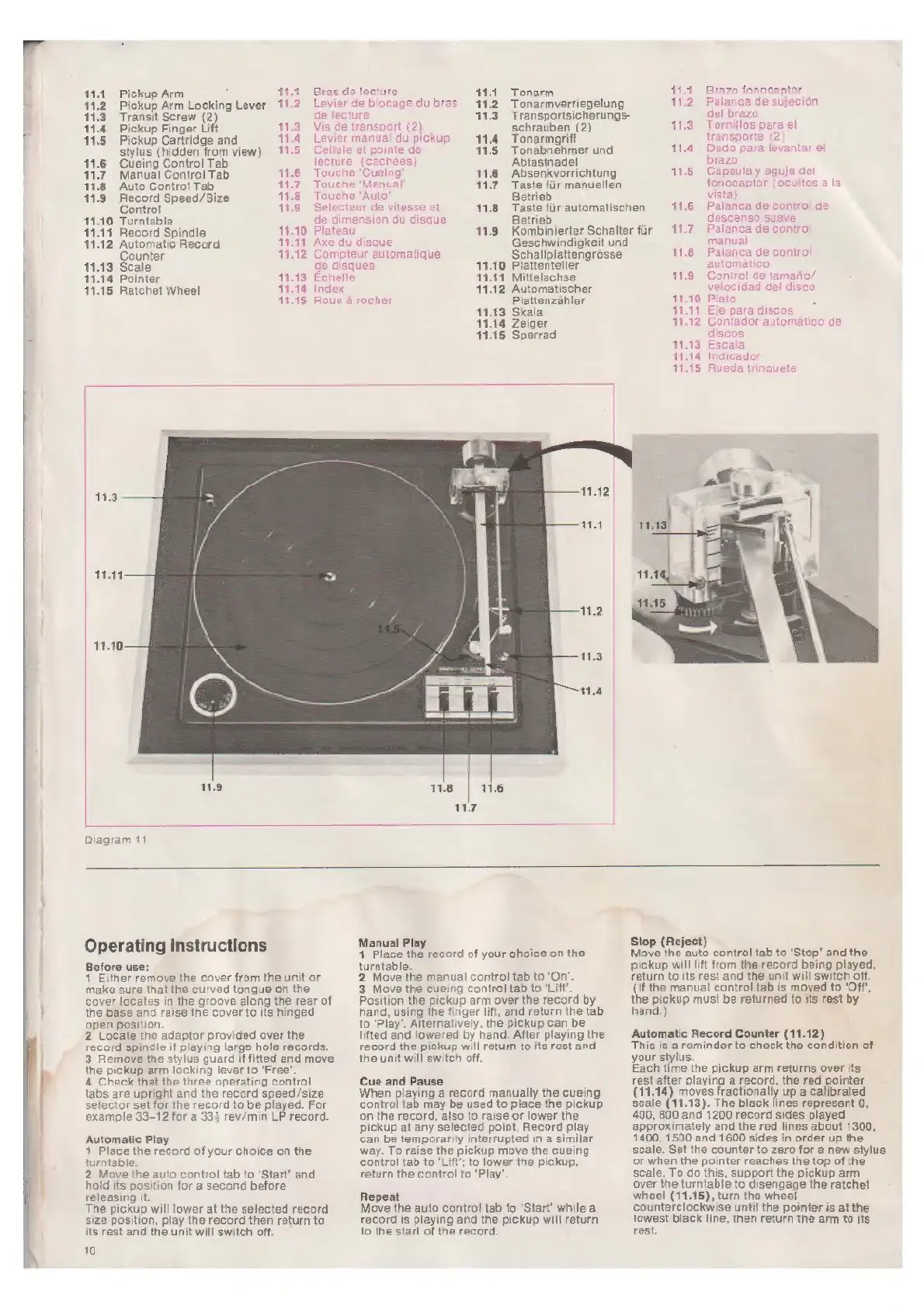
Diagram
11
11.11
Eje
para
discos
1132
Contador
automático
de
discos
11.13
Escala
11:14
Indicador
11:15
Rueda
trinquete
Operating
instructions
Before
use:
1
Either
remove
the
cover
from
the
unit
or
make
sure
that
the
curved
tongue
on
the
cover
locates
in
the
groove
along
the
rear
of
the
base
and
raise
the
cover
to
its
hinged
open
position.
2
Locate
the
adaptor
provided
over
the
record
spindle
if
playing
large
hole
records.
3
Remove
the
stylus
guard
if
fitted
and
move
the
pickup
arm
locking
lever
to
‘Free’.
4
Check
that
the
three
operating
control
tabs
are
upright
and
the
record
speed/size
selector
set
for
the
record
to
be
played.
For
example
33-12
for
a
33)
rev/min
LP
record.
Automatic
Play
1
Place
the
record
of
ycur
choice
on
the
turntable.
2
Move
the
auto
control
tab
to
‘Start’
and
hold
its
position
for
a
second
before
releasing
it.
The
pickup
will
lower
at
the
selected
record
size
position,
play
the
record
then
return
to
its
rest
and
the
unit
will
switch
off.
10
Manual
Play
1
1
Place
the
record
of
your
choice
on
the
turntable.
2
Move
the
manual
control
tab
to
‘On’.
3
Move
the
cueing
control
tab
to
‘Litt’.
Position
the
pickup
arm
over
the
record
by
hand,
using
the
finger
lift,
and
return
the
tab
10
‘Play’.
Alternatively,
the
pickup
can
be
lifted
and
lowered
by
hand.
After
playing
the
record
the
pickup
will
return
to
its
rest
and
the
unit
will
switch
off.
Cue
and
Pause
When
playing
&
record
manually
the
cueing
control
tab
may
be
used
to
place
the
pickup
on
the
record,
also
to
raise
or
lower
the
pickup
at
any
selected
point.
Record
play
can
be
temporarily
interrupted
in
a
similar
way.
To
raise
the
pickup
move
the
cueing
control
tab
to
‘Lift’;
to
lower
the
pickup,
return
the
control
to
‘Play’
Repeat
Move
the
auto
control
tab
to
‘Start’
while
a
record
is
playing
and
the
pickup
will
return
to
the
start
of
the
record.
Stop
(Reject)
Move
the
auto
control
tab
to
‘Stop’
and
the
pickup
will
lift
from
the
record
being
played,
return
to
its
rest
and
the
unit
will
switch
off.
(If
the
manual
control
tab
is
moved
to
'Off*,
the
258m
must
be
returned
to
its
rest
by
and.
Automatic
Record
Counter
(11.12)
This
is
a
reminder
to
check
the
condition
of
your
stylus.
Each
time
the
pickup
arm
returns
over
its
rest
after
playing
a
record,
the
red
pointer
(11.14)
moves
baten?
up
a
calibrated
Scale
(11.13).
The
black
lines
represent
0,
400,
800
and
1200
record
sides
played
approximately
and
the red
lines
about
1300,
1400,
1500
and
1600
sides
in
order
up
the
scale.
Set
the
counter
to
zero
for
a
new
stylus
or
when
the
pointer
reaches
the
top
ofthe
scale.
To
do
this,
support
the
pickup
arm
over
the
turntable
to
disengage
the
ratchet
wheel
(11.15),
turn
the
wheel
counterclockwise
until
the
pointer
is
at
the
lowest
black
line,
then
return
the
arm
to
its
rest.

Related product manuals