38
3. Slide in the grind container (the opening in the lid facing towards the appliance) directly
under the grind outlet until it snaps in place at the magnet in the rear of the appliance.
4. Press the START/CANCEL button to start the grinding process. You can use the automatic mode:
only shortly press the button and let the appliance operate until the calculated amount
is ground.
Alternatively control the grinding manually: hold the button pressed until the desired amount
is ground. The appliance will stop, as soon as you release the button.
5. After grinding is finished, remove the grind container. Close the grind container with the
cap.
WARNING: Do not leave the appliance unattended, while it is connected to the power sup-
ply. Always unplug the appliance, when it is not in use.
6. If you have finished your work, unplug the appliance.
Customising the Pre-Settings
You can adapt the appliance to your particular liking for always getting your preferred taste
of perfect coffee. For this, the appliance offers features for pre-setting. Just try and see whether
the results meet your individual taste. Even after disconnecting the appliance from the power
supply, the appliance will keep your pre-settings, until you modify the adjustments by turning
the dials GRIND SIZE and/or ADJUST AMOUNT.
Note: These settings will only be effective when using automatic mode.
Adjusting the Grind Amount
Via the ADJUST AMOUNT function, you can modify the preset amount to deliver more or less
grinds per cup or shot. Thus, you will get your coffee as strong as you prefer, independently
from the number of cups/shots you wish to prepare.
1. Correctly prepare the appliance for operation (see: ´Preparing the Appliance for Use`).
2. Turn the ADJUST AMOUNT button.
– Turn to the right to increase the amount per cup/shot.
– Turn to the left to decrease the amount per cup/shot.
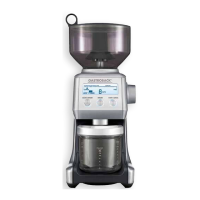
The current selection is displayed via the LESS / MORE scale at the lower left side of the
screen. Each bar on the scale depicts a deviation of 5% from the normal setting (0). You can
select up to 25 % LESS or MORE than normal setting.
Selecting the Grind Size
Various ways of brewing coffee require different grind sizes to give the best results. In the
uppermost line on the screen, the various types are indicated: PLUNGER (plunger coffee ma-
chines), FILTER (manual preparation and drip filter coffee machines), PERCOLATOR (coffee
machines), ESPRESSO (espresso machines). There is a fine grading within these ranges, which
is partly indicated on the scale COARSE to FINE. The current setting is given by the arrow on
the scale.
For information on the type of coffee maschine you use and the required settings, see the ope-
rating instructions of your coffee maschine.


 To Next Page