- 54 -
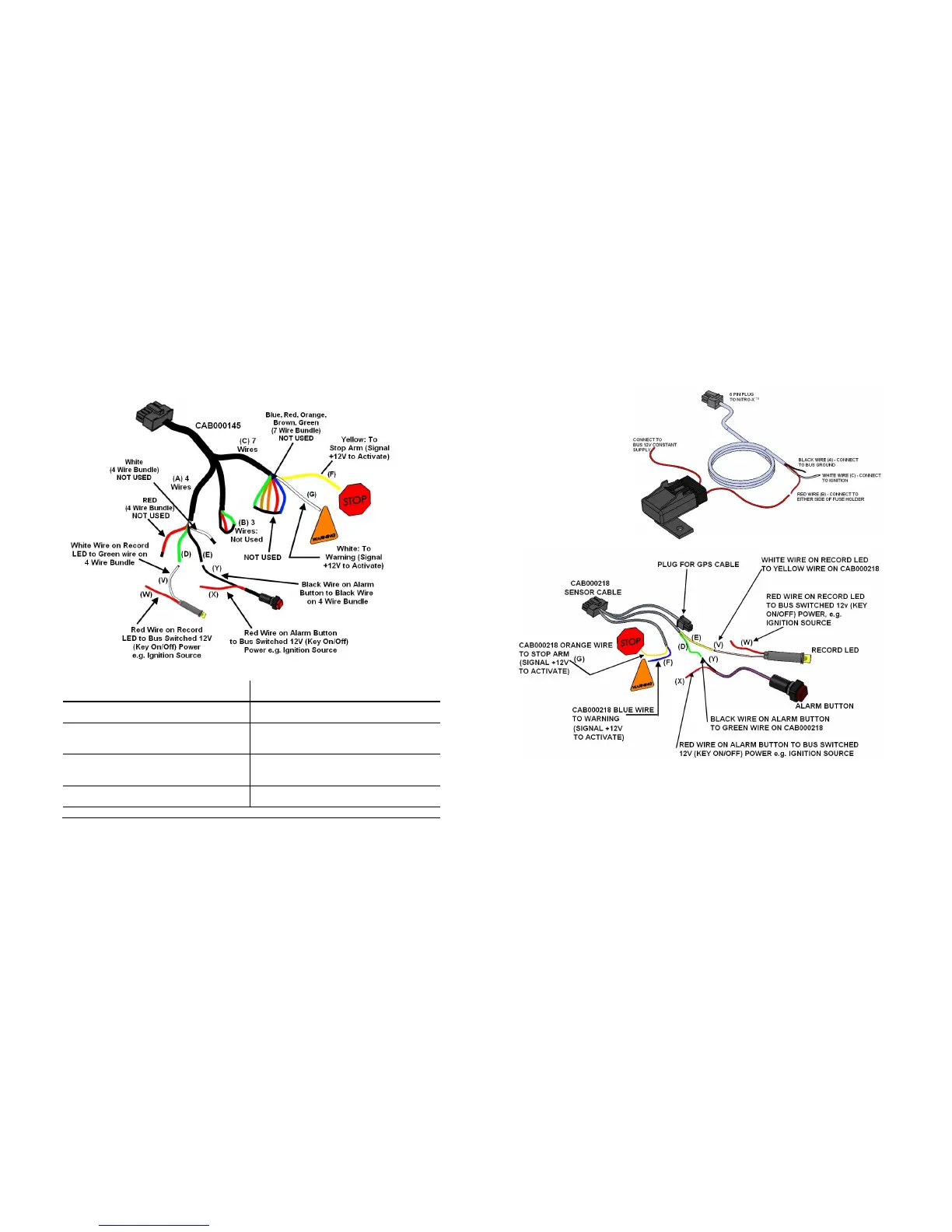
CAB000145: 7 Wire; 4 Wire and 3 Wire Terminations.
CAB000145: 7 Wire; 4 Wire and 3 Wire Terminations.CAB000145: 7 Wire; 4 Wire and 3 Wire Terminations.
CAB000145: 7 Wire; 4 Wire and 3 Wire Terminations.
Figure 41: CAB000145 Terminations.
A
AA
A
Alarm & LED Bundle (4 Wires; White &
Red. Not Used)
G
GG
G
White (7 Wire Bundle) to Warning
(Signal +12V to Activate).
B
BB
B
Speed Bundle (NOT USED) (3 Wires) V
VV
V
White Wire on Record LED Connect to
Green Wire (D) on 4 Wire Bundle.
C
CC
C
Trigger Bundle (7 Wires; Blue, Red,
Orange, Brown, Green. Not Used)
W
WW
W
Red Wire on Record LED to Bus
Switched 12V (Key On/Off) Power, e.g.
Ignition Source.
D
DD
D
Green (4 Wire Bundle) connect to White
(V) on Record LED.
X
XX
X
Red Wire on Alarm Button to Bus
Switched 12V (Key On/Off) Power, e.g.
Ignition Source.
E
EE
E
Black (4 Wire Bundle) connect to Black
(Y) Alarm Button.
Y
YY
Y
Black Wire on Alarm Button to Black
Wire (E) on 4 wire bundle.
F
FF
F
Yellow (7 Wire Bundle) to Stop Arm (Signal +12V to activate).
Table 10: CAB000145 Termination Definitions.
- 15 -
CAB00262 (6 PIN)
NiTRO-X DVR Power
Cable (30 feet long). See
Table 2 for Definitions and
Figure 2 for Connections.
Figure 2: CAB000218 Connections.
Recommended Location for Alarm Button
Recommended Location for Alarm ButtonRecommended Location for Alarm Button
Recommended Location for Alarm Button
The Alarm Button is generally mounted in a location that is within reach of the driver where
the drivers hand will naturally fall into place and its recommended location is towards the
front of the left switch panel.



 To Next Page