3.4 Menus In This Manual
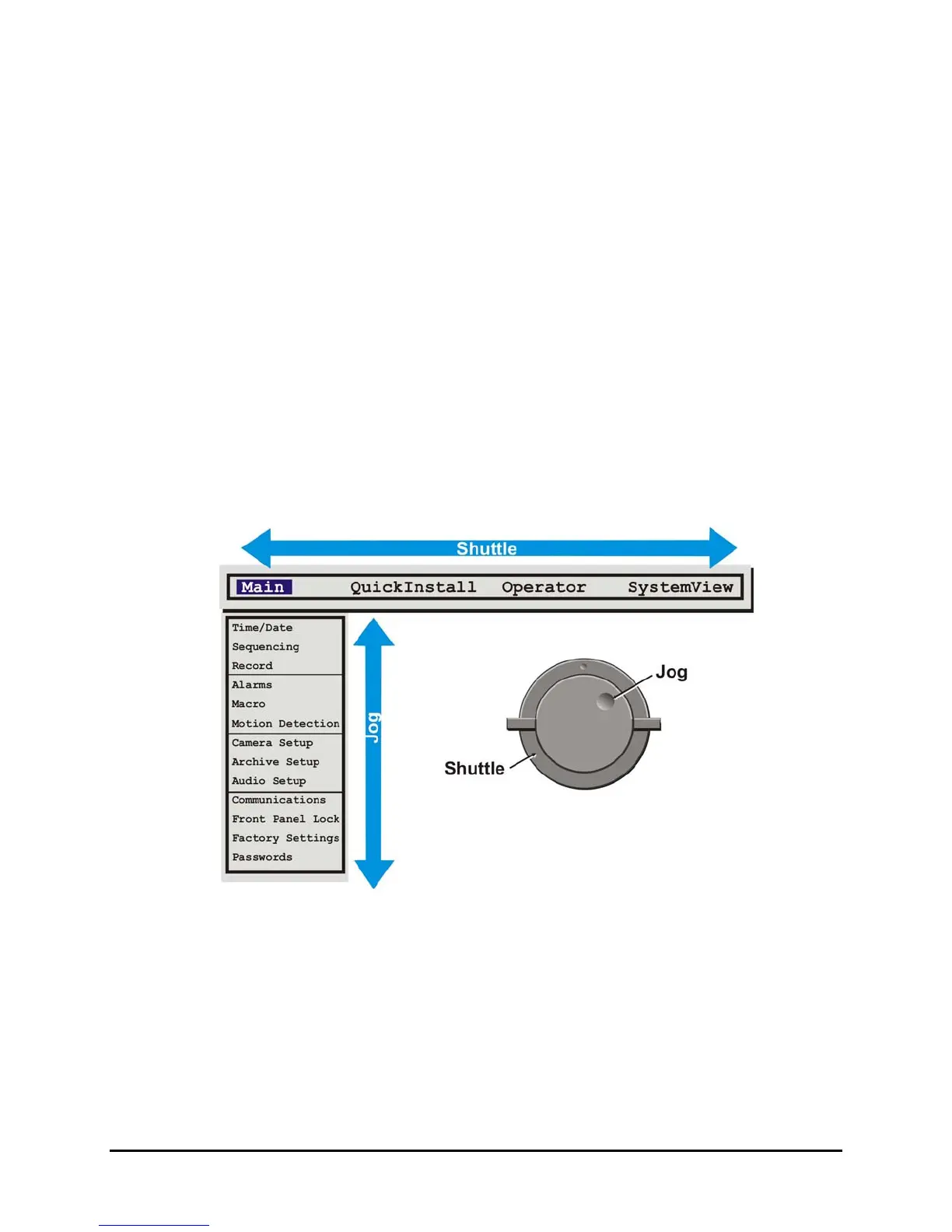
Each menu is covered in detail in this chapter of this manual. Menus and Menu Items appear in the
manual in the same order they appear on-screen.
• Main Menu
• QuickInstall Menu
• Operator menu
• SystemView Menus
3.5 Navigating The Menu System
Selecting a Menu from the Menu Bar: When the menu system is first accessed, only the menu bar
is displayed. Use the Shuttle to select the desired menu.
Opening the Drop Down Menus: Rotate the Jog.
Navigating in Menus: Rotate the Jog to highlight items in the drop-down menus.
Selecting Menu Items: Hit the ENTER button to select the highlighted menu item.
Exiting Menus: Press the Menu button to exit a menu. From the menu bar, press the Menu button
to exit the menu system completely.
3.6 Menu Shortcuts
Zoom Button: In menu lists that have 2 settings per camera, the Zoom button will toggle all
selections. This provides a quick and easy way to enable or disable all cameras
for a particular feature.
Camera Button: In menu lists that provide settings per camera, a particular camera may be
accessed directly by pressing on the associated camera button. Rotate the
Shuttle to modify the setting.
0150-0313B 29 DVMRe CT II


 To Next Page