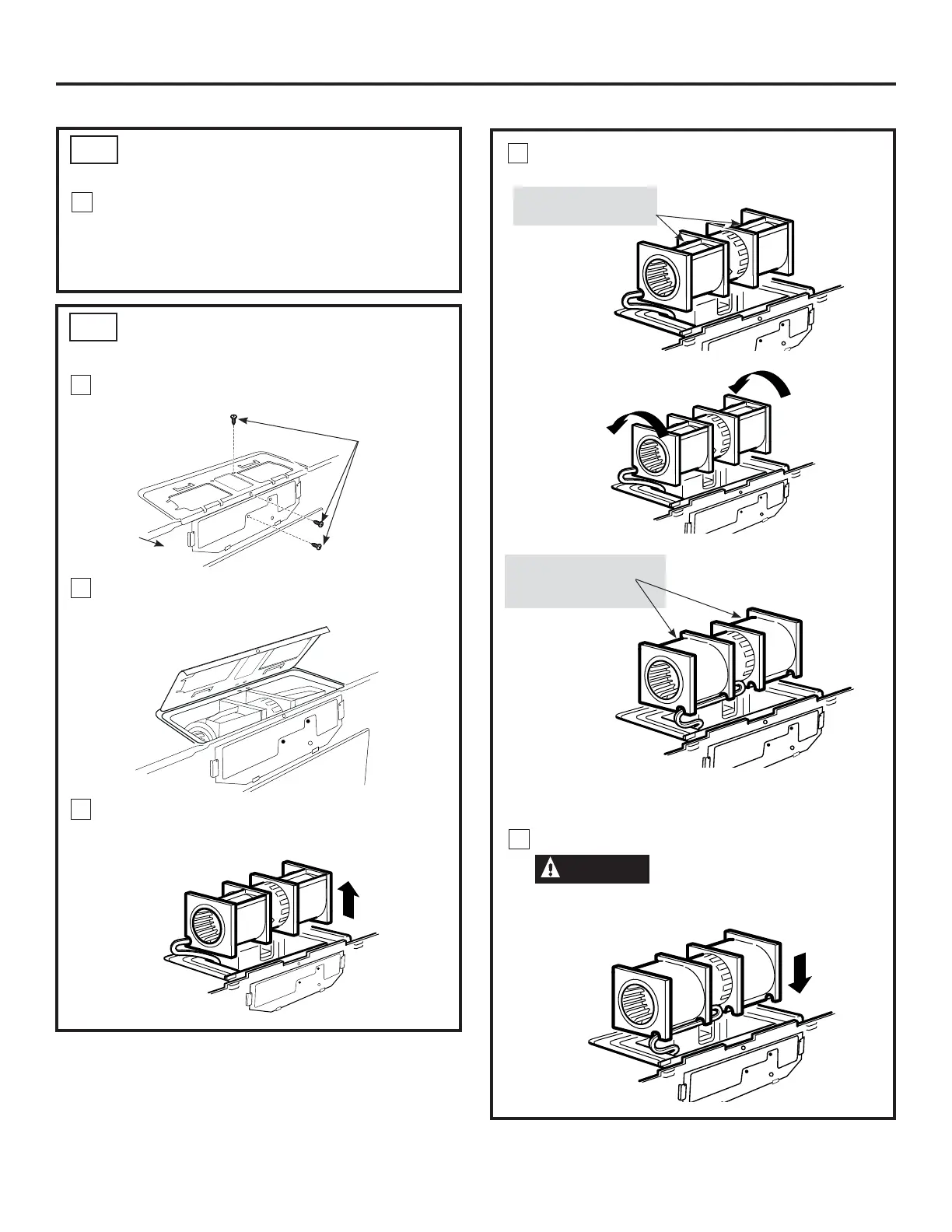
AFTER: Fan Blade
Openings Facing
Forward
4
21
Roll the blower unit 90° so that fan blade openings
are facing toward the front of the microwave.
Roll
NOTE: Make sure wires remain routed in the grooves of
the motor frame.
Installation Instructions
BEFORE: Fan Blade
Openings Facing Up
CHECK BLOWER MOTOR
ORIENTATION
ADAPTING MICROWAVE BLOWER
FOR RECIRCULATION
C3.
C4.
1
1
The blower fan blade opening should be facing
the front of the microwave. If the fan opening is
already facing the front of the microwave, skip to
Step C5. Otherwise, continue to Step C4 to adjust
the blower orientation.
Remove and save screws that holds blower motor
to microwave oven.
2
Open the blower door by lifting it up at the back of
the microwave oven.
3
Carefully pull out the blower unit. The wires
will extend far enough to allow you to adjust the
blower unit.
Back of
Microwave
Oven
Blower Motor
Retaining
Screws
5
Place the blower unit back into the opening.
CAUTION
Do not pull or stretch the blower
unit wiring. Make sure the wires are not pinched.


 To Next Page
 Loading...