GEK-113285A G650 Generator Protection & Control System 8-3
8 BOOTCODE AND FIRMWARE UPGRADE 8.1 INTRODUCTION
8
IP address: 192.168.37.XXX
Netmask: 255.255.255.0 and
Gateway: 192.168.37.10 (if desired).
XXX is a number between 0 and 255 that is not assigned to any other device to avoid collisions.
If there are not TCP/IP settings according to this pattern in the computer, it should be added (in order to communicate with
the relay) following these steps:
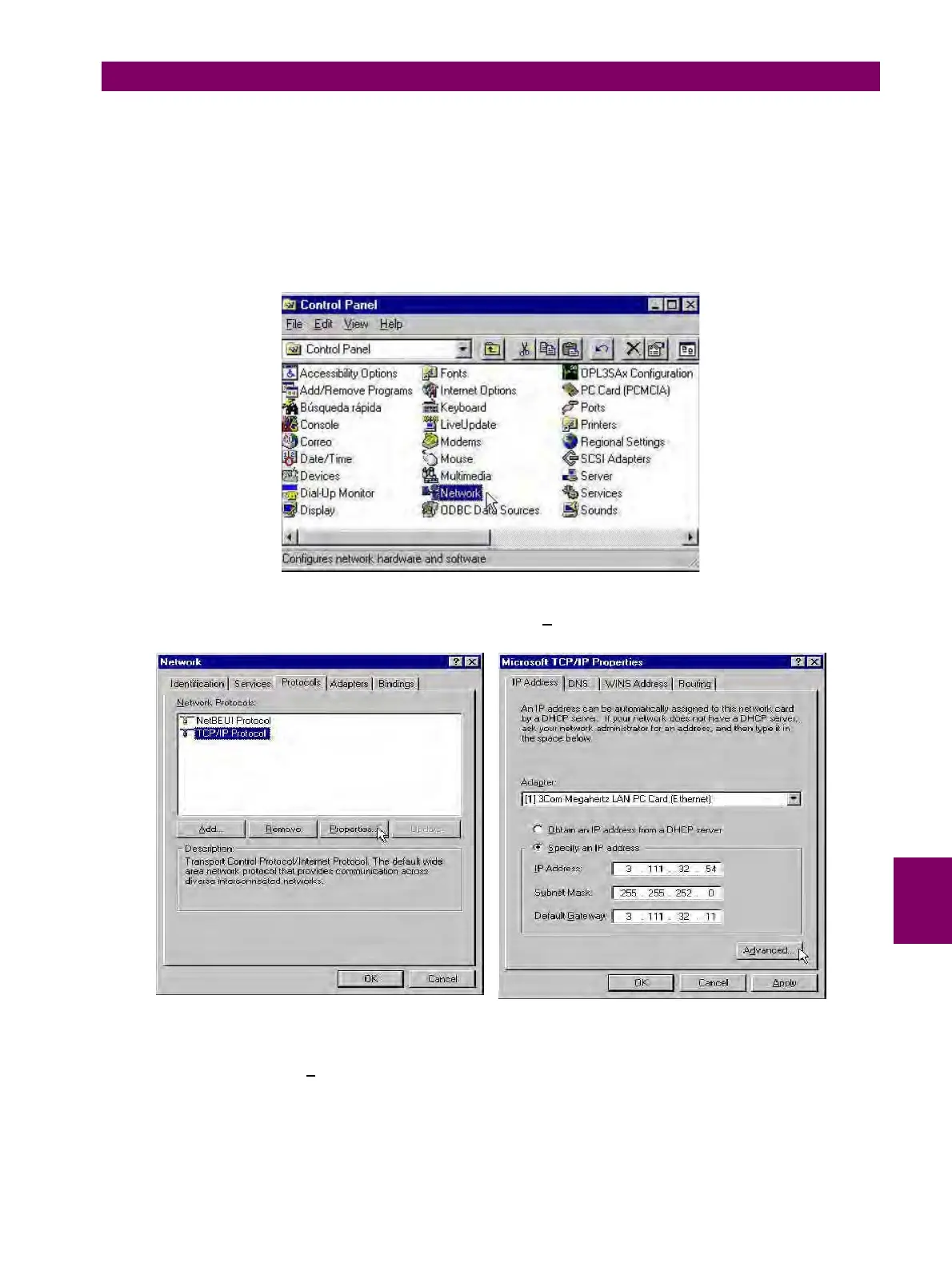
Go to the Control Panel of the computer and select the Network option (the name of this option may depend on the PC
boot code).
Figure 8–2: NETWORK IN CONTROL PANEL
In Network, enter in Protocols, select TCP/IP protocol and click on P
roperties.
Figure 8–3: TCP/IP PROPERTIES
In the IP address tab, select Ad
vanced... (see Figure 8–3:) and add a new address in the PC that corresponds to the
same LAN pattern that the relay has (in the example bellow 192.168.37.54).



 To Next Page