GE Security
g
View zone status
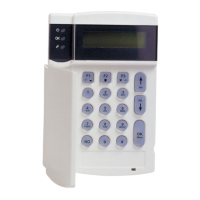
Step 1 Enter the [r] key followed by the [] key. The LCD Screen will display the zone status.
Step 2 Use the up and down scroll keys [][] to browse through the descriptions. The LCD Screen
will display the list of all zones in sequential order by zone number.
Step 3 Press [#] to exit this function.
Setting the keypad tone
Step 1 Press the [r] key followed by the [0] key.
Keypad is now in the “Adjust Tone” mode.
Step 2 Press the [] up scroll key located on the right
side of the display to make the keypad sounder
go to higher tones.
Step 3 Press the [] down scroll key to make the keypad sounder
adjust to lower tones.
Step 4 When the desired tone is reached, press the [#] key to set this tone and exit from the “Adjust
Raise tone
Lower tone
1 Alarm Memory
ZONE 1
Tone” mode.
View alarm memory
Step 1 Press the [r] followed by the [3] key to display the
zone(s) on the keypad that created the last alarm
.
Step 2 The LCD Screen will display the zone description
for those zones.
Step 3 Press [#] to exit the alarm memory.
Programming phone numbers (optional)
If private reporting (voice or siren tone) is enabled, up to 3 phone numbers can be programmed or changed. A
telephone number towards a central monitoring station cannot be changed or reviewed.
Step 1 Disarm the system if it is not already disarmed.
Step 2 Press the [r] key followed by :
[4] [1] to program/change telephone number 1
[4] [2] to program/change telephone number 2
[4] [3] to program/change telephone number 3
Step 3 The LCD display will prompt you for a code. Enter a master code. If the number cannot be
changed, the keypad sounder will produde 3 short beeps.
NX-148E User manual Page 16 04/10/04




 To Next Page