owners manual
ps1600
Page26
FUNCTION
+
FUNCTION
-
FUNCTION
+
FUNCTION
-
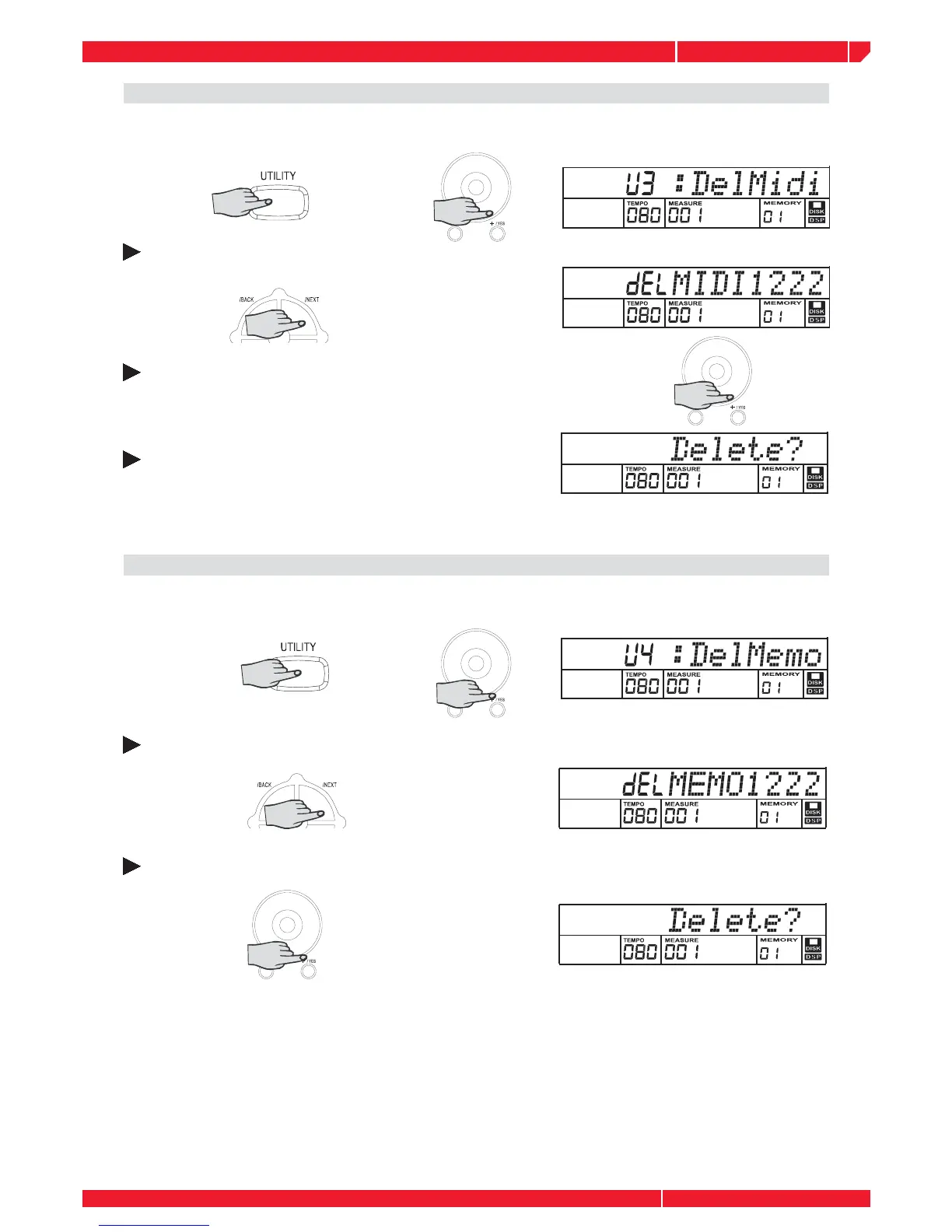
DELETE MIDI
Select the disk midi deletion function by pressing the UTILITY and [+] button or rotate the DIAL.
The message ”DelMid” will appear on the display.
Press the NEXT button and the disk song name (.midi) will display.
Press the [+] button or DIAL to select the song you want to delete.
Press the NEXT button and LCD will display the message:
”DELETE ?”.
If you are sure, press the [+] button and the message “WAIT....” Will appear on the LCD. If you do
not want to delete the song, press the [-] button . Return to the step #2 after the step above.
DELETE MEM
Select the disk memory deletion function by pressing the UTILITY and [+] button or rotate the
DIAL. The message ”Del Memo” will appear on the display.
Press the NEXT button and the disk memory name (.mem) will display.
Press the [+] button or rotate the DIAL to select the memory you want to delete. Press the
NEXT button and LCD will display the message:”DELETE ?”.
If you are sure, press the [+] button and the message “Wait....” appears on the LCD. If you
do not want to delete the song, you can press the [-] button .Return to step 2 after the step
above.



 To Next Page