Maintenance / Repairs ZA08
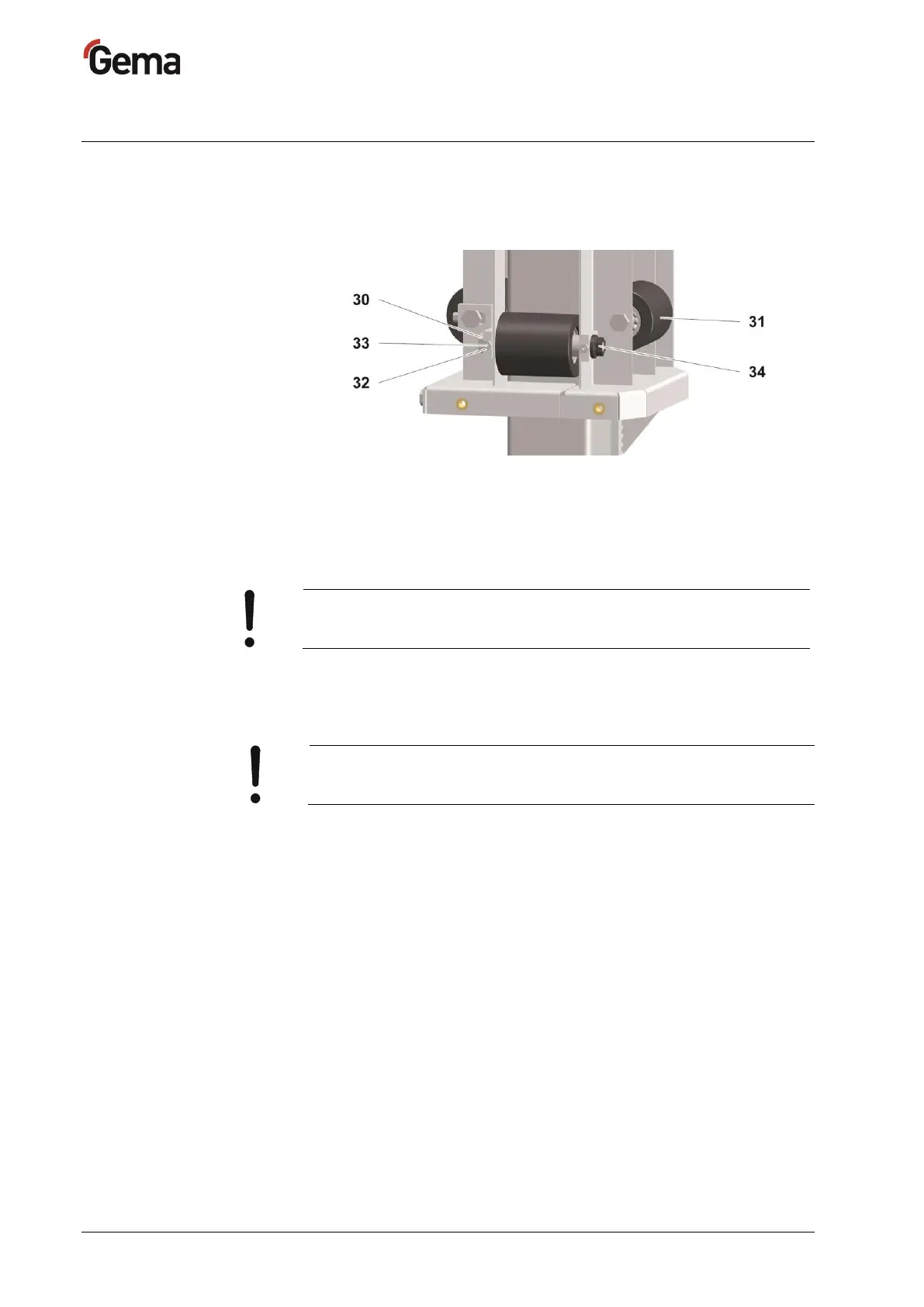
Rollers – Z carriage
If the Z carriage starts to vibrate excessively during operation, especially
at the reversing points, in most cases the cause lies in too much play in
the carriage rollers, or even loose rollers!
: Rollers – Z carriage
In this case, proceed as follows:
1. Switch off the electric power
2. Release the motor brake manually, let the Z carriage move down
onto the lower stop
Caution - Damage to components!
► Do not let the carriage fall without support.
3. Remove the boarding (front and side panels)
4. Loosen the lock nut (32) on the grub screw (33)
5. Loosen the nut (34) on the roller axle bolt (30)
Never loosen more than one roller at the same time!
► Adjust only one roller after another!
6. Adjust the roller pressure with the grub screw, in such a way that the
roller (31) can just be turned by hand
7. Tighten the roller axle bolt (30) and the nut (34)
Tightening torque: 50 Nm
8. Tighten the grub screw (33) and secure it
9. Fit the panels again and fasten them firmly
The Z carriage should run evenly and quietly again!


 To Next Page