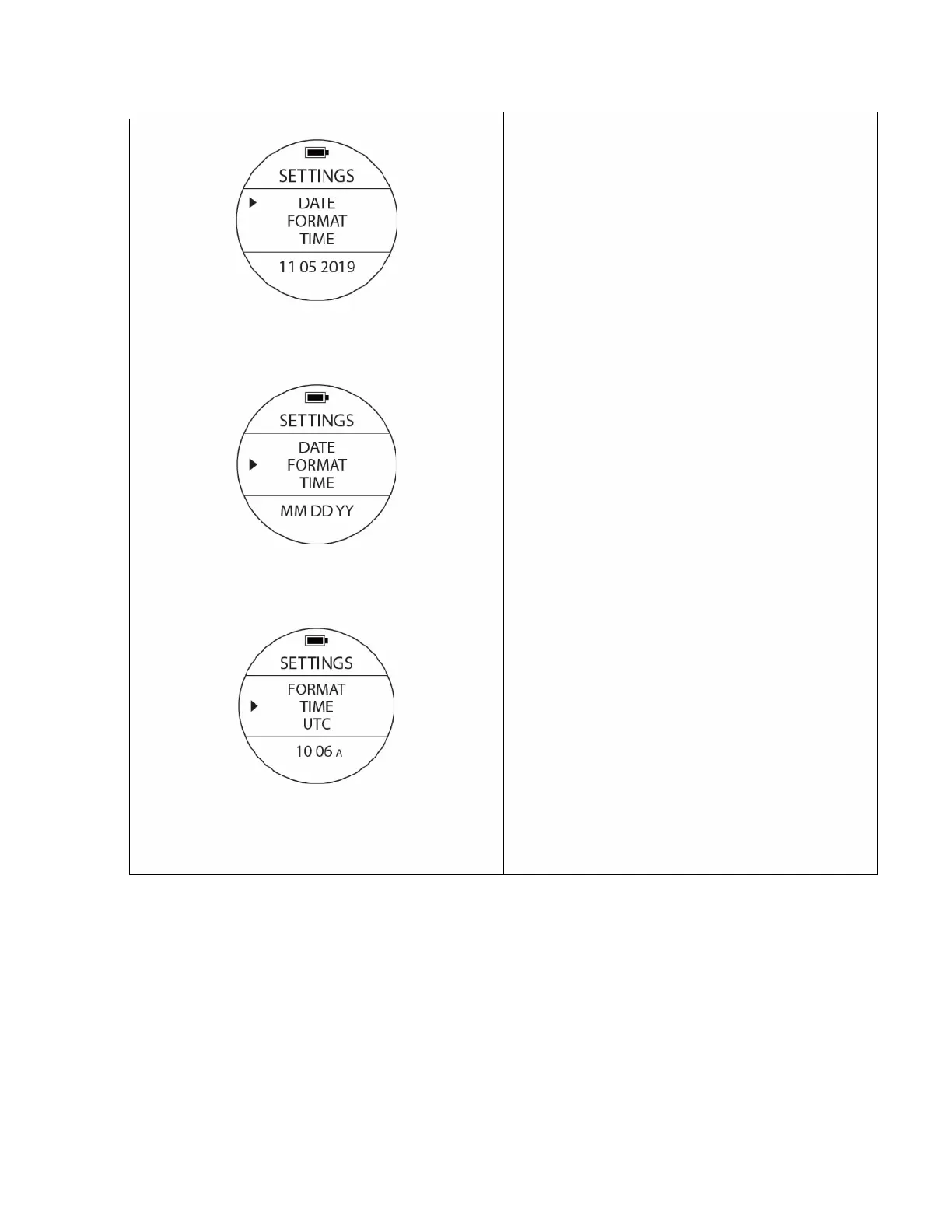
DATE, FORMAT & TIME settings to change the
date, time & the Year, Month & Day.
To access: From the time screen, press the UP
button once to go to SETTINGS. The cursor can be
moved w/ UP or DOWN buttons. Once the cursor is
located at the desired setting press the MODE
button once. The values at the bottom of the
screen will blink.
DATE: Changes the values of 3 groups of digits
corresponding to Month, Day and Year using the
UP or DOWN buttons the selection can be
accepted by using the MODE button.
FORMAT: Changes the order in which the Day,
Month and Year are displayed on the watch to
accommodate the region of the world you live in.
Use the UP or DOWN buttons to change the
format and accept the selection with the MODE
button
TIME: Changes the values for Hours and Minutes
so the correct time can be displayed by the watch
using the same procedure described above. Please
be aware that the watch will not self-adjust for
daylight savings time.
Once back in SETTINGS, change the position of the
cursor to move the next item that requires editing
and follow the same procedure to change values.



 To Next Page