13
12/24 HR Setting
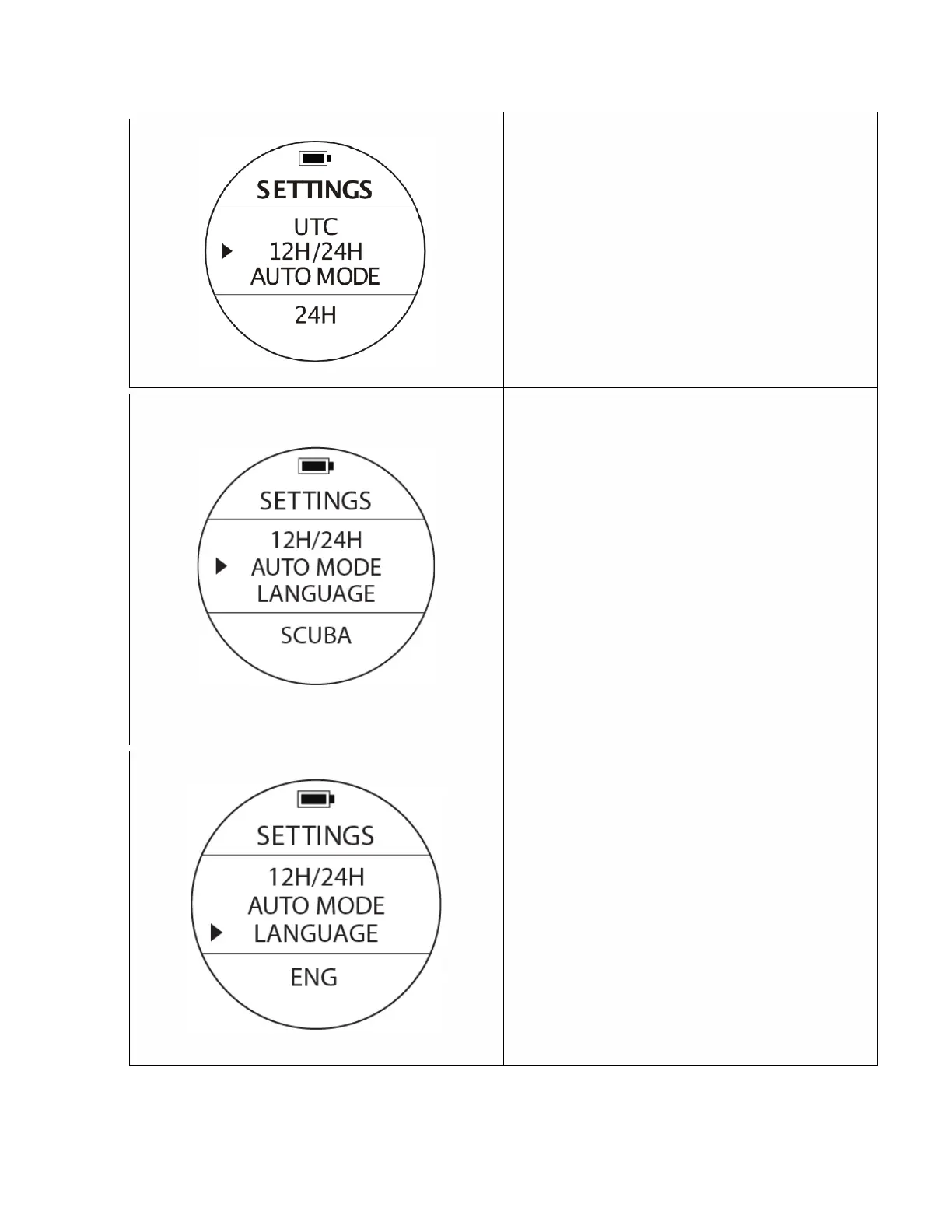
To access: From SETTINGS, use the UP or DOWN
buttons until the pointer aligns with 12H/24H.
Press the MODE button once.
The value at the bottom of the screen will start
blinking. Switch the option with the UP or DOWN
buttons & once the desired option appears, select
it by pressing the MODE button to accept the
value. The watch will be displaying the hour either
on the 12 hour or 24 hour format.
Auto Active Mode at depth | Scuba Diving, Free
Diving, or Gauge (bottom timer).
To Access
:
From SETTINGS, use the UP or DOWN
buttons until the pointer aligns with AUTO MODE.
Press the MODE button once. The option at the
bottom will be blinking and it can be changed with
the UP or DOWN buttons. Select the particular
option pressing the MODE button again.
The AUTO MODE will be the automatic default
option the watch will access immediately after it
senses a depth of 1.5m (4 ft.). The options are
SCUBA, FREE or GAUGE.
Language
To Access: From SETTINGS, use the UP or DOWN
buttons until the pointer aligns with LANGUAGE.
Press the MODE button once to access. Chose the
preferred language the computer will be displaying
and interacting with.
The default option is English, and once it is
blinking the different options can be changed with
the UP or DOWN buttons. Once the desired
selection appears at the bottom of the screen
select your option by pressing the MODE button
again.



 To Next Page