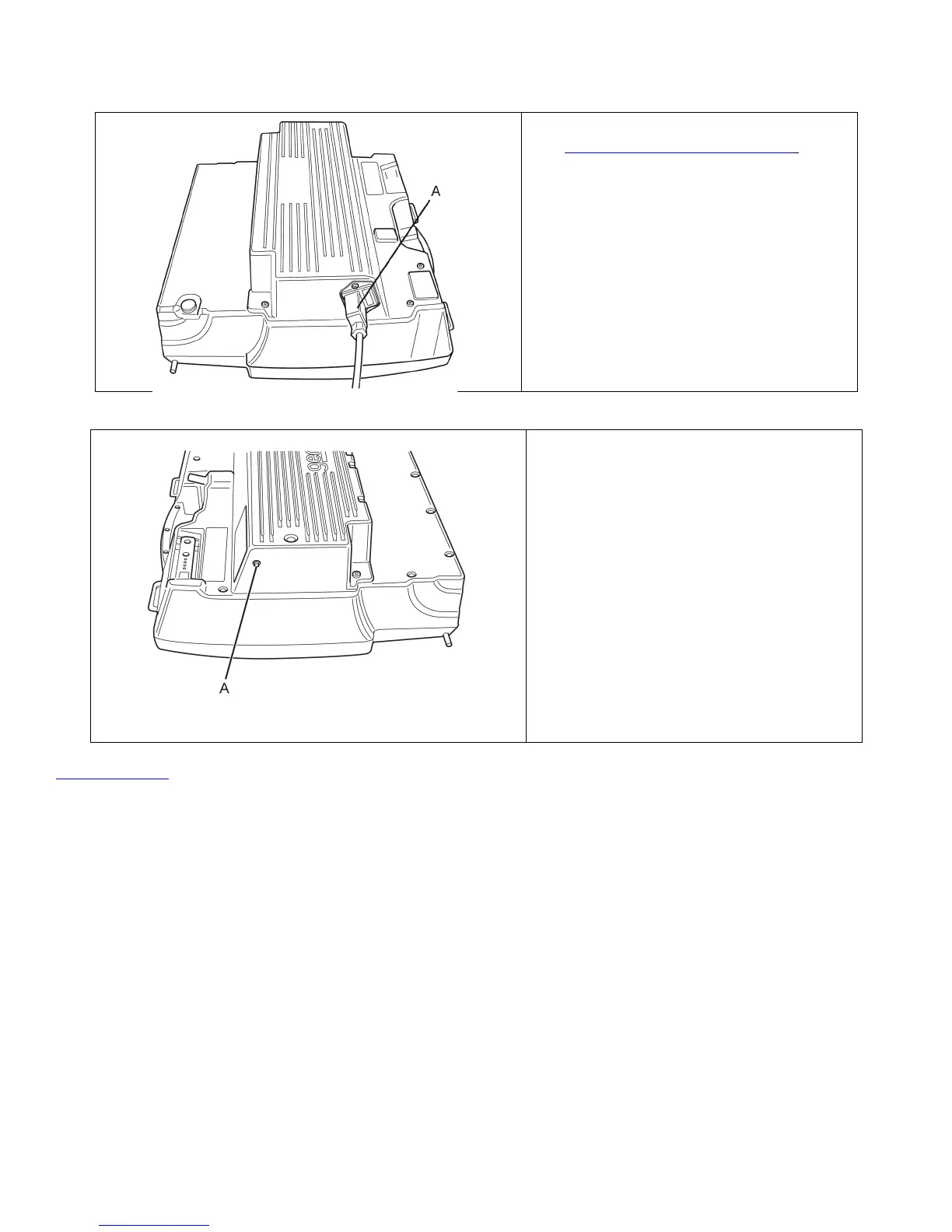
1. Remove the battery pack. See
“
Battery Pack Replacement.
”
2. Plug the supplied AC power cord
(A) into the charger connector.
Always keep the power cord with
the GenZe 2.0. Always connect the
charger to a GROUNDED outlet.
3. Remove and store the AC power
cord when the green LED (A) is no
longer blinking.
NOTE: After removing AC
connection, you may
immediately place the
battery pack in the GenZe
2.0. However, at least 30
seconds must be given before
the battery pack is ready for
use. Pressing the Start
Button before this time has
elapsed will not turn on the
GenZe 2.0.
Back to Top
!
Recycling Your Battery
Lithium-ion batteries should not be thrown away. Once the battery has reached the end of its useful life, customers need
to contact an authorized battery recycler to properly dispose of the battery in accordance with applicable federal and
state laws and ordinances. Customers can find a partial list of battery recycling companies at
http://www.allcelltech.com/resources/links.
!
Storage Areas
Ample storage areas make the GenZe 2.0 very versatile. Storage areas are located in front of the handlebar, and a
rear storage area is located behind and under the seat. Always secure your cargo prior to riding. To fully access the
rear storage area, the seat can be raised. To raise the seat, pull up on the seat and lever (A), and raise the rear of the


 To Next Page