want to get more distance, the Cruise-Connect™ offers 3 drive modes including a setting for those first learning
to ride. For further description and operation, see “
Cruise Connect™ Touch Screen Overview.
”
C. Front Brake
The brake lever is located at the right handlebar grip. To apply the front brake, smoothly pull the lever toward
the handlebar grip.
D. Throttle
For description and operation, see “
Handlebar Controls
”
E. Right Handlebar Control
For description and operation, see “
Handlebar Controls
”
F. Left Handlebar Control
For description and operation, see “
Handlebar Controls
”
Back to Top
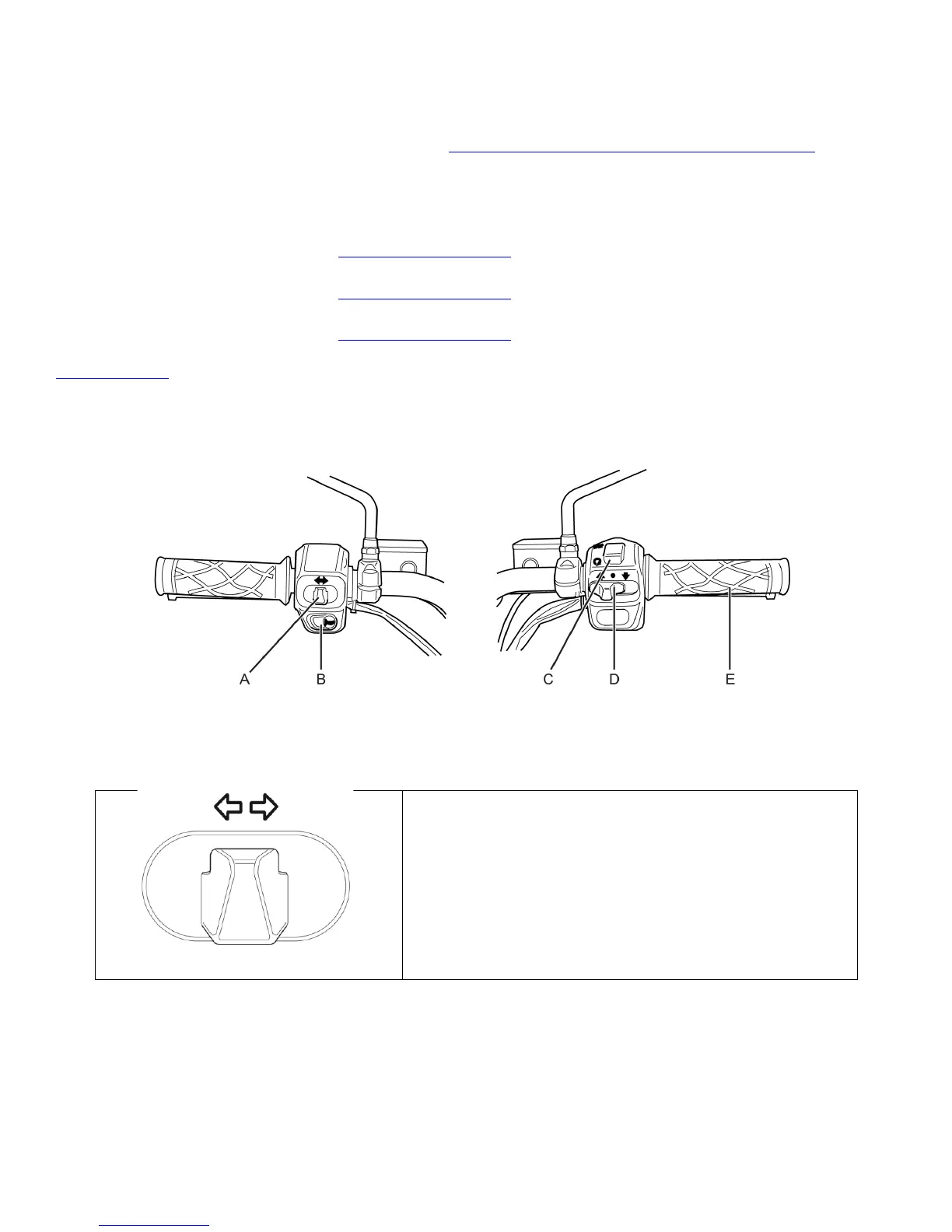
Handlebar Controls
A. Turn Signals
When the Turn Signal Switch is pushed to the left
or right position, the corresponding front and rear
turn signals flash. When the Turn Signal Switch is
ON, the corresponding turn signal indicator on the
touch screen illuminates. Always signal your turns
and other maneuvers as required by law. Unlike an
automobile, the turn signals must always be
canceled manually on the GenZe 2.0. Push in on the
switch and it returns to the center or OFF position.


 To Next Page