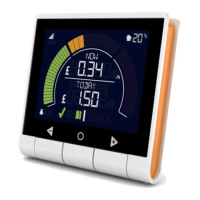
Your Trio Display
5
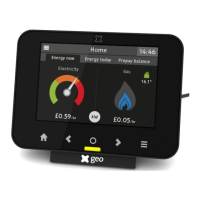
Energy display overview
Now
Electricity
being used now 30 minute average
Gas
0.26/hr £0.05 /hr
Today
Home
Prepay
14:37
(1) The screen on the Trio Display
is touch-sensitive - you only need
to lightly touch it to interact with
the screens.
(2) The banner bar allows you to check
the smart meter(s) signal strength,
battery status (if applicable) and
alerts you to any problems.
(3) Touch the t to show the
Quick
Access
menu, when on the Home
screen; or to return to the Home
screen when you are on any
other screen.
(4) Touch to change to
Now, Today and
Prepay tabs.
(5) Press k to return to the
previous screen.
(6) The LED at the bottom of the
Display shows your electricity usage
(GREEN for low, AMBER for medium
or RED for high).
(7) Press the i to show the
main menu.
(8) Touch here to switch units. (£ to kW
or kW to £)
1
3 75
6
4
2
8



 To Next Page