17
4. How to adjust the setting stroke or setting force
The Blind rivet nut gun may eitherbeoperatedusingarmlyadjustedsettingstrokeor by using
asettingforcethatisadjustedtotherespectivenutsize.
When is this necessary?
In all cases where the same blind rivet nut size and length are set into the same material thickness it is
possible to apply a constant setting stroke.
4.1 How to adjust the setting stroke
Toadjustthesettingstroke,followthe4
operational steps below:
1. Insert set screw 9 (image 2) all the way to
the buffer, using the supplied hexagon
screw driver
2. Press down completely thr green release
button 6
3.Adjustthesettingstrokeaccordingtoscale
5byturningthestrokeadjuster.(1lineof
the scale equals 1 mm of setting stroke)
4. Release the green release button. If release
button 6 does not lock of its own accord,
turnthestrokeadjustercarefullyuntil
strokeadjuster4islocked.
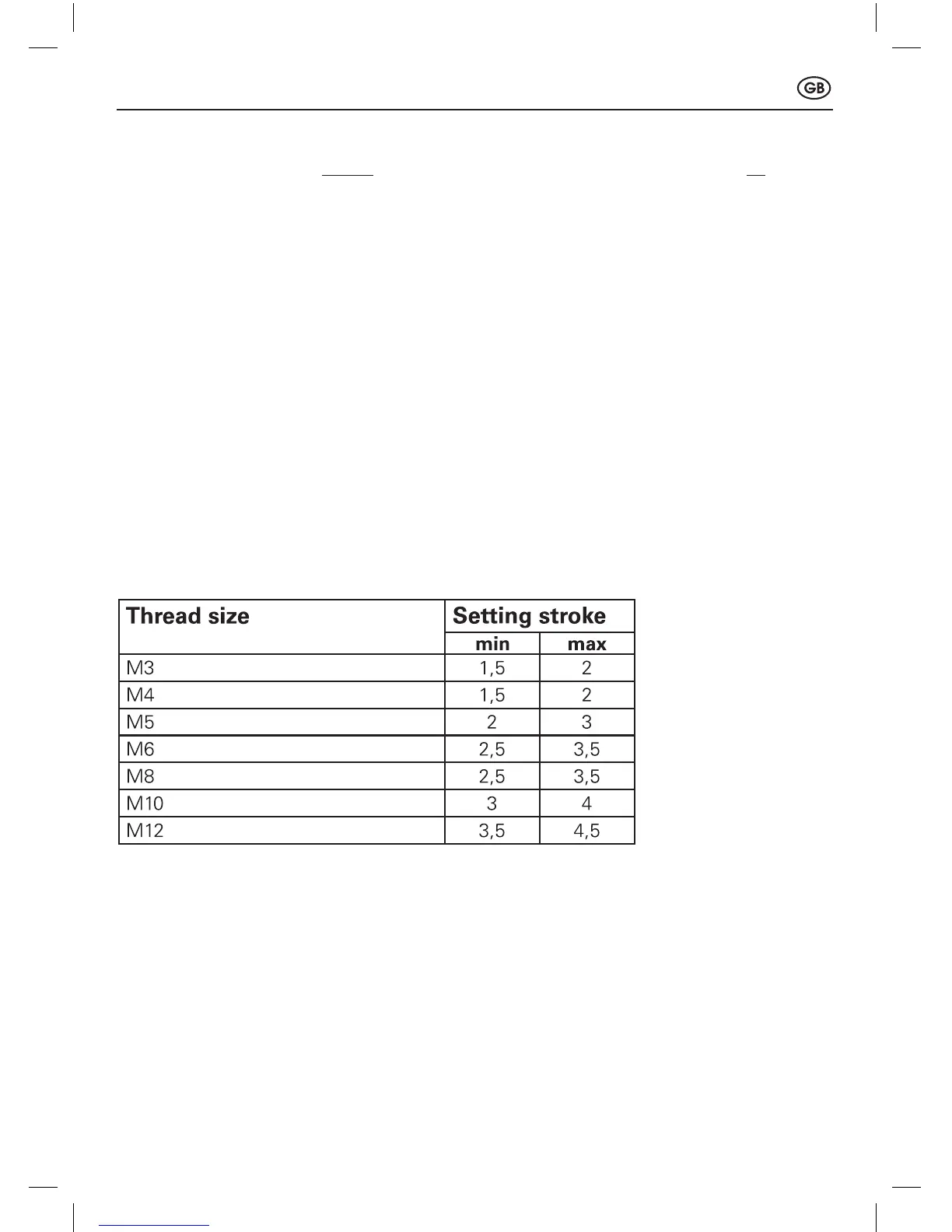
The values for the setting stroke shown on the table below merely constitute reference points and
depend greatly on the thickness of the material! The setting stroke to be set must be determined
by carrying out trials with the exact material thickness. Use a different nut for each trial!
Reference points for setting stroke
4.2 How to adjust the setting force
When is this necessary?
•Necessaryinallcaseswhereablindrivetnutsize(e.g.M6)issetintomaterialsofvarying
thicknesses
•Inallcaseswhereablindrivetnutsizeofvaryinglengths(e.g.M6x15.5orM6x18)is
setintomaterialsofvaryingthicknesses.
41303013_Gesipa_FireFox2_160413.indd 17 16.04.2013 13:39:32


 To Next Page
 Loading...