Input 2 Setup configures the external input 2 (yellow wire, see page 3) to a third party wideband AFR module, and also
allows you to choose whether the gauge shows AFR units or Lambda. Please note that different brands of wideband
modules output different analogue voltage ranges - some are configurable, others are fixed. The G-Force III has 3
different presets to suit the more popular wideband modules on the market.
Select your preferred units and the corresponding wideband module you are using from the following list:
Ÿ OFF - no action, disables the external wideband AFR module (menu item “Lean Cutout” will not be visible).
Ÿ AF1 - Innovate LC1/LC2 wideband module, displaying Air/Fuel Ratio (0V=7.3AFR, 4.5V=20.8AFR)
Ÿ AF2 - AEM X-Series inline and gauge wideband module, displaying Air/Fuel Ratio (0.5V=8.5AFR, 4.5V=18AFR)
Ÿ AF3 - AEM UEGO, PLX SM-AFR, APSX, 14point7, or other** module, displaying AFR (0V=10AFR, 4.5V=19AFR)
Ÿ λ1 - Innovate LC1/LC2 wideband module, displaying Lambda (0V=0.50λ, 4.5V=1.42λ)
Ÿ λ2 - AEM X-Series inline and gauge wideband module, displaying Lambda (0.5V=0.58λ, 4.5V=1.23λ)
Ÿ λ3 - AEM UEGO, PLX SM-AFR, APSX, 14point7, or other** module, displaying Lambda (0V=0.68λ, 4.5V=1.29λ)
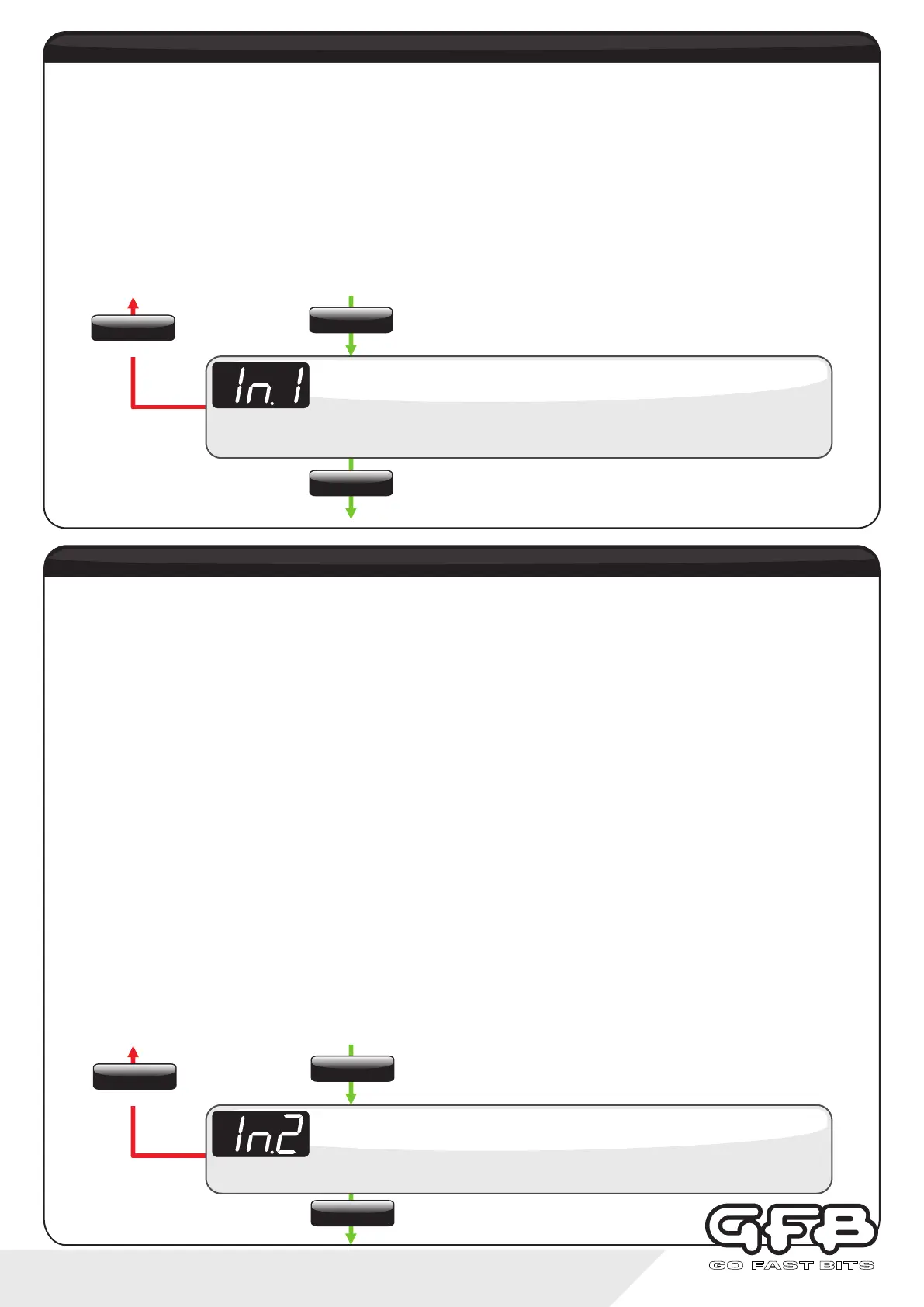
Ÿ From Running Mode, use the “SETTINGS” button to navigate to the Input 2 setting (displays “In.2”)
Ÿ Use the “UP/DOWN” buttons to select from “OFF” (default), AFr1, AFr2, Afr3, λ1, λ2 or λ3
Ÿ Tap “SETTINGS” to save and move to the next menu item, or hold “SETTINGS” to save and exit to Running Mode
NOTE: If you are running a Flex Fuel Sensor, we recommend using Lambda and not AFR.
** When running an unlisted wideband module with a configurable analogue output, use Af3 or λ3 and calibrate the
output voltage range to the following: 0V=0.68 lambda/10 AFR, and4.5V=1.29 lambda/19 AFR.
The G-Force III display will show 3 dashes (---) when the sensor is warming up or if the AFR is off the scale (i.e. during
deceleration when the injectors cut).
Displays “In.2”, followed by the current setting (default is “OFF”).
Input 2
Use the up/down buttons to select from OFF, AFR 1/2/3, or λ 1/2/3
To exit
input 2 setup - Wideband AFR
Input 1 Setup allows you to configure the purpose of the external input 1 (blue wire). For information on how to connect
external input 1 to a button or switch, see the wiring diagram on page 3.
There are three modes for this input:
Ÿ OFF - no action
Ÿ SCr - the scramble feature is activated when the external input is triggered
Ÿ PrE - scrolls sequentially through the boost pressure memories when triggered (in the same way as pressing the
“down” button in running mode)
Ÿ From Running Mode, use the “SETTINGS” button to navigate to the Input 1 setting (displays “In.1”)
Ÿ Use the “UP/DOWN” buttons to select from “OFF” (default), SCr, or PrE
Ÿ Tap “SETTINGS” to save and move to the next menu item, or hold “SETTINGS” to save and exit to Running Mode
Displays “In.1”, followed by the current setting (default is “OFF”).
Input 1
Use the up/down buttons to select from OFF, Scr, or PrE
To exit
input 1 setup - External Trigger
14 - controller functions
SETTINGS
Tap
SETTINGS
Hold
SETTINGS
Tap
SETTINGS
Tap
SETTINGS
Hold
SETTINGS
Tap


 To Next Page