boost gauge calibration
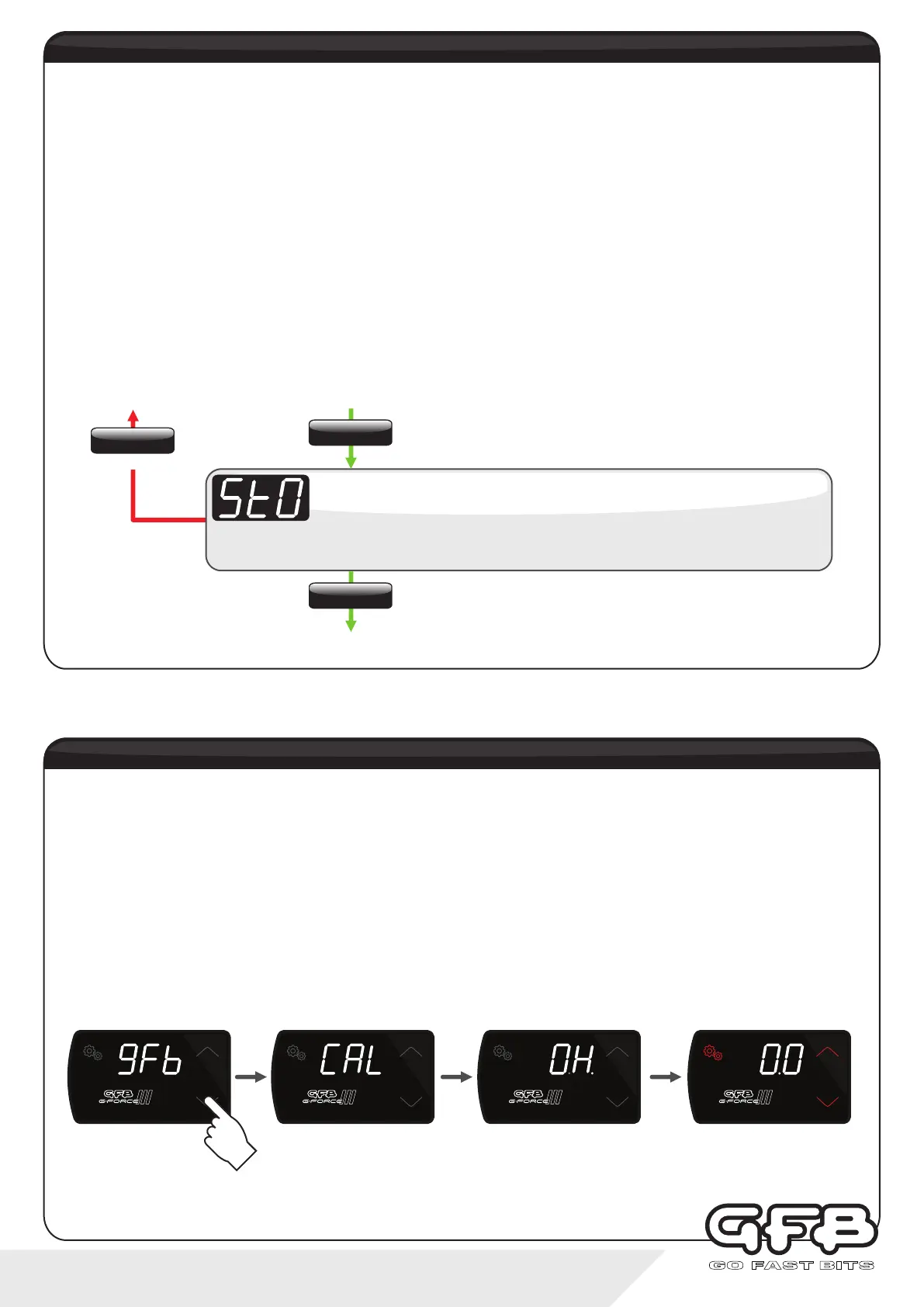
Boost Gauge Calibration is a feature that is not accessed via the menu. It is only to be used if the boost gauge display
does not read zero with the engine off. If your gauge is not reading zero with the engine off, you will most likely not be
able to access the menu and the buttons may appear “dead” and non functional
To re-zero the boost gauge:
Ÿ Turn the ignition off
Ÿ Turn the ignition on, but DO NOT START THE ENGINE
Ÿ When the display starts to show “gFb”, press and hold the down button
Ÿ When the display shows “CAL”, you can release the down button
Ÿ The display will now show “OH.” (i.e. “OK”) to indicate a successful calibration
Ÿ The G-Force III is now functional and the gauge will read zero
Stoichiometric Ratio setting requires you to configure the G-Force III to the specific fuel you are using. By default, we
have configured this setting to 14.7:1 for regular gasoline. If you do not make the correct changes to the stoichiometric
ratio for the fuel type you are running, the display gauge will be inaccurate.
Here is a basic list of stoichiometric ratios of commonly used fuels:
Unleaded Gasoline:
Diesel:
Compressed Natural Gas:
Liquid Propane (LPG):
85% Ethanol (E85):
100% Ethanol (ETOH):
Methanol (MEOH):
NOTE: The Stoichiometric Ratio setting will only be shown in the menu if you have selected Af1, Af2, or Af3 in the Input 2
setup of the previous step.
Displays “StO”, followed by the current setting (default is “14.7”).
Stoichiometric Ratio
Use the up/down buttons to adjust between 6.0:1 and 18.0:1
To exit
stoichiometric ratio
15 - controller functions
SETTINGS
Tap
SETTINGS
Hold
SETTINGS
Tap
SETTINGS
PR ESE T
SCRAMBLE
SETTINGS
PR ESE T
SCRAMBLE
SETTINGS
PR ESE T
SCRAMBLE
SETTINGS
PR ESE T
SCRAMBLE
14.7:1
14.6:1
17.2:1
15.6:1
9.8:1
9.0:1
6.5:1


 To Next Page