7 - MENU navigation
The G-Force III has 6 boost presets (P1-6), each of which can be individually programmed and accessed quickly on-
the-fly using either the “PRESET” button on the G-Force III, or remotely by using the “Input 1" wire connected to a push
button switch.
There is an additional preset called “SCr”, which is the preset that is activated when the scramble feature is used. See
page 11 for more info on the scramble boost feature. “SCr” can be set up and used just like any other preset, so
effectively there are actually 7 presets in total.
Whilst 7 presets may be more than most people will use, there are a number of ways they can be utilized to further fine-
tune your boost to suit whatever it is you plan to do with your car, whether it be for street, drag, circuit, or drift. See the
suggestions listed on page 17 for ideas on different ways the boost presets (and other features) can be used.
Each boost preset consists of 3 adjustments that can be used to tailor the boost characteristics:
· Duty cycle - controls peak boost pressure
· Gain - controls how fast the boost rises
· Sensitivity - controls the strength of the closed-loop correction – i.e. how strongly the controller attempts to
correct boost pressure changes and taper
Note that it is not necessary to set or use Gain and Sensitivity to set the boost pressure - for simplicity, boost can be
controlled only by Duty Cycle if so desired. Usually, a well-matched turbo/wastegate/engine will respond very well with
only Duty Cycle adjustments, however these features are helpful when your goal is to extract the most out of your turbo
system.
For best results, these three adjustments should be made in the order listed above, as each correction builds on the
previous one.
To select boost presets:
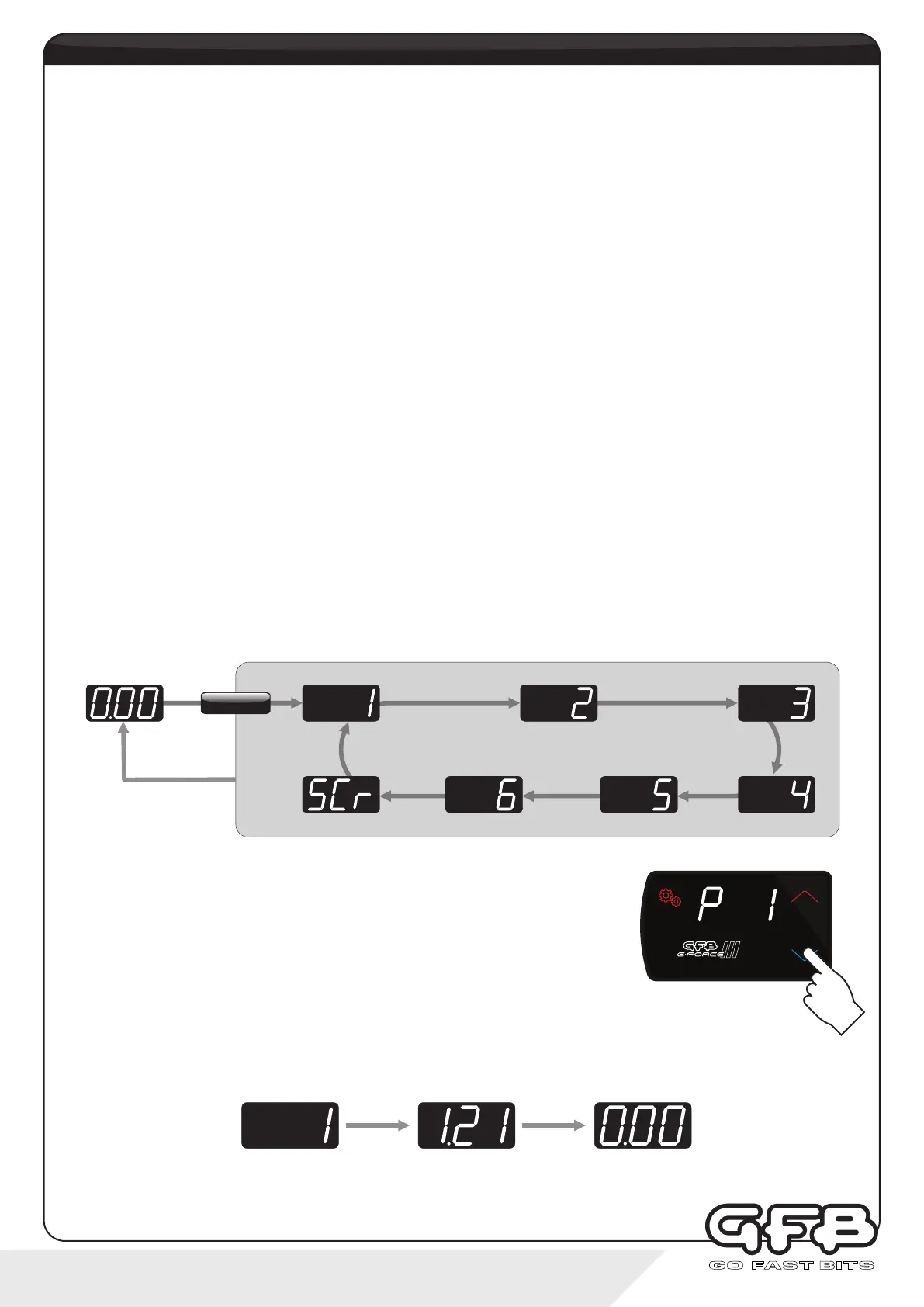
From Running Mode, tap the PRESET button (or the remote input 1 if installed and configured, see page 3 and 14 for
details) to sequentially scroll through the boost presets from 1-SCr, as shown below:
Whenever the PRESET button or remote trigger is used to change the preset, the
PRESET button momentarily changes colour as an additional visual indication that a
preset change has occurred. The colour that the button changes to can be set in the
COL (Colour) menu (see page 16).
Whenever the manifold is in vacuum and a new boost preset is selected, the display will show the boost preset number,
followed by the target boost pressure associated with that preset before returning to Running Mode after a few seconds:
If the manifold is in boost, the display stays as a boost gauge, but the PRESET button still changes colour to indicate a
preset change.
Running Mode
Peak boost
Running modeBoost preset
E.g.
boost presets
Tap
PRESET
SETTINGS
PR ESET
SCRAMBLE


 To Next Page