Stores the modified parameters of the SETUP menu.
(Default) Does not store the modified parameters.
ATTENTION !
All the parameters modified in the SETUP menu are immediately operating but, in case
of power-off of the balance, they will go lost. To store permanently all modifications
select the function STORE on submenu SET DEF.
6.3 “CALIBRATION” FUNCTION
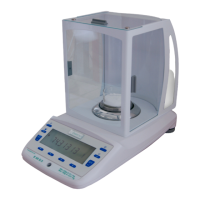
The function CALIBRATION is the last option in the main menu of the configuration mode
and is used to calibrate the balance.
To make a calibration a class F1 certified mass of 1000g (or multiples) is necessary.
Operate as follow:
▪ When the display shows “CALIBRATION”, press the ON-OFF key to confirm.
▪ The display will show “LOAD”: put on the pan the calibration mass.
▪ When the display shows “UNLOAD”, remove the mass from the pan.
▪ Once the calibration process is completed, the display will show for some seconds
“CALIBRATED” and then “0.0”. The balance is calibrated.
If, for some reason, the calibration failed, the display will show “CAL ERROR”. In this
case, the previous calibration value will be maintained.
ATTENTION !
▪ Calibrate periodically the balance, especially when the balance is used intensively
▪ The balance must be calibrated whit the pan absolutely unloaded.
▪ To obtain a precise calibration, the balance must be powered-on minimum 15
minutes earlier, and must be thermally stabilised at any rate.
▪ Use only class F1 masses, best if certified.
- NOTE -
The function CALIBRATION is enabled as default but, if necessary, it is possible to
disable it with the option CALIBR of the SETUP menu (see Section 6.2).



 To Next Page