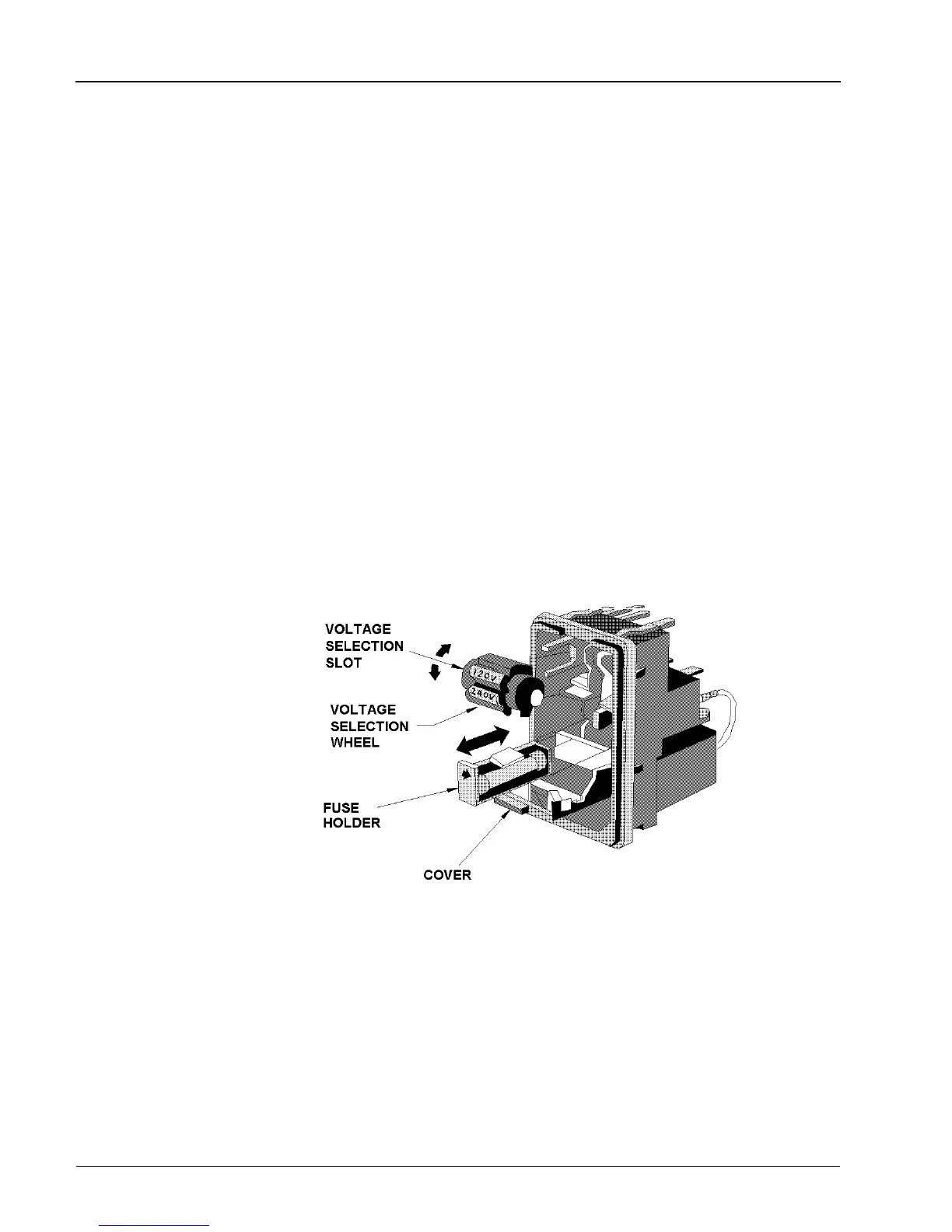
2.2.2 VDE Type Voltage and Fuse Holder
The VDE-approved voltage selector and fuse holder are contained in a covered housing directly above the
ac power connecter.
The line voltages and fuse ratings are:
Line Voltage Fuse Rating
100/120 Vac, ±10%, 50, 60 or 400 Hz ±5% 1.0 AMP Slo-Blo
220/240 Vac, ±10%, 50, 60 or 400 Hz ±5% 2.0 AMP Slo-Blo
To gain access to the voltage selector and fuse, open the cover with a small screwdriver or similar tool
and proceed as follows:
To change the voltage setting:
Use the same tool to remove the voltage selector (a small barrel-shaped component marked with voltage
settings). Rotate the selector so that the desired voltage faces outward and place the selector back in its
slot. Close the housing cover; the appropriate voltage should be visible through the window (see
Figure 2-3).
To replace the fuse:
With the housing cover open, pull out the small drawer on the right side of the housing (marked with an
arrow) and remove the old fuse. Replace with a new fuse, insert the drawer and close the housing cover
(see Figure 2-3).
Figure 2-3. VDE Voltage Selector and Fuse Holder
Series 8500A Peak Power Meters
2-4
Manual No. 20790, Rev C, November 1998



 To Next Page