2.15 Self-Testing the 8500A
Prior to performing a self-test during a testing routine (at some point after the instrument has been turned
on), the detector must either be connected to the Calibrator Output on the front panel, to a 50-ohm
termination, or to a signal source which has the RF power turned OFF.
The Self-Testing feature of the PPM is provided as a quick health check of the instrument. The PPM
performs a Self Test each time it is powered on. To initiate the Self-Test function at other times:
First remove all RF power from the detector. Then press [MENU] (11) [F2]. While the Self-Test is in
progress, the following will be displayed:
Performing Self-Test
CLOCK/CALENDER INDICATES
(day) (date) (time) (year)
System version # = n.nn
At the successful completion of the Self-Test, the PPM will display Self Test Completed: Passed. A beep
will then sound, and the PPM will return to its previous display mode.
If some type of failure is detected by the PPM’s microprocessor during the Self-Test, the display will
indicate:
SELF TEST FAILED! - PRESS CLEAR
ERROR NUMBER(S): 11, 8, etc.
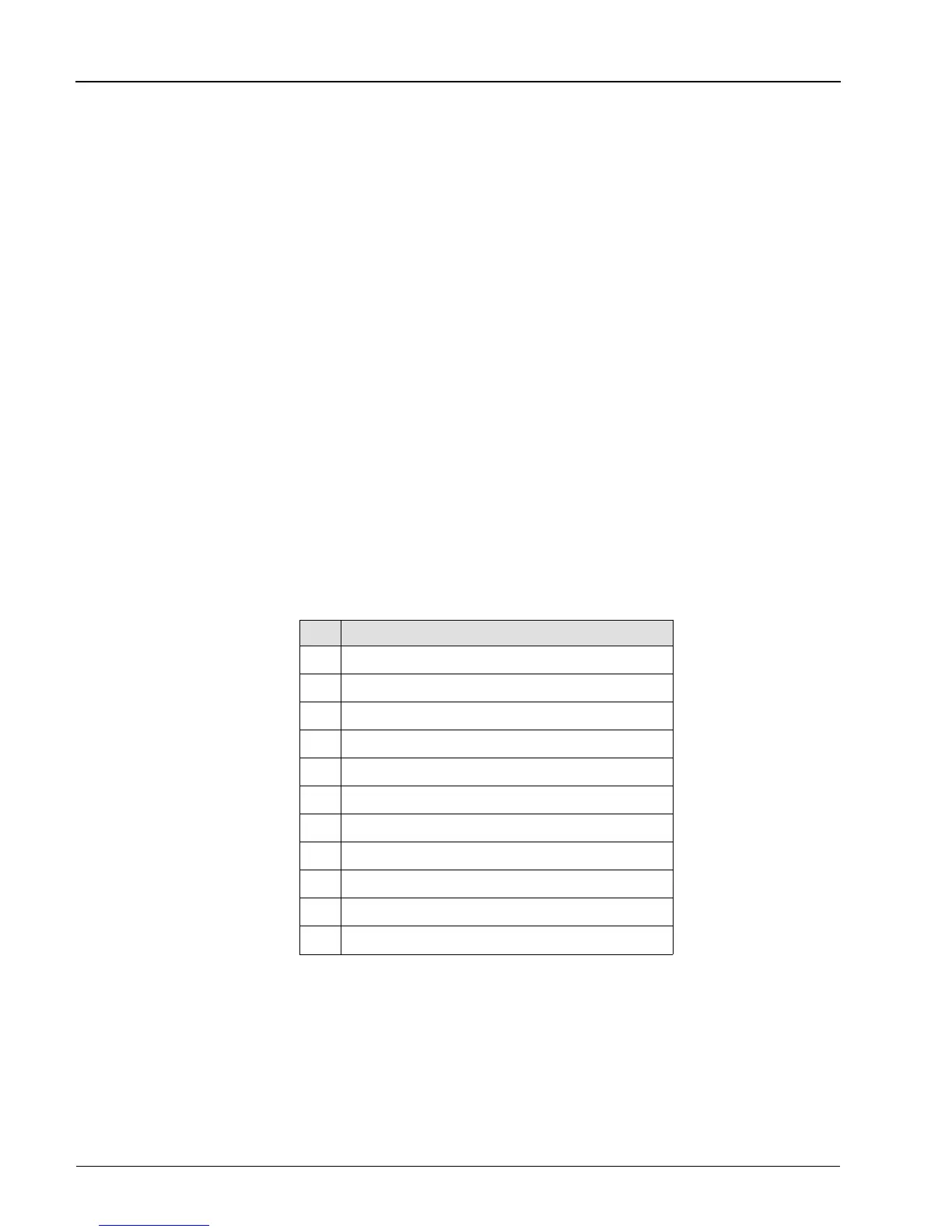
Table 2-1 gives a listing of the error numbers and their associated meanings.
Error Cause
01 -5.2 V Supply
02 Memory Bad
03 Excessive A Channel Offset
04 A Channel Gain Error
05 Excessive B Channel Offset
06 B Channel Gain Error
07 A Channel Analog Output DAC
08 B Channel Analog Output DAC
09 Delay 8555s (ICs)
10 Delay Time Error
11 Calibrator Bridge Voltage Error
Press [CLEAR] to bring back the display of the last setup before Self-Test. However a failed Self-Test
indicates a problem of some kind, and it is recommended that the PPM not be used for measuring until it
is checked according to the procedures given in the Troubleshooting instructions in Chapter 6.
Table 2-1. Self-Test Error Flags
Series 8500A Peak Power Meters
2-44
Manual No. 20790, Rev C, November 1998


 To Next Page