22
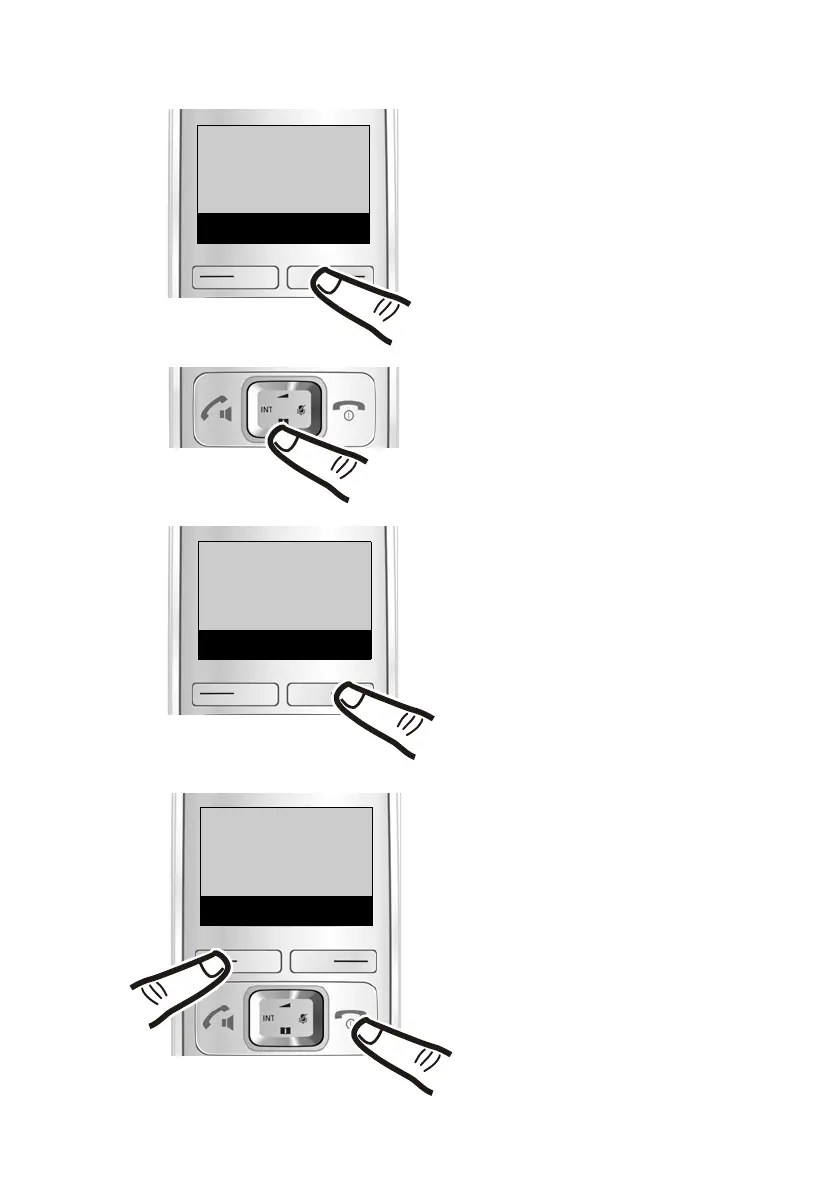
Understanding the operating steps
Gigaset E310/E310A (Panther) / MEA EN / A31008-M2301-A601-1-UZ19 / explanation.fm / 02.05.2012
Version 5, 03.04.2011
Auto
Answer
Back
V
OK
‰
Auto
Answer
Back
V
OK
´
Auto Answer:
... the menu entry Auto Answer
appears on the screen.
Telephony:
... the menu entry Telephony
appears on the screen.
¤ q:
Press up or down on the control
key until ...
¤
§OK :
Press the key below
§OK on the
display screen to open the sub-
menu.
¤
§OK :
Press the key below
§OK on the
display screen to switch the
function on or off (‰ =on).
The change is effective immedi-
ately and does not need to be
confirmed.
Press the key below
§Back§ on the
display screen to jump back to
the previous menu level
or
Press and hold the end call key
a to return to idle status.
Telephony
Back
U
OK



 To Next Page