1
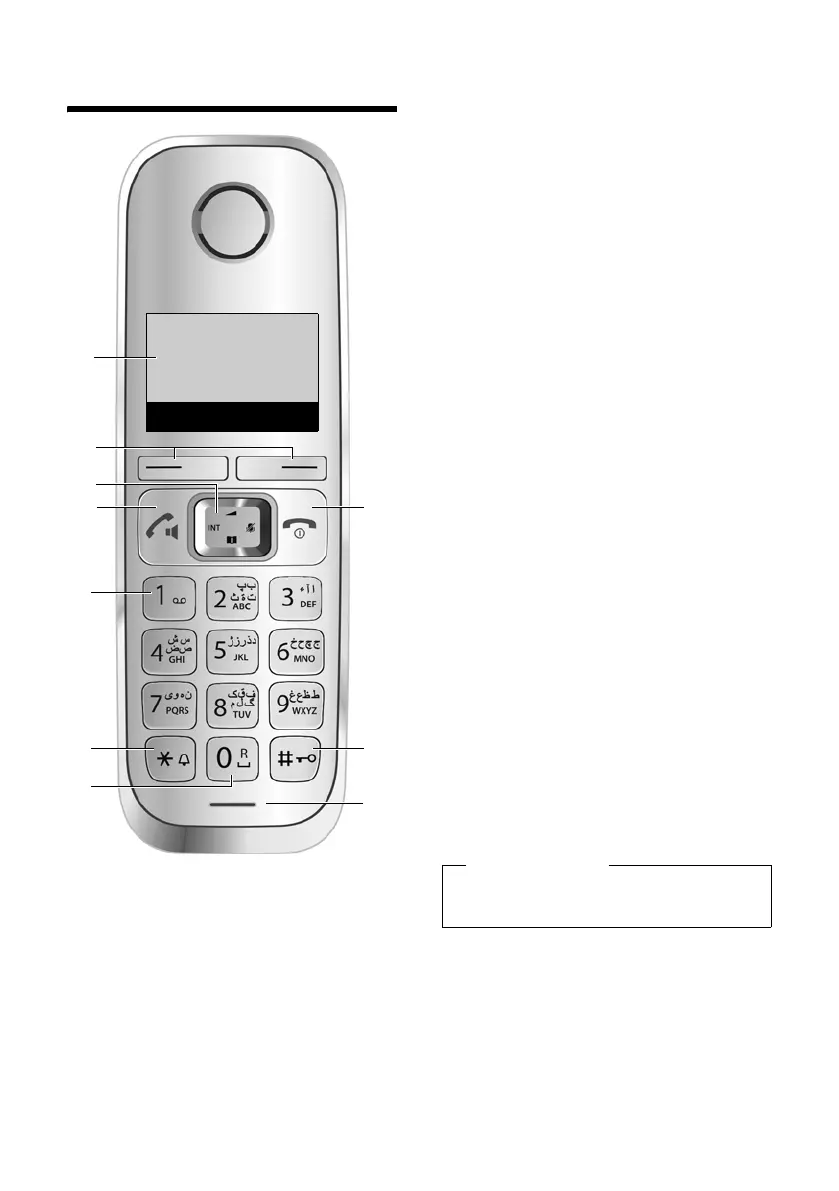
Overview of handset
Gigaset E310/E310A (Panther) / MEA EN / A31008-M2301-A601-1-UZ19 / overview.fm / 11.05.2012
Version 5, 03.04.2011
Overview of handset
1 Display in idle status
(¢ page 17)
2 Display keys (¢ page 4)
3 Control key (¢ page 5)
4 Talk/speaker key
Accept call; start dialling; toggle
between earpiece and speaker
mode (¢ page 27);
Lights up: speaker mode activated;
Flashes: incoming call
5 Key 1
Call the answering machine
(E310A only) (¢ page 35)/
network mailbox (¢ page 40)
6 Star key
Ringers on/off (press and hold);
with an open connection: switch
from pulse dialling to tone dialling
(press briefly, ¢ page 51)
7 0 key/recall key
Consultation call (flash): press and
hold
8 End call key, on/off key
End call; cancel function; go back
one menu level (press briefly);
back to idle status (press and hold);
activate/deactivate handset
(press and hold in idle status)
9 Hash key
Keypad lock on/off (press and hold,
¢ page 20); upper/lower case and
digits (¢ page 63); enter dialling
pause (press and hold)
10 Microphone
4
8
9
10
2
6
5
1
3
7
Ð
Ã
U
INT 1
23.04. 10:53
‘
Menu
Please note
To change the display language,
proceed as described on page 45.



 To Next Page