2
Overview of handset
Gigaset E310/E310A (Panther) / MEA EN / A31008-M2301-A601-1-UZ19 / overview.fm / 11.05.2012
Version 5, 03.04.2011
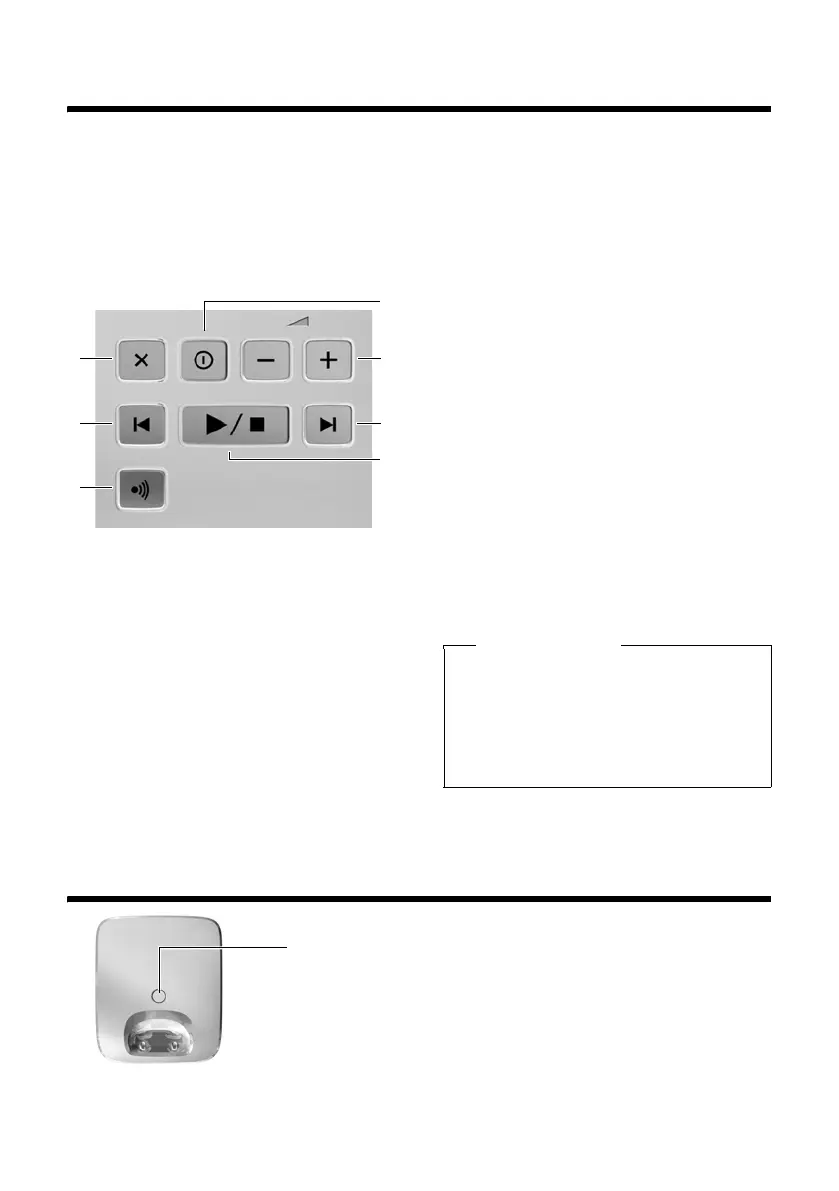
Overview of Gigaset E310A base
You can use the keys on the base to
operate the integrated answering
machine (Gigaset E310 A only),
search for handsets ("paging"
¢ page 44) and register handsets
to the base
¢ page 43.
1 Registration/paging key:
Search for handsets (press brief-
ly, paging ¢ page 44).
Register handsets (press and
hold ¢ page 43).
2 On/off key: switch answering
machine on and off.
Lights up: answering machine
is activated.
Flashes: message is being played
back or recorded.
3 Volume keys:
(– = quieter; + = louder.)
During message playback: adjust
the speaking volume.
While phone is ringing: adjust
ringer melody volume.
4 Play/Stop key:
Play back new messages from an-
swering machine (press briefly),
play back all messages (press
and hold), cancel playback.
Flashes: at least one new mes-
sage is present.
Flashes very quickly: memory
is full.
During message playback:
5 Skip to the start of the current
message (press once) or go to the
previous message (press twice).
6 Go to the next message.
7 Delete current message.
Overview of Gigaset E310 base
3
2
6
5
1
7
4
Please note
If the answering machine is
being operated from a handset
or if it is recording a message, it
cannot be operated from the
base at the same time.
Registration/paging key
Press briefly: search for handsets ("paging"
¢ page 44).
Press and hold: register handsets and DECT
devices (¢ page 43).



 To Next Page