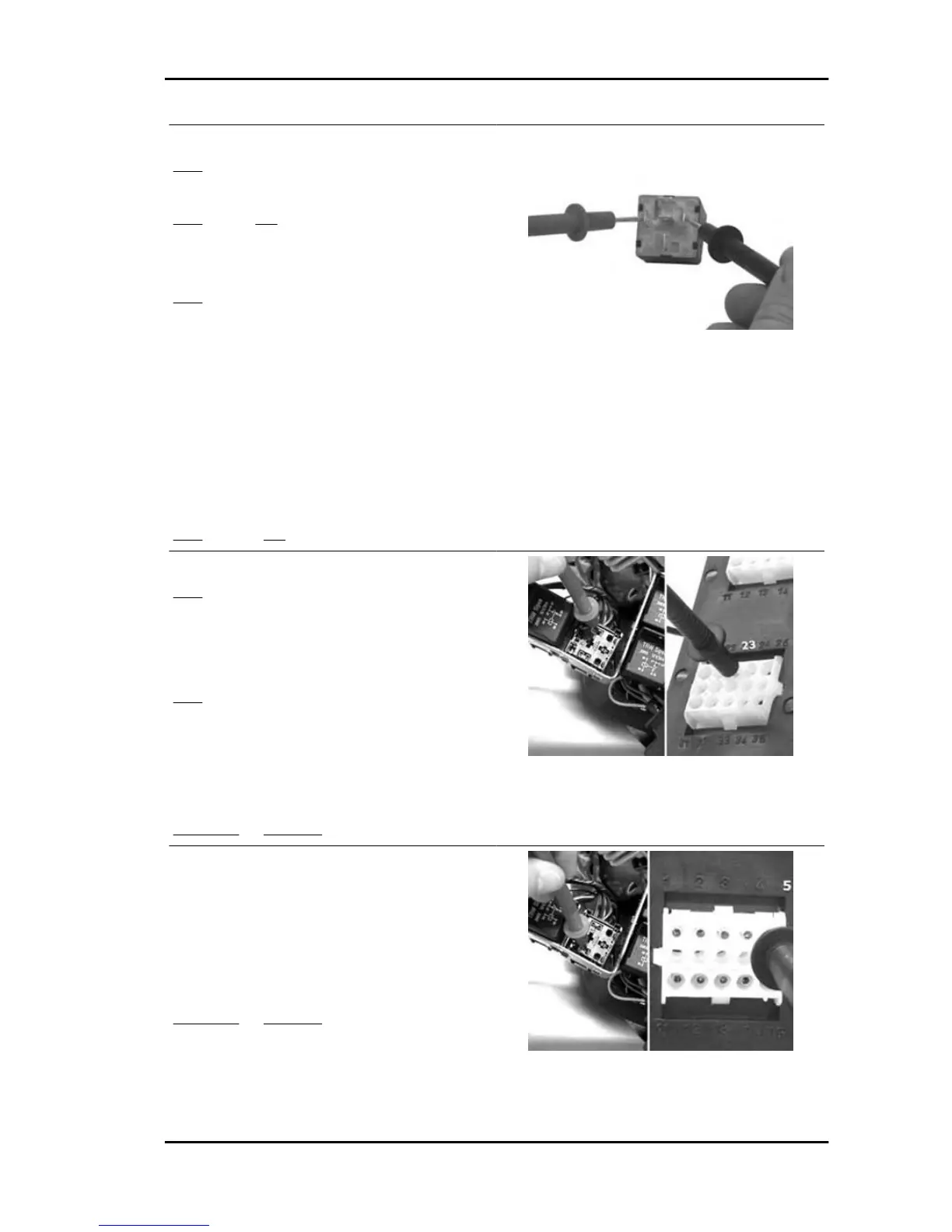
3 - Test successful. The fan is rotating.
YES go to 5
4- Test failed. The fan is not rotating.
YES go to 8 NO go to 6
5- The electric fan system is OK
6 - Test successful. The fan is not functioning
YES go to 7
7 - The remote control switch circuit is OK. Check
the connections to the electric fan, the function of
the contacts of the remote control switch, the pos-
itive lines, the negative line and the motor of the
electric fan.
8 - Disconnect the remote control unit of the elec-
tric fan. Check the continuity of the excitation coil.
85 - 86 = 100 ± 50Ω
YES go to 10 NO go to 9
9 - Replace the remote control switch
YES go to 8
10 - Connect the special tool between the control
unit and the system. Do not connect the electronic
control unit
YES go to 11
11 - Check for positive battery voltage at pin 85 of
the remote control switch connector.
85 (blue/grey) - 23 = Battery voltage with switch in
position "ON"
YES go to 13 NO go to12
12 - Repair or replace the wiring.
13 - Leaving the remote control switch disconnec-
ted, check for continuity between pin 86 of the
remote control switch connector and pin 5 of the
electronic control unit.
86 (green/white) - 5 = 0Ω (continuity)
YES go to 14 NO go to15
Nexus 500 euro 3 Injection
INJEC - 287



 To Next Page